
How to Design Employee of the Month Signs

Recognizing employees for their hard work and achievements is essential for building a positive work environment. Studies show that 83.6% of employees feel that recognition affects their motivation to succeed at work, as researched by AIScreen’s team.
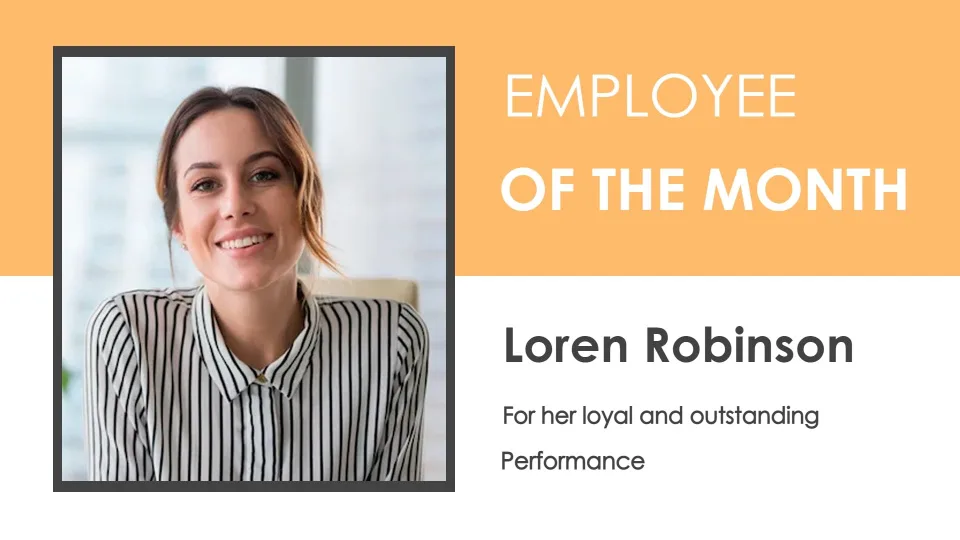
In this blog post, you will learn how to design an effective sign that stands out for employee of the month. We’ll cover everything from selecting the proper display and hardware to choosing templates and organizing content. By the end, you’ll understand how to create a dynamic sign that enhances employee recognition and fosters a workplace appreciation culture.
Short Summary
- Employee of the Month signs boost morale and motivation and foster a positive company culture by publicly recognizing employee achievements.
- Key steps include selecting the best display, hardware, and software and customizing templates to highlight employee accomplishments.
- Digital signage can enhance recognition displays, offering real-time updates and engaging content.
How Can Employee of the Month Signs Impact Company Culture and Engagement?

Signs for Employee of the Month can significantly impact company culture and engagement by fostering a sense of recognition and appreciation. Publicly acknowledging an employee’s hard work boosts morale, enhances motivation, and encourages others to strive for similar recognition.
Real-World Example: Google’s Employee Recognition Program
Google’s culture of appreciation includes initiatives like peer recognition programs and digital signage displays showcasing outstanding employees. Their approach has improved employee retention rates and increased productivity.
By reinforcing desired behaviors, such recognition systems promote a culture of excellence and continuous improvement across the company.
How to Design Signs for an Employee of the Month?

Step 1: Choose the Best Display for Digital Sign
Sony Class BRAVIA 3 LED 4K UHD
- Screen Sizes: Available in 43” to 98” to suit different spaces.
- Brightness: 440 nits, fantastic for indoor lighting.
- Resolution: 4K for sharp, clear visuals.
- Smooth Motion: Reduces blur for crisp visuals.
- Installation: Mount in landscape or portrait mode.
- Price Range: $499.99 – $1,499.99.

Step 2: Choose the Best Hardware for Digital Sign
Raspberry Pi
- Budget-Friendly: Ideal for cost-effective solutions.
- Wi-Fi Enabled: Easy connection to digital signage software.
- Low Power: Saves energy while running efficiently.
- Compatibility: Works with different screen sizes.
- Price: Starts at $128.

Step 3: Choose the Best Software for Digital Sign
- Sign Up & Login: Visit AIScreen’s website, create an account, and log in to manage content.
- Content Management: Easily update employee details, photos, and reasons for recognition.

Step 4: Design Templates for Digital Employee Sign
- Quick Edits: Update employee info and photos in real time.
- Drag & Drop: Easily add images, text, and videos.
- Ready-to-Use Templates: Customize designs for a sleek look.
- Highlight Recognition: Showcase the employee’s name and accomplishments.
- Multimedia Support: Add videos or images to make the sign more engaging.

Step 5: Organize Content for Digital Sign
- Automated Scheduling: Display the sign on specific days or events.
- Real-Time Updates: Instantly change employee details if needed.
- Time-Based Signage: Display the sign at peak times, like before shifts or meetings.
- Organized Layout: Keep content clear and easy to read.
- Engagement: Use interactive elements like QR codes to link to a message from the employee or a video.

How Grocery Store Displays Can Enhance Employee Recognition Programs
Grocery store displays are key to creating engaging signage, and the same concept can be applied to Employee of the Month signs.
Using digital signage like the Sony Class BRAVIA 3 LED 4K UHD, you can showcase employee achievements with customizable photos, names, and accomplishments. Real-time updates keep recognition fresh, motivating others to excel.

How Software Can Help Streamline Employee Recognition Displays
Automatic weather station software provides real-time data, and similarly, digital signage software like AIScreen allows you to update signs for Employee of the Month automatically.
This simplifies the recognition process, ensuring timely and relevant content and keeping employees continuously celebrated.
What Common Mistakes to Avoid When Designing Employee of the Month Signs?

- Cluttered Design: Avoid overcrowding the sign with too much text or unnecessary images. Please keep it simple and focused.
- Poor Readability: Ensure the font size and contrast make the text easily readable from a distance.
- Lack of Consistency: Stick to your company’s branding. Use the same colors, fonts, and logos to maintain a cohesive look.
- Neglecting to Update: Failing to update the sign regularly can make it feel outdated. Use AIScreen to manage real-time updates easily.
- Ignoring Employee’s Achievement: Don’t just focus on the name; highlight the employee’s specific contributions or reason for recognition.

FAQs
What are the best materials for Employee of the Month signs?
Consider durable materials like acrylic, wood, or metal for longevity and professional appearance.
How do I customize an Employee of the Month sign?
Use design software such as Canva or AIScreen to create a personalized sign with your company’s branding and the employee’s details.
Why is it important to recognize employees with a sign?
It boosts morale, encourages high performance, and reinforces positive behavior, contributing to a more engaged and motivated workforce.
Enhance Employee Recognition Programs With AIScreen


In conclusion, designing an effective Employee of the Month sign can significantly boost morale, motivation, and company culture. Digital signage solutions make it easy to create, update, and display engaging recognition signs that highlight employee achievements in real-time.
AIScreen is a leading provider, offering flexible, customizable options to ensure your employee recognition program runs smoothly and effectively. Contact us for more details.
