
How to Transform Your Room with a Virtual Window
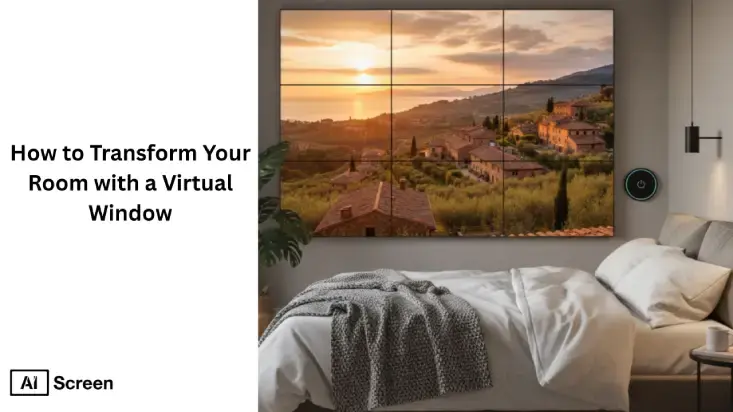
Virtual windows are innovative digital displays that simulate outdoor views, creating a calming, natural atmosphere indoors. They help improve mood, reduce stress, and increase productivity by providing a simulated connection to nature. According to studies published in the Journal of Environmental Psychology, digital exposure to nature can reduce stress by 20-30% and enhance focus by 15-20%.
This article will guide you through integrating a virtual window into your space, covering installation steps, ideal screen sizes, and the best content for your room. You’ll also discover how digital signage software can enhance virtual windows, elevate your environment, improve mental well-being, and boost overall productivity.
What is a Virtual Window?
A virtual window is a digital screen or projection that mimics natural scenery using live feeds or pre-recorded visuals, creating the illusion of looking outside. These digital signage software can show anything from sunlit landscapes to bustling city streets, simulating natural light and outdoor views. Virtual windows are especially useful in windowless spaces rooms, offices, basements, or healthcare spaces, where they help improve ambiance, reduce feelings of confinement, health benefits, and bring a sense of openness and connection to the outdoors.
How Do Virtual Windows Work?
Virtual windows work by combining high-resolution displays, real-time lighting synchronization, and motion sensors to recreate the experience of a real window. These systems use LED or 4K/8K just presentation screens to display lifelike visuals, while smart lighting adjusts brightness and color temperature based on the time of day, creating a natural indoor ambiance. In advanced setups, motion sensors can respond to viewer presence or angle, enhancing realism by adjusting perspective or triggering dynamic effects.
The visual manage content comes from live high resolution camera streams or pre-recorded scenic footage, such as nature landscapes, city views, or blue sky scenes. These feeds are often captured in ultra-high definition to ensure clarity and immersion. By combining real-time data with curated visuals, virtual windows deliver a seamless and engaging outdoor experience, even in completely enclosed spaces.
What are the Benefits of Virtual Windows?
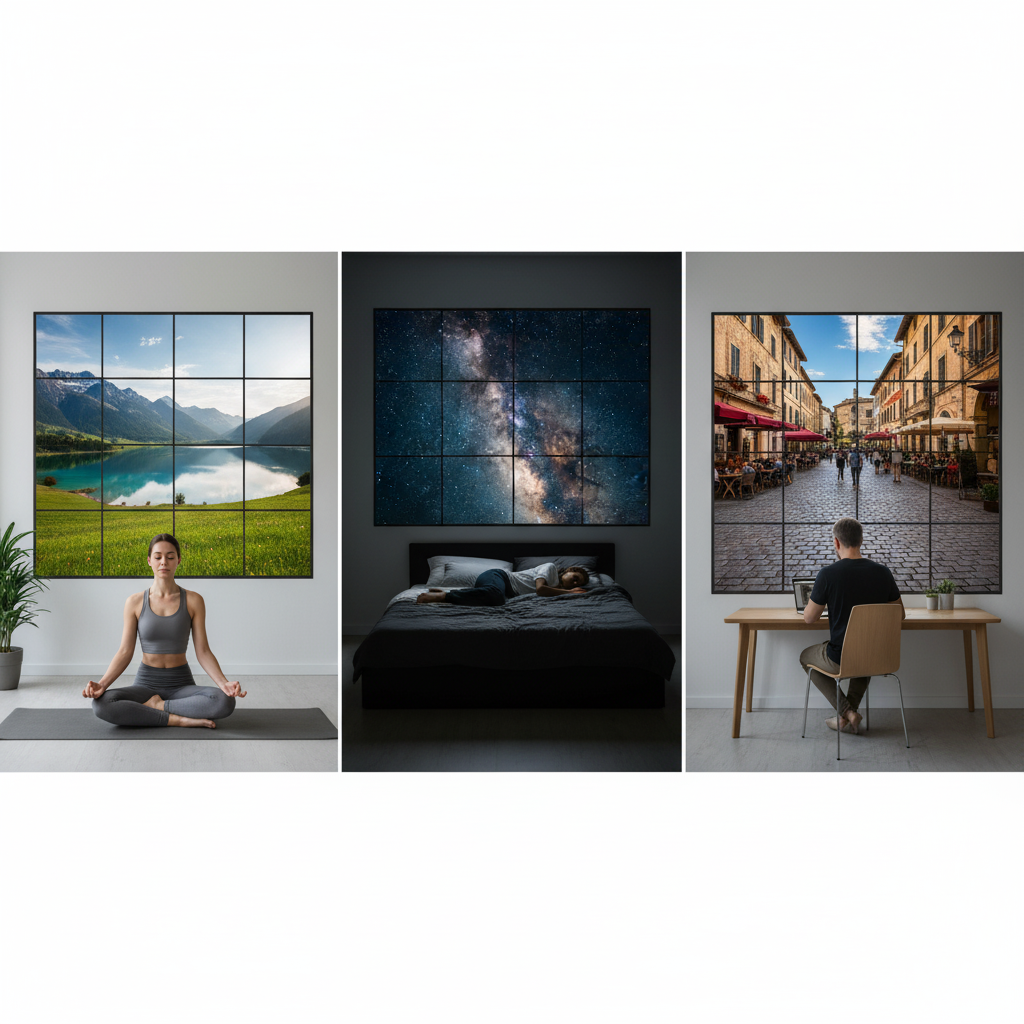
Virtual windows offer multiple benefits by improving both the visual experience and well-being of indoor or residential spaces. They bring natural-looking views indoors, helping reduce stress and create a more comfortable environment in places like offices, hospitals, and studios.
- Enhanced Mental Well-Being: Nature-inspired visuals help reduce stress and improve mood, especially in windowless environments.
- Improved Lighting Aesthetics: Simulates natural light, making spaces feel brighter and more open.
- Flexible Interior Design: Acts as a dynamic design interactive element, adding depth and modern appeal to any room.
- Boosts Productivity & Focus: In workplaces, virtual windows can improve concentration and overall optimal performance.
- Real-World Use Cases: Offices use them to enhance employee focus, hospitals to improve patient comfort, and studios to create inspiring creative environments.
Virtual windows are more than decorative, they’re tools for wellness and productivity. Whether in a busy hospital hallway or a small urban apartment, they open up enclosed spaces, bringing in light, nature, and a renewed sense of comfort that changes how people experience their environment.
Where Can a Digital Window Be Installed?
A digital signage window can be installed in any indoor space where natural light or outdoor views are limited, helping transform dull or enclosed areas into visually engaging environments. These digital window displays are commonly used to enhance ambiance, improve well-being, and support better interior design and communication across residential and commercial spaces.
- Homes: Living rooms, bedrooms, and basements to add light, depth, and relaxing nature views.
- Offices & Workspaces: Meeting rooms, cabins, and open areas to boost productivity and reduce stress.
- Hospitals & Healthcare Facilities: Patient rooms and waiting closed areas to improve comfort and recovery experience.
- Retail Stores & Showrooms: Use digital signage in retail environments to attract potential customers and create immersive brand experiences.
- Hotels & Hospitality Industry Spaces: Lobbies and guest rooms to enhance guest satisfaction and ambiance.
- Studios & Creative Spaces: For inspiration, mood enhancement, and visually appealing backdrops.
Digital signage artificial windows are a flexible solution that fits multiple environments, making them ideal for improving both aesthetics and user experience.
To explore practical setup tips and ideal placement for your digital window experience, check out our next guide, “how to set up digital windows for maximum impact“, where we cover installation strategies, positioning advice, and ways to enhance both aesthetics and functionality in any space.


What are the Different Types of Virtual Windows?
Virtual windows come in various types, each designed to suit different spaces, purposes, and user interactions. They can mimic outdoor views while enhancing artificial lighting, interior design, and overall ambiance.
Static Virtual Windows?

Static virtual windows display pre-recorded or still nature scenes, making them ideal for calm environments like bedrooms, waiting rooms, or healthcare spaces. These digital window displays focus on relaxation and ambiance by providing consistent, non-changing visuals that reduce stress and improve comfort.
Interactive Virtual Windows?
Interactive virtual windows allow users to control views, explore virtual landscapes, or adjust lighting settings in real time. These AI-powered virtual displays are commonly used in offices and creative studios to enhance engagement, personalization, and user experience.
Wall-Mounted Virtual Windows?
Wall-mounted virtual windows are installed on flat surfaces to replicate the look of real windows, transforming blank walls into dynamic visual elements. These artificial and fake windows enhance interior design while delivering real-time or pre-scheduled content for improved visual appeal.
Ceiling-Mounted Virtual Windows?
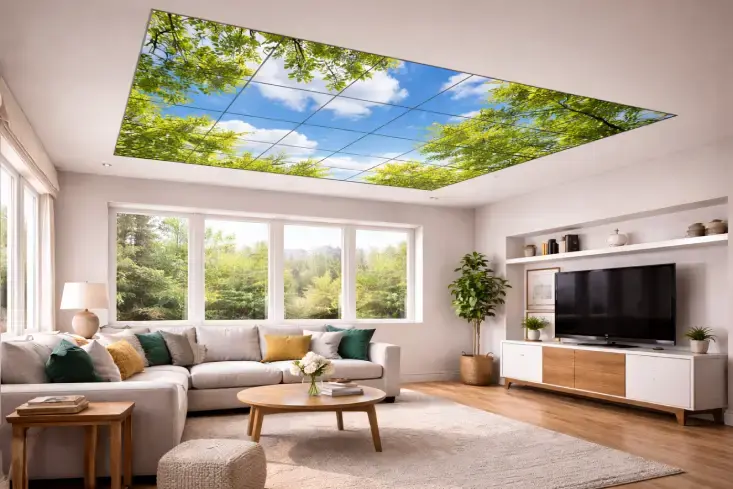
Ceiling-mounted virtual windows simulate skylights by projecting natural sky views and sunlight effects on ceilings. These immersive digital displays are perfect for windowless rooms, basements, or enclosed spaces, creating a sense of openness and improving overall ambiance.
These types offer flexible installation options and functional benefits, enabling businesses and homeowners to choose solutions that best enhance well-being, aesthetics, and productivity.
What is the Cost of a Virtual Window?
When you’re thinking about what it takes to transform your room with a luminous virtual window solutions, the price depends on a few key variables: display size format, size, lighting setup, and content integration.
Here’s a detailed pricing breakdown table showing how the cost of a virtual window varies by setup type, features, and usage level:
| Category | Price Range (USD) | Display Type | Lighting & Effects | Content & Control | Ideal For | Key Features |
| Basic Consumer Setup | $500 – $2,000 | Standard 4K LED / LCD TV used as a traditional static display | Minimal or no integrated lighting | Pre-loaded static image/video wall scenes; manual control via remote | Small apartments, home offices, basements | Affordable entry-level setup, easy to install, limited realism |
| Mid-Range Smart Display | $3,000 – $6,000 | Dedicated HD or 4K touchscreen display panels designed for wall/ceiling mounting | Ambient backlighting, dimmable LED glow, basic daylight simulation | Wi-Fi control, app-based scheduling, cloud content access | Modern homes, studios, boutique retail spaces | Enhanced realism, smart automation, mid-level customization |
| Advanced Smart / Circadian Display | $7,000 – $12,000 | Commercial-grade LED or OLED panels with high brightness | Integrated circadian lighting system with color temperature adjustment | Smart AI-driven visuals that adapt to time of entire day or weather | Luxury homes, offices, wellness centers | High realism, time-synced visuals, health-focused lighting |
| Commercial Installation | $10,000 – $25,000 | Multi-panel LED wall or high-end projection system | Advanced lighting integration with ambient daylight replication | Cloud-based management, multi-zone scheduling, motion sensors | Corporate offices, restaurants, hotels, healthcare facilities | Multi-screen setup, energy-efficient lighting, scalable control |
| Premium Custom Build | $25,000 – $60,000+ | 8K ultra-high-resolution prosky panels or multi-screen arrays | Fully integrated dynamic lighting and environmental simulation | Live-stream scenes, 24-hour cycle transitions, voice or sensor control | Museums, hospitals, senior living centers, luxury spaces | Immersive, photo-realistic visuals, custom frame, live content |
Additional Cost Factors
- Frame & Finishing Options: Custom wood, metal, or composite trims add $300–$1,000 depending on frame material.
- Installation & Setup: Professional mounting, wiring, and calibration typically cost $500–$2,000.
- Software & Licensing: Some brands charge annual fees ($100–$500/year) for access to premium content libraries.
- Audio Integration: Adding ambient sound or surround effects can cost $200–$800 extra.
- Maintenance & Updates: Regular content or firmware updates may incur small subscription costs.
In short, your virtual window cost depends on how immersive and functional you want your “beautiful view” to be. A simple wall-mounted display gives you the basics, while a full commercial-grade easy installation transforms your space into a lifelike, biophilic experience complete with light, sound, and movement.
How to Set Up a Virtual Window for Your Room with AIScreen?
Setting up a virtual window for your room involves choosing the right display, placing it strategically, and using AIScreen digital signage platform to deliver realistic, dynamic content. With AIScreen, you can automate visuals, manage content remotely, and create an immersive indoor environment using real-time, data-driven communication that enhances mood and ambiance.
Choose the Right Display for Your Virtual Window
Selecting a high-resolution screen with the right size and brightness ensures clear and lifelike visuals for your space. With AIScreen, you can optimize display performance by delivering high-quality content tailored to different screen types and environments.
Position the Virtual Window Strategically
Proper placement, such as eye-level installation or window-like positioning, enhances realism and viewer engagement. AIScreen supports flexible screen setups, allowing you to manage and control displays efficiently regardless of placement.
Select Realistic and Dynamic Content
Choosing nature scenes, skylines, or seasonal visuals helps create a calming and immersive experience. Using AIScreen, you can access and schedule dynamic content that updates automatically based on time, mood, or environment.
Use Digital Signage Software for Control
A cloud-based CMS is essential for managing and automating content across your virtual window setup. AIScreen’s digital signage CMS enables remote scheduling, real-time updates, and seamless control for consistent and engaging visuals.
Optimize Lighting and Surroundings
Balancing room lighting with virtual window visuals creates a more natural and cohesive atmosphere. With AIScreen, you can adjust brightness and content settings to match ambient conditions for a realistic experience.
Who Are the Manufacturers of Digital Windows?
Curious about who’s leading the innovation behind digital and virtual windows? A handful of forward-thinking brands have mastered the blend of technology, artistry, and wellness design, ready to respond to unexpected events . Each brings something unique, from cinematic realism to smart home integration, letting you choose the experience that best fits your space and style.
Atmoph: Wake up to a breathtaking direct sunlight over Mount Fuji or a quiet Paris street with Atmoph’s 4K window frames, offering hundreds of motion scenes to set the room’s mood.
LG: LG’s LED and OLED prosky panels deliver natural light and color with exceptional depth, creating immersive, lifelike environments perfect for offices and hotels.
Samsung: Samsung’s 8K digital windows sync with IoT systems, adapting to lighting and user preferences while displaying city skylines or ocean views, all managed via the cloud.
Sky Factory: Sky Factory’s biophilic virtual windows mimic daylight cycles to reduce stress and improve mood, widely used in hospitals and wellness centers.
Window Sight: Window Sight transforms digital windows into a curated art gallery, letting users browse landscape orientation and photography, fully personalized throughout the day a mobile device. Together, these brands are redefining how technology connects us with nature, bringing comfort, creativity, and calm into every kind of space.
How Do Internal Communication Best Practices Improve Virtual Window Experiences?
Internal communication best practices enhance the effectiveness of virtual windows by ensuring the right content is delivered clearly, consistently, and in real time. When integrated with digital signage systems, virtual windows can display announcements, updates, and team messages that improve engagement, collaboration, and workplace communication. To explore this in detail, read internal communication best practices, where you’ll learn how to optimize messaging and employee interaction.
How AIScreen Enhances the Virtual Window Experience with Digital Signage
AIScreen digital signage elevates the virtual window experience by enabling seamless control over visuals, lighting, and ambient mood through a centralized, cloud-based platform. Whether in a home or a corporate space, AIScreen allows smooth transitions between nature scenes, lighting conditions, and dynamic content, creating an immersive and calming environment powered by data-driven communication.
In commercial environments, AIScreen’s intelligent digital signage software supports dynamic storytelling by adjusting visuals, colors, and content based on time, events, or audience context. With advanced CMS features and automation, businesses can schedule content, sync virtual daylight with real time, and optimize display performance effortlessly. Start using AIScreen today to transform your virtual windows into engaging, interactive, and visually impactful digital experiences.
Frequently Asked Questions
Why should I install a virtual window in my home or office?
You should install a virtual window in your home or office to bring natural light and scenic beauty into enclosed or windowless spaces. It helps reduce stress, improves mood, and boosts focus by simulating realistic outdoor environments. Beyond aesthetics, it enhances productivity and creates a calming atmosphere. Whether for a cozy home office or a relaxing lounge, it transforms the entire space experience.
What types of virtual window technology are available?
The main types of virtual window technology include LED panel windows, projection-based systems, digital skylights, and smart mirrors. Some feature static display imagery, while others display dynamic 4K or 8K video scenes for lifelike depth. Interactive versions adjust brightness and color based on time or weather. Each type caters to different room sizes, budgets, and design needs.
How do I choose the best virtual window view or scene for my room?
You can choose the best virtual window view or scene based on your room’s mood, lighting, and purpose. For calm spaces, choose nature scenes like forests or oceans, while urban views suit modern offices or studios. Many systems offer customizable libraries and time-based transitions. The goal is to match visuals that complement your décor and enhance well-being.
Are virtual windows suitable for bedrooms, basements, or windowless rooms?
Yes, virtual windows are perfect for bedrooms, basements, or windowless rooms that lack natural light. They simulated window daylight and scenic visuals to make enclosed areas feel open and inviting. Advanced lighting features also support circadian rhythm regulation for better sleep patterns and energy. It’s an ideal solution for improving comfort and mental wellness in low-light spaces, even when it’s connected to a computer .
How do I integrate a virtual window with smart home systems or audio ambient sound?
You can integrate a virtual atmoph window with smart home systems or ambient audio throughout the day Wi-Fi, Bluetooth, or IoT platforms. Many displays sync with smart lighting conditions, thermostats, or sound systems for full environmental control. You can automate brightness and audio to match time or activity. This creates a seamless, immersive experience that reacts to your daily routine.
