Transportation Digital Signage

Transportation digital signage delivers real-time travel updates, clear navigation, and centralized messaging to keep passengers informed across busy transit environments. Real-time arrivals, service alerts, and ads reach travelers on rugged digital signage screens across stations and vehicles. See also stadium digital signage, event digital signage, and convention center digital signage. AIScreen is a complete digital signage solution for managing screens at scale. Explore related AIScreen solutions: parking digital signage, and logistics digital signage.
14-day FREE trial. No credit card required
Transportation Digital Signage Software

Why Transportation Digital Signage Improves Passenger Experience and Operations

Smart signage keeps travelers informed across busy transportation hubs by delivering real-time updates, clear navigation, and centralized content control, ensuring passengers get the right information exactly when they need it. Digital signage has transformed static signs into live passenger information screens at airports, bus stops, and train stations. This use case sits within AIScreen’s broader digital signage network. Get started with this simple framework. Transit hubs and fleets show real-time arrivals, route maps, service alerts, and safety messaging for riders. AIScreen drives platform and vehicle displays from your own service data and pushes delay or detour notices from one place. For transit agencies and fleet operators, the value of passenger signage is measured in reduced confusion at the platform: AIScreen pushes live arrival, gate, and service-change updates to every screen from one place, so riders act on current information instead of yesterday’s printed timetable.

  • 1

    Keep passengers informed with real-time travel data integration
  • 2

    Guide travelers using interactive wayfinding and digital navigation
  • 3

    Manage all transportation screens from one centralized content platform

1. Keep passengers
informed with real-time
travel data integration.

Ensure every display shows current information drawn from your own systems through JSON and XML feeds or an open API. Any screen on the network, from an LED board at the platform to a compact display at the gate, shares alerts the moment they change.

  • Show gate changes, platform updates, and service alerts using alerts & screen health monitoring

  • Powered by reliable live data integration

Transportation Digital Signage Software

2. Guide travelers with interactive wayfinding and digital navigation tools.

Help passengers move confidently through large airports, stations, and terminals using intuitive touch-enabled signage. Travelers can search for gates, platforms, baggage claim, restrooms, and connecting services, then follow clear turn-by-turn directions mapped to their current location. Interactive wayfinding kiosks ease pressure on staffed information desks and let people self-serve at their own pace, in the language they prefer. Real-time updates keep routes accurate when a gate changes or a platform closes, so directions always reflect live conditions. The result is a calmer, more independent journey with shorter queues and travelers who reach their destination without stopping to ask for help.

3. Manage all transportation screens from one centralized content platform.

Simplify operations by controlling messaging, schedules, and updates remotely from a powerful, web-based system. Manage every screen across terminals, concourses, and stations from a single dashboard, so one change reaches the entire network in moments. Schedule content by time, location, or route to match peak travel windows and quieter periods automatically. Role-based access lets local teams handle their own displays while headquarters keeps brand and safety messaging consistent. When disruptions happen, operators push service alerts and rerouting notices instantly, without visiting each site. Centralized management cuts manual effort, keeps information current, and gives your team full control from anywhere.

Transportation Digital Signage Software

Transportation Digital Signage Across Stations, Vehicles and Terminals

Transportation Digital Signage to Improve Travel Experiences

Deliver accurate service updates, clear navigation, and responsive communication with digital signage software
built for transportation environments and large-scale
operations. Digital signs stay in sync across terminals, so operators publish once and passengers see the same message everywhere.

What a platform display actually shows

A typical platform layout carries the next departures with destination and scheduled time, the platform number, a service status line, and a banner when a disruption is published.

Current service information on every screen

Drive platform and concourse screens from your own service data, and keep them playing during outages with offline playback.

Digital Signage for Bus and Rail Stations

AIScreen keeps station screens driven by data from your own systems, so a platform never advertises a departure that already left.

Platform and Concourse Displays

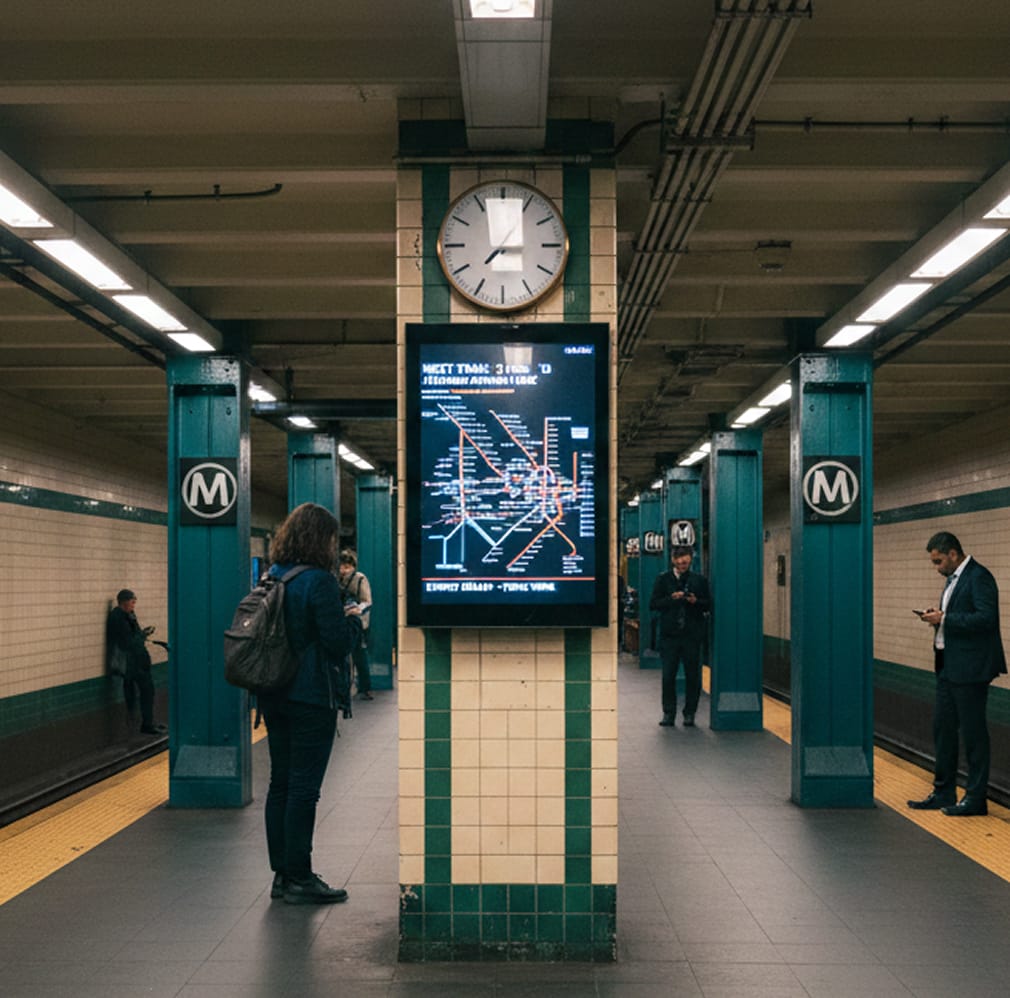
Concourse screens carry upcoming departures, service notices and wayfinding, and platform screens narrow it to the next service. Both run from one content library, so one update reaches every screen. This is passenger information across public transit networks at station scale.

Service Alerts and Disruption Notices

A disruption notice must reach every screen at once. An operator interrupts normal content with a priority takeover across a station or the whole network, and normal content resumes automatically when the alert clears.

Onboard and Fleet Digital Signage

Screens inside a bus, tram or rail car face vibration, changing light and patchy coverage.

Next Stop and Route Displays

Onboard screens show the stop sequence, position along the route and connections ahead. Content is stored locally on the player, so the display keeps playing through tunnels and coverage gaps.

Depot and Driver Communications

Depot screens carry shift boards, route changes and vehicle assignments for drivers and maintenance staff.

The same screens cover the rest of the journey:

Built for Station and Vehicle Conditions

Displays that stay readable outdoors. Shelters and park and ride sites need bright, sunlight readable screens in enclosures rated for the location, and that rating belongs to the display rather than the software. AIScreen is display agnostic: it runs on Android, Fire OS, ChromeOS, LG webOS, Tizen, Windows, Linux and Raspberry Pi, so you pair it with the digital signage screens and media players a site needs.

Screens you can check remotely. Connected players report status to a central dashboard, so an operator sees what needs attention without a site visit. Screen health alerts are available on Business plans and above.

One team, many sites. Screens can be grouped and tagged however your network is organized, with content targeted by station, platform or vehicle. See our best transportation digital signage software guide to compare options.

Discover how transit hubs improve passenger flow with transportation
digital signage

Transportation Digital Signage Software

Illustrative Scenario: Transportation Digital Signage at a Regional Transit Authority

This is an illustrative scenario rather than a customer reference. A regional transit authority replaces static boards with digital signage and manages every screen centrally.

Transportation Digital Signage Software

Transportation Digital Signage That Keeps Passengers
Moving

From airports and rail stations to bus terminals and metros, transportation digital signage ensures travelers always see the right information at the right time. Real-time data, interactive wayfinding, and centralized control help operators improve flow, reduce stress, and communicate clearly at scale.

Explore other use cases

  • Digital Signage for Airports

    Display live flight updates, gate changes, wayfinding, and alerts in real time. Synchronize screens across terminals and enhance operational clarity with centralized control.

  • Digital Signage for Outdoor

    Replace static billboards with dynamic, automated displays that update instantly. Manage outdoor campaigns centrally and ensure reliable performance in demanding environments.

Frequently Asked Questions

What is transportation digital signage?
Digital screens across transit hubs, platforms, and vehicles that show live arrivals, gate and route changes, wayfinding, and service alerts so passengers act on current information.
How does it reduce passenger confusion?
Screens are driven by data from your own systems, so service information updates as the source data changes rather than sitting on an out of date printed timetable.
Can AIScreen display live transit information?
Transit screens can be driven by data from your own systems rather than by static content, so service information updates on screen as the source data changes. AIScreen connects to live data sources including JSON and XML feeds and an open API. Our team can confirm what integration path applies to your network.
Does it support multilingual and accessibility needs?
Content can be presented in more than one language, and screens can be grouped so different parts of a station run different content. Layouts can be built for high contrast and legibility at a distance. Speak to our team about what fits your riders.
Where is transportation signage used?
Bus and rail stations, airports, ferry terminals, park-and-ride lots, and inside vehicles and shelters.
How are emergency or service alerts pushed?
Authorized staff override screens with a service-change or safety alert in seconds from one dashboard, then return to normal content just as fast.
What hardware is needed for transit environments?
A commercial display suited to the site, a media player, and network connectivity. AIScreen is display agnostic software and runs on Android, Fire OS, ChromeOS, LG webOS, Tizen, Windows, Linux and Raspberry Pi. Outdoor readability and enclosure ratings are properties of the display you choose.
Can one agency manage many stations centrally?
Yes. AIScreen lets an agency schedule and target content by station, platform, or vehicle from a single system.
What happens to a transit screen if the network connection drops?
Content is stored locally on the player, so the screen keeps playing through a connection loss instead of going blank. Offline playback is a standard part of the platform.
How do we know if a screen at an unattended stop has gone dark?
Connected players report status back to a central dashboard. Screen health alerts are available on Business plans and above.