
What are the Best Digital Signage Internal Communication Tools? Top 22

Tools of internal communication are necessary to improve workplace culture and engagement. Digital Signage Software is my pick for the best internal communication tool in 2025.
According to Gallup, engaged employees lead to a 23% increase in profitability and a 16% increase in productivity.
Here’s how internal communication tools make that possible: by fostering collaborative task management and employee communication.
Short Summary
- Workplace communication platforms increase productivity and profitability by 16% and 23 %, respectively.
- Some of these tools simplify employee communication; others facilitate collaboration and task management; and together, they streamline workflows.
- 22 essential tools of internal communication include Digital Signage Software, Outlook, Monday.com, Google Calendar, Power BI, Google Slides, Sheets, Weather, YouTube, News, Slack, Trello, Date, Teams, Zoom, Google Workspace, Connecteam, Happeo, Qualtrics, Smarp, Jostle, and Simpplr.
What Are Tools Of Internal Communication?
Tools of internal communication are digital-first communication platforms that facilitate real-time team chat and collaboration.
These tools provide a more centralized medium for sharing critical information like news and company updates without relying heavily on meetings and overcrowded inboxes. Among them, digital signage for internal communication broadcasts these updates to staff away from a desk.
What Are 22 Must-Have Tools For Internal Communication
The tools of internal communication that we’ve picked diligently and after testing, open doors for transparent interactions. These communication platforms explicate internal company goals.
#1 Internal Communication Tool: Digital Signage Software

Workplace digital signage is our pick for the number #1 internal communication tool.
Well, it’s for a simple reason that digital signage simplifies how you communicate with your staff at your workplace. And that is the single most important factor enhancing employee engagement, and concomitantly, workplace productivity.
This is because the message digital signage delivers is relevant and timely.
Gartner, Inc. surveyed over 3,100 chief information officers and IT executives, and 1,100 non-IT executives, for their study on digital initiatives.
According to Gartner, Inc.’s survey, enterprises that deployed digital initiatives exceeded target outcomes by 71 percent. That’s to say, they had the highest achievement rate.
Raf Gelders, VP of Research, at Gartner, had the following to say about the study:
“This digital vanguard distinguishes themselves from the rest of CIOs and CxOs because they co-own digital delivery.”
In other words, digital information delivery is crucial to enhance business outcomes.
In that respect, digital signage lends businesses a dynamic platform for the digital delivery of communications in the manufacturing, retail, hospitality, education, and corporate sectors.
What Workplace Communication Problem Does Digital Signage Solve?

Digital signage solves the problem of communication barriers in workplaces.
Communication barriers give birth to the problem of disengaged and unproductive employees, costing trillions to the global economy.
According to Gallup’s 2023 State of the Global Workplace Report, disengaged employees cause an $8.8 trillion loss in productivity to global GDP.
Ryan Pendell, Gallup’s Senior Workplace Science Editor, presents a rather bleak picture by stating that 77% of the total workforce of the world is disengaged at work.
With digital signage, larger-scale corporations efficiently communicate key updates and motivational quotes to keep their employees updated and motivated.
Some of the common locations where signage screens can be installed include:
- Lobbies and break rooms in your corporate offices
- Floors and ceilings in your manufacturing hubs and warehouses
- Meeting and conference rooms in your business offices
Case Study: Swissport’s Digital Signage Deployment Improved Cargo Handler Efficiency

Swissport deployed digital signage to simplify information sharing with deskless cargo handlers. Consequently, reducing communication delays by a huge percentage (80).
Swissport is a big player in the aviation industry, handling cargo services for millions of flights and passengers, annually.
The Challenge:
Cargo handlers are deskless workers.
In other words, traditional communication tools like email or mobile notifications are the least effective, especially when workforce safety and well-being are top priorities.
Swissport wanted a system to send critical updates like safety alerts and instructions to keep workers engaged, but, here’s a catch: without the use of phones, as the phone isn’t allowed during work.
The Solution:
Digital signage solved Swissport’s problems and aligned perfectly with its operational vision.
Swissport now communicates tailored content resonating with the unique needs of its cargo handlers using signage software. Also, it benefits from the remote management of screens and content to improve employee communications.
Utilizing built-in templates, it instantly creates content to send safety alerts and announcements through large digital displays in full view of cargo handlers.
Pros and Cons of Digital Signage Internal Communication Tool
Pros: Attention-grabbing, Immersive Display, Consistent Content Quality, Time and Money Saving, Real-time Content Update, Management Tools Integration
Cons: Upfront Cost
Key Takeaways:
- Digital signage improves employee engagement.
- It can display meeting reminders, company news, maintenance alerts, event announcements, and more.
- Digital signage significantly reduces response time by facilitating instant broadcast of emergency alerts.
#2 Internal Communication Tool: Microsoft Outlook

Microsoft Outlook, as a tool of international communication, simplifies task, event, and content calendar creation. Companies integrate Outlook communication software with other tools, such as Microsoft Teams video conferencing tool to modernize the digital workplace.
According to an HBR article by Feng Zhu, Outlook comes with third-party “add-ins” from the likes of Uber, PayPal, Evernote, and more for enhanced employee productivity.
This is how Microsoft’s employee communication tool, Outlook “add-ins” boosts productivity…
- Book an Uber ride directly from Outlook for upcoming meetings
- Use PayPal “add-in” in the Outlook application to send money via email
- Add key information from Evernote to enhance team communication
Outlook for Data-Driven Digital Internal Communications Strategy
An internal communication strategy is nothing if it’s not data-driven. Even with the best communication platforms, your outcome may look pale in the absence of data.
So, how does Outlook come to the rescue?
Outlook is the goldmine of corporate data. Integrating it with Digital Signage Software means companies can broadcast that data to workplace signage screens, turning ordinary screens into the best internal communication tools.
Go a step further. This is how?
Utilize the workplace communication software platform, Microsoft Outlook as a centralized system for content management and start displaying announcements, graphs, reports, data, presentations, etc.
Microsoft Outlook As CMS For Digital Signage Team Communication
Outlook-powered team communication is dynamic as it’s data-driven. Synchronize Microsoft Outlook and instantly retrieve signage information, such as calendar and agenda.
Once integrated, employees can view and manage agendas on signage screens through secure file sharing for digital signage.
- Display time-restricted appointment calendar messages, say, from 10 to 11 am.
- After 11 am the text will automatically be removed from the screen.
- Set reminders for the appointment, say, 30 minutes in advance.
- Display task due dates and status of ongoing projects.
Pros and Cons of Employee Communication Software Outlook
Outlook is an effective internal communication software platform, indeed. But, despite a plethora of pros, Outlook isn’t without cons.
Pros: User-Friendly Interface, Built-in Project Management Tool, Theme Customization, Add-ins and Integrations, Tech Support
Cons: Too Much Functionality, Costly
Key Takeaways:
- Outlook is a powerful communication tool for creating events, tasks, and booking appointments.
- Outlook is an instant messaging tool suitable for internal and external communication to showcase meeting dates, times, and venues.
- Outlook offers a user-friendly interface for creating reports and dashboards by integrating with other applications.
#3 Internal Communication Tool: Monday.com

Monday.com is as much an internal communication software as it’s a leading project management tool for managing organizational workflows.
This employee communication software fosters team collaboration to achieve business objectives systematically.
With Monday.com, you can:
- Create projects easily
- Track projects from start to completion
- Analyze outcomes
Case Study: Zippo Achieve 8x ROI Leveraging Monday.com Project Management Tool
Best internal communication platforms like Monday.com improve workflow efficiency and enhance internal communication.
Problem: Zippo was expanding rapidly but its workflows were stuck in time-consuming spreadsheets. Without knowledge management tools its meetings suffered. According to Chris Funk, Director of Product Innovation, at Zippo:
Updating projects took hours as outdated, analog tools slowed down project managemebt processes.
Solution: Zippo, a manufacturing giant, replaced paper-based worksheets with Monday.com, a digital project management tool to manage internal workflows and foster collaboration.
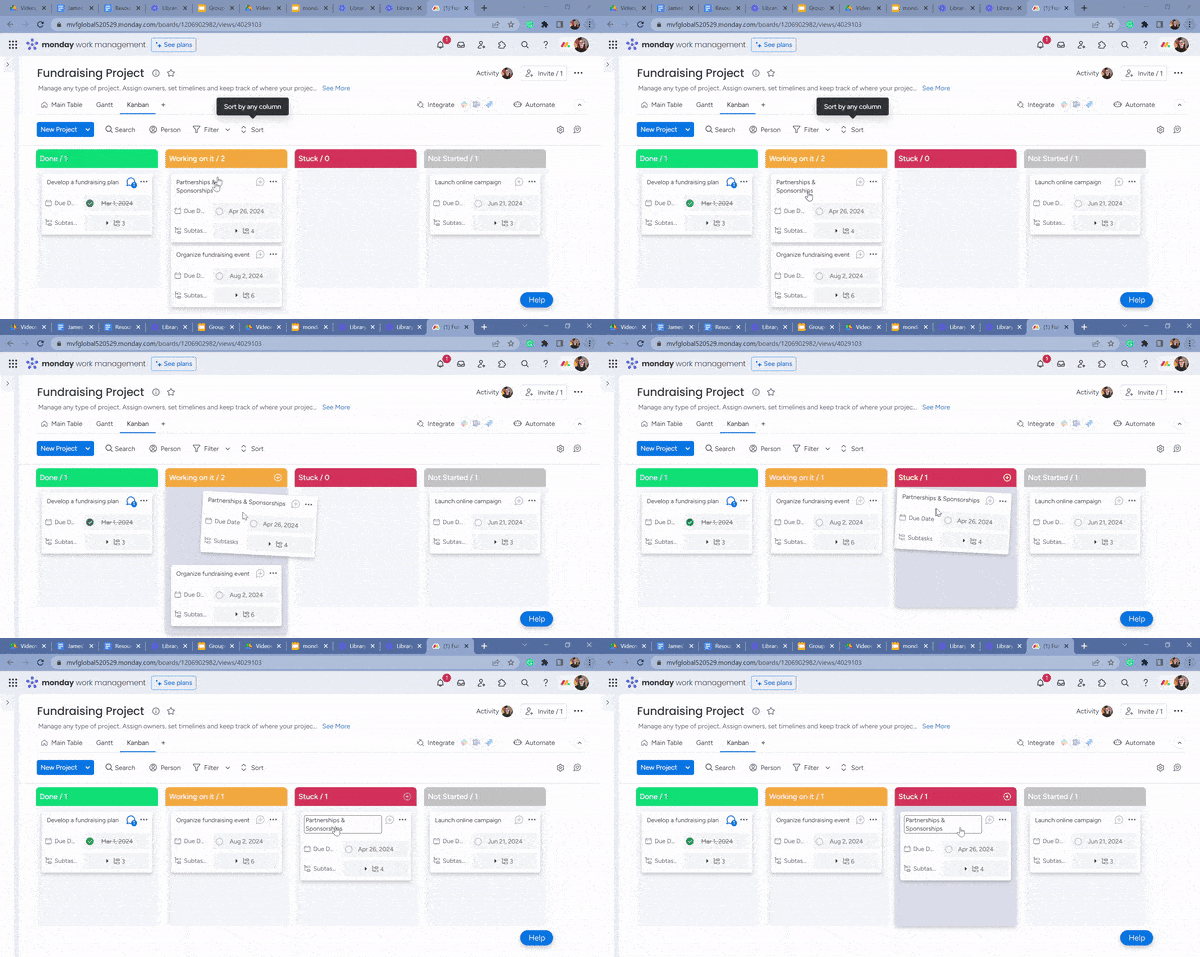
A simple drag-and-drop interface for task management expedited approval processes. A centralized dashboard and calendar view allowed teams to track project progress in real-time.
Results: After over 8 months of Zippo’s deployment of Monday.com, it:
- Saved £82k/year
- Achieve 8x ROI
- Saved an hour per day and 3 business days per week
Monday.com Employee Engagement And Collaboration Tool: Pros And Cons
Among collaboration tools, Monday.com is the best for employee engagement. As an instant messaging tool, it streamlines communication for teams. Still, it has its pros and cons.
Pros: All Plans Feature‘Custom Fields’, Rules-based Task Automation, 200+ Task Management Templates, Minimalistic User Interface, Free Plan for Solo Users, Live Chat, Project Budgeting Information
Cons: Restrictive Task Filtering, Time Tracking Feature Only on Pro Plan, Dashboard Needs Guidance
Key Takeaways:
- Integrate Monday.com with digital signage to broadcast projects.
- Share calendars and dashboards.
- Display company goals to foster team member collaboration.
- Instant messaging tomanage workflows, from project creation to completion.
#4 Internal Communication Tool: Google Calendar

Internal communication tool Google Calendar simplifies task and event creation in the calendar and facilitates color-coded task management.
Google Calendar is an effective internal communication tool for task management and employee engagement. It lets users create project-specific calendars to share with teams.
Organizations can prevent scheduling conflicts by deploying Google Calendar to manage meeting room bookings as they can quickly view availability on the calendar. Our internal research shows that using Google Calendar for shared scheduling reduced missed meetings by 40%.
Moreover, with Google Workspace integration:
- Schedule virtual meetings
- Leverage Google Meet video conferencing capabilities of Google Meet
- Document sharing capabilities of Google Drive
- Send emails to event participants from Google Calendar
- Plan and schedule content creation calendar
- Add documents to events

In short, businesses can leverage Google Calendar to organize meetings and events without causing scheduling conflicts.
A significant audience for workplace communication is deskless workers, in, say, a manufacturing sector. Push notifications don’t work for such audiences.
Are you wondering how a collaboration tool like Google Calendar streamlines internal comms for deskless workers without resorting to push notifications?
Google Calendar is an important internal communication tool because it allows companies to engage deskless workers by broadcasting event reminders on signage screens, eliminating the need for push notifications.
Google Calendar Internal Communication Platform: Pros And Cons
Google Calendar is the best internal communication platform with many pros, but that doesn’t mean it’s without cons.
Pros: Shareable Online Calendar, Ease of Use, Customization, Color-Coding, Create Daily Goals and Tasks, Set Reminders and Deadlines, Sharing Calendars, Integration with Google Drive, Google Workspace
Cons: Reading Difficulty on Mobile Devices, Lack of Image Integration, Limited Offline Functionality
Key Takeaways:
- Instantly create events and tasks in Google Calendar.
- Send reminders and deadline notifications to team members.
- Manage schedules and appointments to streamline communication.
- Create to-do lists and tasks for employees. Add and check off items seamlessly.
#5 Internal Communication Tool: Microsoft Power BI

Internal communication software platform, Microsoft Power BI streamlines business analytics and data visualization.
Businesses leverage this internal communication software to create sales dashboards and performance reports, supporting secure file-sharing to display dashboards on screens.
As a collaboration tool, it fosters employee engagement and offers a secure platform for knowledge management, file sharing, and instant messaging to improve internal communication.
This is how Meijer, a Retail Industry Pioneer, leveraged Power BI to streamline data management for operational efficiency:

Challenge: Difficulty analyzing large volumes of sales and inventory data to uncover trends, obstructing data-driven decision-making.
Solution: Meijer adopted Power BI to leverage its analytics capabilities to manage inventory records, facilitating robust sales trend analysis.
Result: Meijer significantly improved operational efficiency. The strong data analysis capabilities of Power BI yielded strategic insights empowering data-driven decisions.
Furthermore, Power BI can be a video conferencing tool as well.
Here’s how?
In video conferencing or business meetings in general, there’s a need for file-sharing and other internal communications initiatives to keep employees informed.
For example, you might need to share dashboards for efficiently managing projects. Businesses share screenshots of reports in in-person and virtual meetings, which isn’t helpful.
With communication software, Power BI, you can share interactive and responsive dashboards on meeting room signage screens through simple file sharing.
This is what Karl Kreis, Senior Product Intelligence Manager, CDnA, at Microsoft, has to say about Power BI’s dashboard sharing capabilities in meetings:
“Business users can share dynamic dashboards in meeting using Power BI. Eliminating need for static screenshots, users can directly open the dashboard from Power BI in a meeting to sift through highly visualized data.”
Power BI Employee Communication Tool: Pros And Cons
Pros: Affordability, Custom Visualizations, Excel Integration, Multi-source Data Connectivity like SQL Databases And Excel, Embed Power BI Reports, Data Accessibility Through Centralized Data Storage, Interactive Visualizations
Cons: Complex to Learn, Data Analysis Expressions (DAX) Barriers (For Non-technical Users), Custom Code Limitations, Dependency on Microsoft Products
Key Takeaways:
- Create and share interactive reports and dashboards with Power BI.
- Embed links to broadcast dashboards on meeting room signage displays.
- Visualize complex data into insightful reports.
- Track performance and other key metrics and sales figures.
#6 Internal Communication Tool: Google Slides

Internal communications tool, Google Slides is used for making presentations. One of its key features is that any changes made to the presentation are auto-saved.
A template library is another key feature of Google Slides, which you can utilize to create and share reports on the go.
Yet another key feature of communication software, Google Slides is document sharing. You can share the presentation with team members, or showcase it on a meeting or conference room signage screen during in-person or virtual meetings.
Use Google Slides with existing tools for collaboration, such as Google Workspace to improve productivity and prove effective in internal communication marketing.
Google Workspace includes communication software tools like Gmail, Calendar, Drive, Meet, and more, to send employee surveys, and conduct high-quality video calls and virtual meetings.
Some of Google Slides key features include:
- Access from phone, tablet, or computer
- Compatibility with Android, iPhone/iPad, Windows
- Restrict/enable viewing while sharing presentations
- Auto-save edits
- Present across operating systems including digital signage without connector cable
Google Slides Internal Communication Platform: Pros And Cons
Pros: Easy to Use, Real-time Collaboration, Accessibility, Cost-effective, Customization Options, Multimedia Support, Easy Google Workspace Integration, Auto-save
Cons: Limited Offline Functionality, Potential Formatting Issues, Lacking Advanced Features
Key Takeaways:
- Use Google Slides to create internal comms presentations.
- Edit slides to incorporate your branding elements like logos, colors, fonts, etc.
- Run slideshows of new products, company policies, or goals.
- Turn into a team bonding tool to display instructions, highlight employee contributions, etc.
- Use as an employee recognition tool to spotlight top performers on signage screens.
#7 Internal Communication Tool: Google Sheets

Google Sheets is an internal communication software driving employee engagement by providing an online, collaborative platform for creating spreadsheets.
You can use Google Sheets to visualize and analyze complex data and also to:
- Format and design spreadsheets using tables
- Input data like names, dates, and files using smart chips
- Use custom-built tables for project and inventory management, event planning, etc.
- Sift through previous versions
- Give instant feedback using comments
- Assign projects to team members for collaboration
- Sync across devices to keep track of comments and edits
This is what Chris Montfot, Robinhood’s Head of Strategic Operations for Corporate Engineering, has to say about using Google Sheets:

In other words, according to Chris Montfot, Google Sheets fosters collaboration and provides real-time access to data to deliver data-driven decisions.
Google Sheets vs. Excel: Comparing Internal Comms Tools
Comparing internal communication tools is important if you want to choose the best tool that perfectly aligns with your needs. Which software application should you use to create spreadsheets: Google Sheets or Excel?
This infographic (below) discusses key features of Google Sheets and Excel and reveals a clear winner for each feature:

Google Sheets Employee Communication Software: Pros And Cons
Pros: Free Personal Use, Multiple Users Can Edit Simultaneously, Ideal for Team Projects, User-friendly Interface, Easy to Use for Beginners
Cons: Lacks Tools for Advanced Data Analysis, Limited Data Visualization, Lag Issues
Key Takeaways:
- Generate reports, analyze data, and collaborate with teams using Google Sheets.
- Use a simple embed link to display spreadsheets on signage displays.
- Assign tasks to different team members and give real-time feedback via comments.
#8 Internal Communication Tool: Weather App

A weather app is a necessary internal communication software for keeping employees updated about weather conditions.
Broadcasting weather information about a city is a step towards engaging employees.
Only through the dissemination of weather updates can they take actionable steps like keeping an umbrella with them in case it’s raining or going to rain.
Employees can view daily or weekly forecasts at a glance using the Weather app on a digital signage screen. You have the flexibility to either use Fahrenheit or Celsius to display weather content.
Weather App Internal Comms Tool: Pros And Cons
Pros: Detailed Forecasts, User-friendly Interface, Digital Signage Integration, Clear graphics, Accurate Weather Forecasting
Cons: Occasional Slowdown, Limited Features
Key Takeaways:
- Display weather information on a signage screen to keep employees updated.
- Keep track of real-time changes in weather conditions to take actionable steps.
#9 Internal Communication Tool: YouTube

As an internal communication software, YouTube upgrades corporate communications to the next level, especially concerning different types of internal communications, such as videos.
At AIScreen, our internal research has revealed that video is preferred over text by over 75% of employees. Video is the most engaging content form for training employees.
Not just training, videos can motivate your staff as well.
Imagine the CEO recording a short video arousing the passions of employees.
If the same video is broadcasted on screens across your workplace, it will energize your workforce to contribute towards company goals more than text messages can ever do.
Furthermore, out of different types of internal communications such as text, video, audio, etc., information shared through videos, is retained the most. In other words, videos involve the visual and auditory senses. As a result, viewers remember over 68% of the information.
YouTube Videos Transform Internal Communications
You can transform internal communications in your organization using YouTube videos.
Here’s how …
- Videos resonate more with your audience these days, as a result, you can engage them through captivating videos.
- Remote teams can glimpse colleagues through videos that forge stronger relationships.
- Convey complex information or learning material using videos to boost employee engagement.
- Videos eliminate the need for in-person meetings, saving you time communicating internal company announcements.
- Showcase company culture and employee interviews to enhance your brand image as an inclusive workplace.
- Create short, creative YouTube event promos, tutorials, and onboarding videos to broadcast on signage screens.
YouTube Employee Communication Software: Pros And Cons
Pros: Free to Use, Accessibility, User-Friendly Interface, Timestamp Generator, Digital Signage Integration
Cons: Privacy Concerns (For Confidential Internal Content), Limited Interactivity, Distraction
Key Takeaways:
- Integrate YouTube with digital signage to broadcast videos on multiple digital displays.
- Start publishing training and onboarding videos to engage employees.
- Copy and paste the YouTube video link signage software to load YouTube videos on screens.
- Mute the videos if necessary.
#10 Tool of Internal Communication: Google News

A tool of internal communication, Google News is a must-have for creating informative workplaces.
Broadcast company news to inspire your workforce; global news stories to keep them informed. Show only news items that will interest your workforce by wisely choosing topics in Google News.
Use Google News for live news updates. This is a must to keep abreast of happenings worldwide, including the latest news headlines to engage your audience in topics such as technology, business, sports, politics, and more.
Google News Employee Communication Tool: Pros And Cons
Pros: Local News, Full Coverage of Topics, Newsstand Top Stories, Curated Based on Users’ Google Search History
Cons: Lacking Reader View, Redirects to Article Webpage
Key Takeaways:
- Run news tickers on signage screens across your workplace to engage and inform employees.
- Broadcast live breaking news for employees to have a global outlook.
- Select news topics of employees’ interest for enhanced viewer engagement.
What Are Other Must-Use Tools of Internal Communication
Tools of internal communication organizations must use to improve employee engagement and collaboration include:
#11 ‘Date’ Communication Tool

‘Date’ is a communication tool organizations can leverage to create appointments and manage bookings. Display the current date and times on the signage screen utilizing its in-built styles and formats; it supports multiple languages.
#12 ‘Slack’ Internal Communication Software

Slack is a great internal communication software for instant messaging.
It can integrate smoothly with other apps and offers file-sharing options for teams to stay connected. Slack fosters real-time collaboration on projects and supports one-to-one instant messaging.
According to a study by McKinsey, collaborative tools like Slack increase productivity by 20-25%.
#13 ‘Trello’ Internal Communication Platform

Trello is an easy-to-use internal communication software platform for companies to organize projects and forge collaboration.
As a project management tool, Trello allows users to create task deadlines, add attachments, and separate projects into lists, cards, or boards. Assign tasks to team members and keep track of card changes.
#14 Microsoft Teams Employee Engagement Tool

Microsoft Teams is an employee engagement tool for direct messaging, high-quality video calls, and virtual meetings.
Microsoft Teams simplifies video conferencing. Companies can leverage it to meet communication needs, including instant messaging and video conferencing.
You can integrate Microsoft Teams with other Microsoft Office applications, and enjoy communication features like video meetings and chats.
#15 Zoom Internal Communications Platform

Zoom is an internal communication app that streamlines instant messaging and video conferencing. Zoom offers communication features like virtual meetings and remote training sessions. It’s easy to use and comes with AI capabilities.
#16 Google Workspace Communication Tool

Google Workspace is a multifunctional communication tool that integrates with Calendar, Gmail, Sheets, and other Google applications. Google Workplace offers communication features like a browser-based interface for sharing information.
#17 Connecteam Internal Communication Software

Connecteam is an internal communication software with communication features suitable for deskless employees. You can use it to send push notifications, schedule events, and collect employee feedback. Connecteam works seamlessly on smartphones and tablets. Connecteam works seamlessly on smartphones and tablets. It’s especially useful for organizations exploring what are the best digital signage team internal communication apps for 2025? to support non-desk-based teams.
#18 Happeo Company Intranet Tool

Happeo is a powerful company intranet tool businesses leverage to integrate tools like Google Workspace.
Happeo provides a centralized platform for sharing company news and documents. Tools like these improve employee engagement, facilitating seamless access to company resources.
#19 Qualtrics Tool of Internal Communication

Qualtrics is a tool of internal communication that allows users to collect feedback and conduct surveys. Besides, it offers analytics capabilities for in-depth reporting and data-driven decisions.
#20 Smarp (Now Haiilo) Employee Advocacy Software

Smarp (now Haiilo) is an employee advocacy software that facilitates employees to share company content on social media platforms.
Simplify Employee Communication With AIScreen


Internal communication tools simplify how companies communicate with employees.
These tools enhance workplace productivity and engagement by offering communication features like data visualization and employee recognition.
AIScreen integrates with all communication tools.
Start your free 14-day trial to see the impact of digital signage on employee engagement!
