Storefront Digital Signage for Window Screens That Bring Shoppers In

Powered by AIScreen digital signage software, window screens give stores a modern, efficient way to reach shoppers. Storefront digital signage turns your shop window into a channel you update from one dashboard in real time. Bright and always current, the screen grabs the attention of people walking past. Design it in AIScreen Aura so every screen matches your brand, whatever your setup.
14-day FREE trial. No credit card required
Storefront digital signage

Storefront Digital Signage Advantages Every Window Screen Delivers

Storefront digital signage brings the facade to life, so brands get noticed from the street. Both the store and its customers gain from it in several ways.

Three window-facing displays hanging behind a clothing store window, each showing a New Season fashion campaign

Catching the Eye of Passersby

Storefront digital signage with vivid colors and high brightness stands out from far down the street. AIScreen Window Facing Displays use 1000–2500 nit panels, so your messages stay readable in bright sunlight and under cloudy skies. Promotions and animated content set your store apart from static storefronts, make passersby curious and help bring more foot traffic through the door.

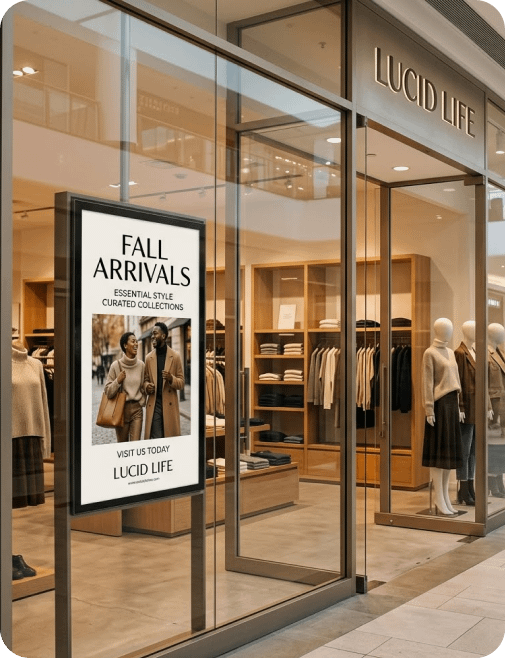
Couple with shopping bags walking past a portrait storefront screen showing a fashion model in a mall shop window

A Competitive Edge on Your Street

Window screens give your brand a modern, dynamic image. Where printed displays stay fixed, screens let you adjust messages quickly to the weather, current promotions or local events. That flexibility is a real competitive edge, since the content you show stays relevant and appealing.

Why Use Storefront Digital Signage Software for Your Window Screens?

How well a window screen performs comes down to the software behind it. Our digital signage CMS makes creating and publishing content quick and simple, and its advanced features help you manage every screen, get the most from each message and keep the display running properly.

  • Icon of a picture with an editing pencil

    Simple Content Management, Fast Edits

    The intuitive AIScreen dashboard lets you create, schedule and change content in a few clicks, with AIScreen Aura for design. Whether you’re starting a sale or sharing event news, you can change course anytime. Messages change in real time, so the screen always matches what’s happening in your store.

  • Icon of a gear with an upward arrow

    Content Automation

    Pull prices, promotions and other information automatically from data sources and the business tools you use. A phone repair shop, for example, can keep its price list in Google Sheets and connect it with the Google Sheets app, so a price changed in the sheet shows up in the window display without anyone touching the screen. Automation keeps what your storefront shows up to date, with no extra manual work for your team.

  • Icon of two overlapping blue screens

    Consistent Messaging Across Storefronts

    For brands with several locations, the software centralizes content management in one dashboard. Send one message to every storefront to keep communication consistent, or adapt the content to local needs store by store. Your brand identity grows stronger, and each location still gets what it needs.

  • Icon of a calendar with a checked day

    Scheduled Power On and Off

    A window screen earns its keep only while people are out on the street. On the Business plan, AIScreen lets you schedule screens to power on and off at the times you choose. Screens light up for opening hours and busy evenings and switch off once the store closes, so they don’t run longer than you need.

  • Icon of a blue notification bell

    Preventing Black Screens

    A black storefront screen means a message nobody sees and a passerby you never had the chance to win over. With remote device management, AIScreen monitors each screen and triggers an alert automatically when a failure is detected. Your team can step in right away. Media players restart remotely, and offline playback keeps content running if the connection drops.

  • Icon of a purple broadcast signal

    Earning Revenue With DOOH Advertising

    Digital out-of-home (DOOH) advertising can also turn storefront digital signage into a revenue stream. In a shopping center, for instance, you can sell screen time to partner brands or neighboring stores and run their ads between your own content. Passersby see a wider mix of information, and the business gains an extra income stream.

What Storefront Digital Signage Content Should You Show in the Window?

Variety across your window screens is what gives customers a reason to step inside the store. Plan visuals and messages strategically to get the most from your retail digital signage.

Smiling shopper stopping at a shop window screen that announces the final day of an autumn sale

Promotions and Flash Sales

Current offers are the natural fit for a window screen. They prompt people to buy and give potential customers a real sense of urgency. Automated scheduling starts and ends special offers, short-term discounts and flash sales on time, so passersby always see the current deal.

Shopper watching a freestanding screen that presents a lipstick collection at the front of a cosmetics store

Product Demonstrations on Screen

Show products in an appealing setting, demonstrate how they work, or bring their benefits to life with video. Done well, storefront digital signage gives a passerby a clear reason to stop and look.

Two matching portrait screens on either side of a store entrance showing the same campaign visual at night

Corporate and Brand Advertising

Window screens put your brand’s visual identity on full display. Keep your logo, brand colors and slogans on the glass, in view of everyone who walks past the store.

Restaurant front window with two portrait screens promoting weekend brunch and weekend drink specials

Content Tied to In-Store Activities

Let window screens reflect current store events, so your storefront digital signage feels truly dynamic. Feature flagship products or current offers, post practical details such as holiday store hours, and switch content in real time with the weather, for instance by showing seasonal items or rain gear when the forecast turns. Because these changes happen automatically, every message stays timely and engaging.

Storefront Digital Signage FAQs

What is storefront digital signage?

Storefront digital signage is the use of digital screens in a shop window, at the entrance or just inside the door to show offers, opening hours and brand content to people passing by. With AIScreen, every one of those screens is managed from a single cloud dashboard.

Why use the storefront window for signage?

The storefront window is what people see before they decide whether to walk in, and it is on view all day to everyone who passes. A digital screen keeps that space in step with your current offers, so an outdated poster never sits in the glass for weeks.

Can window content change by time of day?

Yes, window content can change by time of day. In AIScreen you schedule playlists by time, date or interval, so a morning offer gives way to an evening promotion on its own, and you can update any storefront remotely.

Does it help drive foot traffic?

Storefront digital signage helps drive foot traffic by putting eye-catching, up-to-date offers where passersby already look. Moving images and fresh promotions give people a reason to stop, and new arrivals in the window show them what is worth coming in for.

Where are storefront screens placed?

Storefront screens are placed in the shop window, at the entrance and just inside the door, wherever people on the sidewalk can see them. Window-facing displays hang or stand behind the glass with the screen turned toward the street.

Can I manage windows across many stores?

Yes, you can manage window screens across many stores from one AIScreen dashboard. Send the same promotion and opening hours to every location to keep things consistent, or choose specific screens when one store needs a local offer.

What hardware suits a window display?

Hardware for a window display should be bright enough to stay readable in daylight. The AIScreen Window Facing Display has a 1000–2500 nit panel in sizes from 32″ to 65″, and the AIScreen app can also run on smart TVs and media players you already own.

How does AIScreen manage storefront screens?

AIScreen manages storefront screens from one cloud dashboard. You design content in AIScreen Aura or start from digital signage templates, schedule it by daypart and push updates to every location in real time, while remote device management alerts you if a screen fails.