
What are the Best Strategies to Streamline the Communication with Digital Signage? Top 7

Effective communication is crucial for organizational success. Studies show that 86% of employees cite a lack of effective collaboration and communication as the leading cause of workplace failures, as researched by the AIScreen team.
In this article, you’ll learn seven strategies to enhance communication within your organization, including setting clear roles, utilizing project management tools, and organizing information effectively. These strategies can improve collaboration, productivity, and a more cohesive work environment.
Short Summary
- Streamlining communication improves efficiency by removing unnecessary steps and ensuring the right messages reach the right people at the right time.
- The right tools, like digital signage and project management software, can optimize team collaboration and reduce errors.
- Simplifying communication channels and clarifying roles helps teams stay focused and improve productivity.
- Regular company-wide updates, such as newsletters or meetings, foster employee engagement and support the organization’s goals.
What Does it Mean to Streamline Communication?

Streamlining communication means simplifying and improving the flow of information within a business or organization to make it faster, more transparent, and more efficient.
It involves removing unnecessary steps, reducing misunderstandings, and ensuring that messages are delivered to the right people at the right time using the most effective tools and methods.
The goal is to make communication more direct and practical through digital signage, collaboration tools, or other technologies. This will ultimately improve productivity and reduce errors or delays.
How to Set Up a Digital Signage Solution to Streamline Communication

Step 1: Buy the Right TV to Simplify Communication
Insignia – 50″ LED 4k Digital Signage Solution
- Resolution: Enjoy clear movies, shows, and games in 720p HD.
- Voice Control: Use the Alexa remote to search, control apps, and switch inputs quickly.
- Sharing: Stream videos, photos, and music from Apple devices.
- Audio: Connect directly to a soundbar or AV receiver using HDMI.
- Usage: Works for 10-7 hours, ideal for digital menus or small businesses.
- Price: $150 – $550.

Step 2: Buy the Right Hardware to Simplify Communication
Raspberry Pi with AIScreen OS is an excellent option for businesses needing more features or non-smart TVs.
Raspberry Pi Hardware
- Affordable: Perfect for restaurants on a budget.
- Price: Starts at $128.
- Features: Wi-Fi, energy-efficient, portable, and works with different screens.

Step 3: Download Software to Optimize Communication
- Go to the AIScreen website.
- Click “Sign Up” or “Create Account.”
- Choose a username and password.
- Log in to use the digital signage software.

Step 4: Design Templates for Your Communication Needs
- We offer customizable templates for your business needs.
- Use templates for promotional boards, safety signage, or quick announcements.
- Easily design and deliver clear, effective communication with these templates.

Step 5: Schedule and Display Content to Simplify Communication
- After creating templates, use our scheduling tool.
- Set the right time to display your messages.
- Ensure your communication reaches the right audience on time.
What Are The 9 Strategies to Streamline Communication

1. Simplify Team Communication by Setting a Team Lead
When a project involves multiple people, there needs to be one person in charge. This person will guide the team and ensure things stay on track, even if the team is from different departments.
You can assign this role to someone else if you’re a senior leader. They are responsible for running meetings, setting deadlines, assigning tasks, keeping everyone on track, and ensuring the project gets completed successfully.
2. Clarify Roles to Enhance Team Communication
It’s essential to clearly define everyone’s role in the company, from regular tasks to temporary project duties. When expectations are communicated, employees often meet them and do great work. Make sure they have answers to these basic questions:
- Who do they report to?
- Who reports to them?
- Do they need to prepare for weekly meetings?
- What KPIs are they responsible for?
- Who is in charge of updating key documents or sending company-wide messages?
3. Optimize Team Workflow Using Project Management Digital Software
Project management software (PMS) is a powerful tool to simplify communication. Many teams use it to assign precise tasks and set deadlines. Weekly meetings are often held to review last week’s tasks and plan for the upcoming ones.
4. Provide Clear and Detailed Internal Communication Upfront
For many companies, communication mostly happens through email and direct messaging instead of phone calls or face-to-face conversations. These written messages often miss key details, leading to follow-up questions from the recipients.
In such cases, businesses can explore how to address internal communication challenges with business digital signage solutions to make information delivery more consistent and visual, especially for high-priority updates across departments.
Managers and senior leaders sometimes send quick messages to save time, but this can make tasks unclear for employees, causing them to spend extra time seeking clarification or figuring things out.
Please review your message before sending it and ensure it includes all the essential details. This simple step will save time and improve communication within the team.

5. Organize Files to Improve Team Communication Efficiency
As mentioned earlier, most workplace communication happens digitally rather than face-to-face. Employees often read and update documents created by others, and even in smaller organizations, the number of shared documents can quickly grow.
Many companies use tools like Google Workspace for easy emailing, chatting, and document creation. Regardless of your role—whether you’re a manager or a team member—it’s essential to emphasize clear file naming, folder organization, and defining employee roles to keep everything updated and easy to find.

6. Establish a Clear Hierarchy for Effective Team Communication
Larger companies typically have more apparent structures for who should communicate and report to whom. In smaller companies, it’s common for CEOs to give tasks directly to lower-level employees and for those employees to report back to the CEO.
However, this bypasses department managers, who may have their own priorities and tasks for the team. When a CEO or senior leader contacts an employee, the employee may feel compelled to drop everything else to respond.

7. Set Preferred Office Communication Methods for Better Coordination
One of the biggest challenges teams face is having too many communication methods. It wastes time if employees have to check email, messages, project management tools, voicemails, and more to ensure they don’t miss anything important.
Many companies now use direct messaging systems, which allow employees to access all messages in one place. This is especially useful for remote teams. To improve communication, reduce the number of channels and tell employees when to use each one.
8. Define Clear Meeting Purposes and Timeframes for Effective Communication
No one enjoys unnecessary meetings. First, ask if the meeting is needed. Employees don’t like preparing and attending meetings to find out it could have been an email.
The person organizing the meeting should clearly define its purpose. Then, set a timeframe and agenda, ensuring they are brief and leave enough time for questions.
Meetings usually last no more than an hour. Finally, ensure everyone knows what tasks to complete after the discussion.
9. Ensure Regular Company-Wide Team Communication to Foster Engagement
Employees who feel connected and part of the company are more likely to support its goals and stay engaged. To boost team spirit, regular updates should be sent to all employees. These updates can be shared through:
- A newsletter
- A company-wide message
- A quick weekly all-hands meeting
What Are The Benefits of Streamline Communications?

Quicker And Better Access To Data with Simplified Office Communication
When you streamline communication in your company, it helps employees and customers get the correct information faster.
This clarifies communication, saves time by removing unnecessary details, and focuses on the most critical updates. The result? Better decisions across your business, leading to growth and success.
Improved Workforce Communication through Clear Channels
A company with clear communication works well together, with better team connections. Having organized and consistent communication builds trust, making it easier for everyone to share and discuss information. This improved communication can be enhanced by using professional services automation software, which streamlines workflows and ensures important information is shared across teams in real time.
This is much better than the old way of getting information, which was often complicated, expensive, and slow.

Better Productivity through Efficient Office Communication
Simplifying digital signage employee communication removes the need to manually copy, share, and wait for data to move between departments.
With automated and faster processes, employees can focus more on essential tasks, boosting the company’s overall productivity. This, in turn, helps your business grow.
Single Access Point for Clear Internal Communication
Storing all your data in one easy-to-access place saves time and effort in communication. Having a single access point reduces confusion and makes sharing information easier.
With everything in one system, your company gets a better overview, leading to fewer management issues and more effective communication skills.

Rapid And Substantial Growth with Optimized Workforce Communication
Managing multiple applications can become complicated as your company grows, causing processes and information to get tangled.
Simplifying with integrated software solves these issues and makes changes more manageable with just a few clicks. This approach helps your business grow quickly and keeps your employees succeeding.
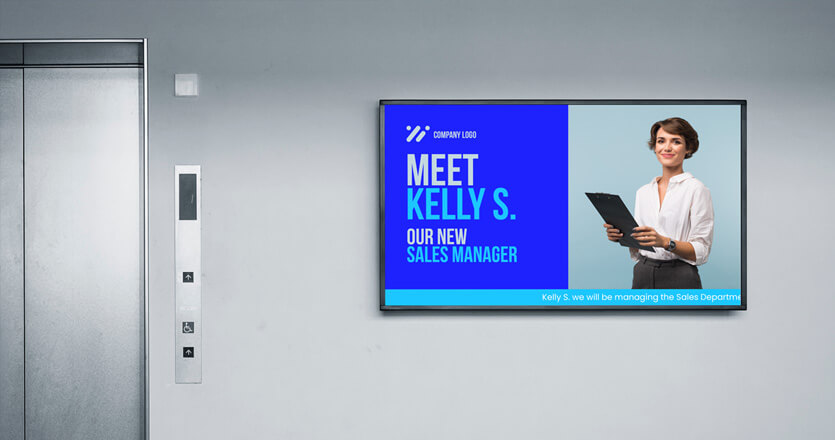
Streamline The Internal Communication With AIScreen


Streamlining trends in communication is essential for improving efficiency and productivity in any organization. Businesses can enhance collaboration and decision-making by implementing transparent processes, using the right tools, and simplifying messaging.
We are a leading provider of digital signage solutions that can help you achieve streamlined communication in your workplace.
