Event Digital Signage
for a Better Visitor Experience

Keep attendees informed and moving with high-impact event screens. AIScreen event digital signage covers real-time updates, key information, and moments worth remembering.

Start free trial
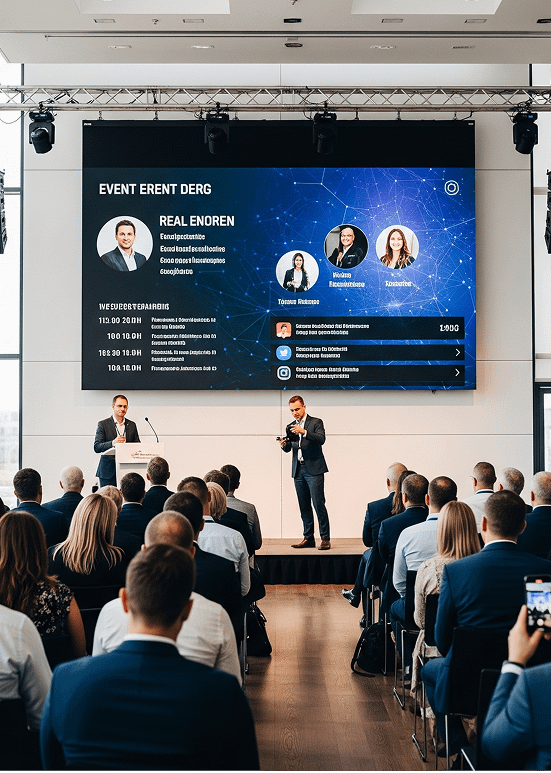
Event digital signage screen showing a business model slide behind two speakers on a conference stage
Digital signage for events

Event Digital Signage
That Keeps Organizers in Control

Share Agendas and Session Changes in Real Time

Welcome messages, stage changes, and live schedules keep the event experience seamless.

  • Display real-time agendas for every stage and welcome desk.
  • Spotlight speakers and upcoming slots from calendar apps.
  • Add touchscreens and QR codes that pull up floor plans or session ratings.
Today's schedule screen listing sessions, times and rooms outside a busy conference networking hall

Guide Attendees Around Any Venue Without Guesswork

Clear digital directions let people move from entrances to halls and rooms without slowing down.

  • Use wayfinding screens to point the way to each room.
  • Reduce late arrivals and crowding when traffic peaks.
  • Direct guests toward exits, restrooms, and the registration desk.
Freestanding welcome screen at a tech expo pointing attendees to the keynote hall, exhibit area and networking lounge

Control Every Screen While the Event Is Live

Send out urgent and last-minute changes with no delay.

  • Push updates to all event screens the moment you save.
  • Send emergency alerts and urgent announcements to every screen.
  • Bring in live streams, weather, and traffic between sessions.
Keynote speaker on a conference stage between large screens showing the summit title

Increase Visibility for Sponsors, Partners, and Exhibitors

Blend live content with branding and promotions so each sponsor gets real exposure.

  • Rotate each sponsor’s ads through every playlist.
  • Schedule sponsor promos for set stages and hours.
  • Use outdoor displays as digital billboards for sponsors.
Exhibitor booth at a trade show with a curved video wall and digital wayfinding screens

Create a Memorable Event Experience for Every Attendee

Digital screens for events set the atmosphere, tell your story, and keep energy high.

  • Increase dwell time with short video clips and moving graphics that hold attention.
  • Share live moments and attendee photos on a social media wall.
  • Place interactive screens where traffic is heaviest and keep visitors entertained with playlists.
Festival visitors tapping an outdoor interactive kiosk that shows the stage schedule and a site map

Event Digital Signage Ideas for Every Type of Event

  • tradeshow event icon

    Trade Shows and Expos

    Help visitors find each booth while exhibitor offers play

  • conference event icon

    Conferences

    Keep every room change and agenda reminder in view

  • sports event icon

    Sports Events

    Gate details, start times, and safety alerts for the crowd

  • corporate event icon

    Event Centers

    Room directories, daily schedules, and wayfinding

  • festival event icon

    Festivals

    Stage times, site maps, and alerts across the grounds

  • gala event icon

    Award Shows

    Nominees on screen as each award is announced

Event Digital Signage That Never Falls Out of Date

Without AIScreen

  • Printed agendas are outdated within hours.
  • Announcements and sessions slip past attendees.
  • Staff rush to change event signage by hand.
  • Sponsors see little value or visibility.

With AIScreen

  • Every screen shows the updated agenda at once.
  • Attendees reach the right session without confusion.
  • One dashboard runs every screen during the event.
  • Sponsor promotions play on schedule venue-wide.

Event Digital Signage Setup in Three Steps

Step 1.

Connect

AIScreen pairing screen with a four-digit code next to the Adding new screen dialog in the dashboard

Install the AIScreen app on a smart TV or media player from our supported hardware list and pair it with a one-time code.

Step 2.

Create

Event welcome screen with agenda published from AIScreen

Build agendas, welcome slides, and sponsor loops in AIScreen Aura or start from a template.

Step 3.

Push to Screen

Attendees walking past a wall screen welcoming them to a marketing summit with links to registration, sessions and networking

Schedule playlists in the AIScreen digital signage CMS and send them to one hall or the whole venue.

Event Digital Signage Apps for Calendars, Social Media, and More

Open the AIScreen app catalog and add event-ready apps such as Google Calendar, Canva, social media, and weather, so screens stay current.

Google Calendar

Session times pulled from your calendar

Microsoft Calendar

Outlook events on hall screens

Canva

Sponsor slides designed in Canva

Facebook Live Stream

Live sessions streamed to the venue

YouTube Live

Keynotes shown live in overflow rooms

Walls.io

A social wall of attendee posts

Fireworks event background template on a purple night sky Karaoke Party event template with a vintage microphone and stage lights Welcome back to school event template with a chalkboard sign Festive Holiday Bazaar event template with market dates and opening hours Holiday Market event template with dates, opening hours and vendor details Halloween party event template with a haunted house Welcome to the office event template with a bold banner Happy Birthday to you celebration template with balloons and bunting Big game football event template with a countdown Happy Thanksgiving greeting template with a pumpkin and autumn leaves American football game night event template Boxing Day Delights special offers template with a QR code

Event Digital Signage Templates for Polished, Professional Screens

Start from a ready-made design for a karaoke night, a game day, a holiday market, or a birthday party, add your branding in AIScreen Aura, and publish it to every screen at the venue.

Why Organizers Pick AIScreen
for Event Digital Signage

Four Reasons AIScreen Fits Live Events

  • Made for live events. Event schedules shift by the hour. With AIScreen digital signage software, you fix agendas, announcements, and other updates in real time, so every screen stays accurate.
  • Simple to update at showtime. Cloud-based digital signage lets you edit from backstage or across town, and remote device management looks after the players, so showtime changes need no ladder or IT ticket.
  • Central control across venues. Halls, foyers, and outdoor zones sit in a single dashboard, so messages stay consistent and in sync on busy days at big events.
  • Dependable when it matters most. A live event cannot stop for a dropped connection. AIScreen players support offline playback, and remote device management tracks every screen and triggers alerts when something fails.
Conference lobby with digital signage: a welcome screen, a wayfinding pillar for keynote and breakout rooms, and registration check-in displays as attendees arrive

Questions About Event Digital Signage?
Our Team Is Ready to Help

From a single conference room to a festival site, we help event teams plan screens, content, and rollout.

Have questions? Our sales team is happy to help. Give us a call, and we will walk you through everything.

Contact Us: +1 (302) 291-3330

Event Digital Signage FAQs

What is event digital signage?

Event digital signage puts TVs, monitors, video walls, outdoor displays, and interactive kiosks to work across a venue. The screens guide attendees, share the schedule, promote sponsors, and carry emergency alerts or live updates. A fixed welcome poster becomes a dynamic screen that previews announcements and the next sessions.

How do organizers use digital signage during an event?

Organizers use digital signage during an event for jobs like these:

  • Video walls behind the stage that carry the event’s look
  • Welcome screens that introduce speakers and thank sponsors
  • Agenda boards showing who speaks where and when
  • Check-in screens that point arrivals to the right desk
  • An advertising network that gives exhibitors paid screen time
  • Menu boards for the food court, updated in real time
Is digital signage hard to run during a live event?

Digital signage is not hard to run during a live event. From the web dashboard on a laptop, you update a single screen or hundreds at once. When a session moves, a speaker runs long, or a hall reaches capacity, the change reaches attendees right away, with no reprinting and no running between halls.

Can several teams handle event content and adapt it room by room?

Several teams can handle event content in AIScreen at the same time. Collaboration features with approval workflows let organizers keep control of venue-wide messages while session and sponsor teams look after their own content. Each playlist goes only to the screens you choose: sponsor loops for the exhibit hall, the session schedule beside the ballroom, and food and drink menus at the café. Updates stay consistent across the venue.

Can event digital signage give sponsors and exhibitors more visibility?

Event digital signage gives sponsors and exhibitors more visibility, above all at expos and trade shows. Screens cycle through sponsor ads, videos, logos, and offers in the breaks between talks or beside the schedule. That keeps sponsors in view across the whole venue and gives sponsorship managers something concrete to show partners. A digital screen also changes far more easily than a printed banner.

Can a regular TV work for event signage?

A regular TV works for event signage. Install the AIScreen app on a smart TV, or plug the AIScreen Stick Player into any TV with HDMI. For smaller or short events, consumer TVs usually do the job. For bright halls, large venues, or all-day use, AIScreen also sells commercial wall-mounted, freestanding, and outdoor displays.

How does pricing work for event digital signage?

Event digital signage pricing at AIScreen is based on the number of screens, so the cost grows with the size of the venue. Plans start at just $10/month. You can begin with a 14-day free trial, no credit card required, and add screens as your events grow. Every plan covers playlists, content scheduling, and split screen zones.

Why do event organizers pick AIScreen?

Event organizers pick AIScreen because it pairs real-time updates with simple setup. It suits large venues, trade shows, and conferences, where every minute counts. Central control, split screen zones, and sponsor-ready playlists help organizers keep communication clear, crowds moving, and the event experience engaging.

How much can you rely on digital signage during a live event?

You can rely on digital signage during a live event because the player keeps working without the network. AIScreen players support offline playback, so screens keep showing content even if the connection drops. Remote device management tracks whether each screen is online and alerts your team about failures, and you can restart a player remotely.

Does AIScreen serve industries other than events?

AIScreen serves many industries beyond events, including:

  • Hospitality digital signage for hotels and resorts
  • Restaurants and cafés
  • Retail stores
  • Corporate offices
  • Schools and universities
  • Hospitals and clinics

Wherever a business needs clear, real-time messages on its screens, AIScreen adapts to the setting and the audience.

Event Digital Signage Without the Hassle

Start your 14-day free trial today, no credit card needed.