
The Best Examination Room Sign for Hospitals

Hospitals and medical offices rely on exam room signs to keep operations running smoothly. These signs do more than just mark room numbers—they help patients find their way, assist staff in managing appointments, and maintain privacy in medical spaces.
Despite the importance of clear signage, many facilities still struggle with navigation issues. Research from the National Library of Medicine found that poor facility wayfinding increases patient stress and contributes to delays in treatment.
According to our internal research team at AIScreen, facilities that upgrade their exam room signage system experience a 35% drop in patient navigation issues and a 20% improvement in staff efficiency. These improvements not only make hospital visits less stressful for patients but also free up employees’ schedules.
Short Summary:
- Exam room signs help maintain organization by guiding people, assisting staff with scheduling, and ensuring privacy in medical spaces.
- Clear room signs reduce navigation issues, as research shows that poor wayfinding increases stress and contributes to missed appointments and delays.
- Healthcare practices can choose from a variety of exam room signs, including room number plates, occupancy indicators, nameplates for specialists, and ADA-compliant options to improve accessibility.
- Implementing a modern exam room signage system improves efficiency, user experience, and navigation, making it easier for guests and staff to find the right rooms.
What Are Exam Room Signs?

An exam room sign is a door sign or wall marker that identifies a room in a medical facility. These signs can display room numbers, availability, doctor names, or patient instructions.
Exam room signs can be standard or customized, depending on the facility’s needs. Some are small message plates, while others offer interactive features.
Best Types of Exam Room Signs

Exam room signs serve various functions. This is why choosing the right option for your medical facility, clinic, or school health center is important. Available options include:
1. Exam Room Number Signs

Exam room number signs are the most basic and essential form of medical office signage. These exam room signs clearly mark each exam room, helping patients, visitors, and staff navigate the facility with ease.
They come in a variety of materials, including plastic, metal, and acrylic, and can be made-to-order to match the hospital’s branding and interior design.
2. Occupancy Door Signs

Occupancy signs indicate whether an exam room is vacant, occupied, or in use. These door signs help avoid interruptions during consultations and examinations, ensuring a smooth workflow for both patients and employees.
Some occupancy signs feature sliding plates or flipping mechanisms that allow staff to update the status manually. Others use color-coded indicators to signal different conditions, such as “In Use” (Red), “Available” (Green), or “Needs Cleaning” (Yellow). This small but effective detail prevents scheduling conflicts and enhances efficiency.
3. Nameplates for Specialist Offices

Medical offices often have rotating specialists, making it necessary to update exam room signs frequently. Made-to-order plates allow practices to swap out doctor names manually, ensuring that patients know which specialist they will be seeing.
These door signs are commonly used in multi-specialty clinics, where doctors share consultation spaces. Some plates include additional details such as the doctor’s specialty, office hours, or consultation status, making them even more informative.
4. ADA-Compliant & Multilingual Exam Room Signs

Accessibility is a major consideration when designing healthcare signage. ADA-compliant exam room signs include braille, high-contrast text, and clear fonts to assist visually impaired individuals.
In multicultural communities, multilingual signs help non-English-speaking patients navigate the facility more easily. Some exam room signs feature multiple language translations, ensuring that all patients understand important information.
5. Interactive Digital Exam Room Signs

Certain exam room signs provide specific instructions to patients and staff, such as:
- “Please Knock Before Entering”
- “Patient Waiting – Do Not Disturb”
- “NPO – No Food or Drink Allowed” (for patients preparing for surgery)
- “Isolation Room – Protective Equipment Required”
These small message plates add clarity to facility operations, ensuring that patients, visitors, and employees follow necessary protocols. They are often made to order in different sizes and colors to match a hospital’s design standards.
How Do Exam Room Signs Benefit Patients?
1. Reduces Confusion & Anxiety

A visit to a medical center can be overwhelming, especially for new patients and visitors. Clear exam room number signs ensure that people enter the correct rooms without needing constant assistance.
Well-placed door signs also prevent patients from feeling lost in a large facility, reducing unnecessary stress before their consultation. Facilities that customize their signage to be highly visible and easy to read create a more welcoming environment for patients.
2. Enhances Privacy

Maintaining patient confidentiality is essential in medical settings. Exam room door signs prevent unwanted interruptions and ensure that consultations remain private. Occupancy door signs let others know when an exam room is in use, minimizing disruptions.
In certain cases, privacy signs also inform patients and visitors about special medical conditions, such as isolation rooms or post-surgical recovery areas, keeping sensitive medical information secure.
3. Supports Accessibility

Not all patients have the same physical abilities or language proficiency. Medical offices that provide ADA-compliant signage with braille and high-contrast text make it easier for visually impaired patients to navigate the facility.
Multilingual exam room number signs also improve patient experiences by eliminating language barriers. Some hospitals customize signs based on the most commonly spoken languages in their community, ensuring that all patients feel included and informed.
4. Improves the Check-In Process

Hospitals with well-organized exam room signs make the check-in process much smoother. Patients can easily find their assigned exam room number, reducing wait times and preventing congestion in reception areas.
Instructional signs that guide people to the correct floor, waiting area, or check-in station also contribute to a more efficient hospital workflow. This ensures that visitors arrive at the right location on time without needing repeated assistance from hospital staff.
How Do Exam Room Signs Benefit Staff?
1. Streamlines Workflow
For doctors, nurses, and administrative staff, properly labeled exam room signs help reduce unnecessary interruptions. Clear exam room signs minimize the need for repeated directions, allowing hospital employees to focus on patient care instead of navigation questions.
2. Prevents Scheduling Conflicts
Without an organized exam room sign system, staff members may struggle to coordinate room assignments efficiently. Occupancy indicators help prevent double booking or confusion over which exam room is in use.
3. Reinforces Safety & Compliance
Hospitals have strict safety protocols, and exam room signs play a key role in compliance. Clear signage for quarantine areas, sanitation stations, and restricted zones helps maintain proper health and security measures.
4. Saves Time & Reduces Errors
Without proper signage, hospitals risk misdirecting visitors, delaying procedures, or confusing staff assignments. Well-placed exam room signs help prevent these issues, keeping the facility running efficiently.
Traditional vs Digital Exam Room Signs
Both traditional and digital signs serve essential functions, but digital signs offer greater efficiency, flexibility, and real-time updates.
| Feature | Traditional Signs | Digital Signs |
|---|---|---|
| Customization | Requires new prints for updates | Instant updates via software |
| Visibility | Static, limited in design | Dynamic, bright, and interactive |
| Patient Engagement | Basic information only | Displays live messages, schedules, and alerts |
| Accessibility | Standard braille plates | Supports translations, audio, and large text options |
| Cost Over Time | Frequent replacements needed | One-time setup with long-term savings |
How to Start Using Exam Room Signs in Hospitals
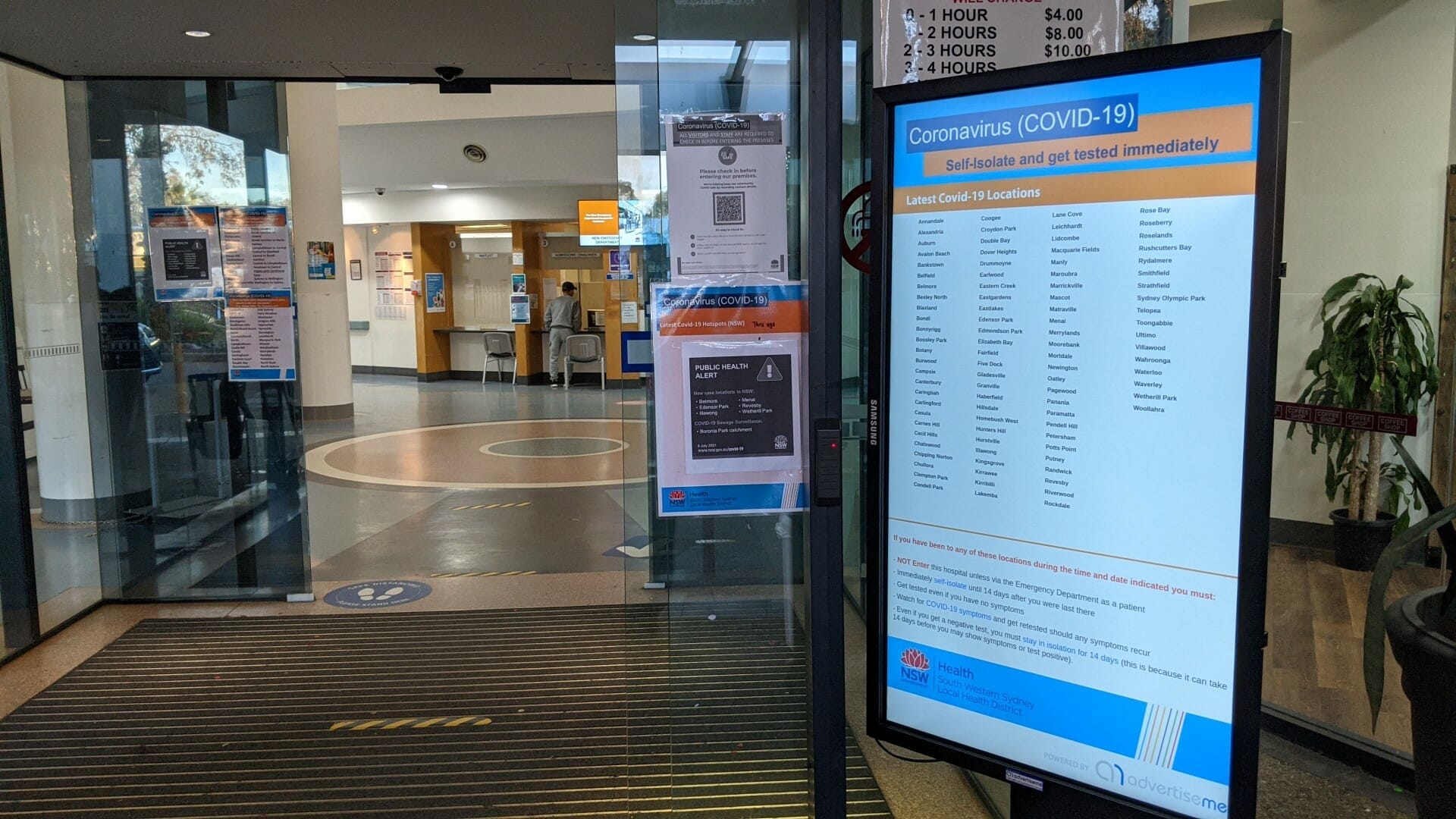
Proper exam room signs improve hospital efficiency, patient experience, and staff workflow. While traditional signage is helpful, integrating digital healthcare signage, interactive directories, and check-in kiosks streamlines communication and navigation even further.
This guide outlines a simple step-by-step process for setting up a comprehensive signage system that enhances wayfinding, room status updates, and check-in efficiency.
Step 1: Choose Your Setup
Hospitals can implement digital exam room signs using one of three easy options:

Existing Displays – Convert any TV or monitor into a signage screen by using an Amazon Fire Stick or TV slider.
Smart TVs – Download the signage app directly from the TV’s app store and start displaying educational and promotional content.

Online Player – Use a web-based signage player on a computer to display room numbers and doctor schedules without extra hardware.
Once a hospital selects its preferred setup, the next step is to connect the screens and upload content.
Step 2: Sign Up & Pair Your Screens

After selecting a setup, hospitals must pair their screens with the signage system to enable live updates and scheduling.

Create an account on the digital signage platform. Log in and navigate to the screen pairing section.

Enter the pairing code shown on the display or web player.

Assign a name to the screen (e.g., “Exam Room 3” or “Pediatrics Wing”).

Choose a display orientation (vertical or horizontal) and test the connection.
Once paired, the screen is ready to display exam room numbers, occupancy status, and doctor assignments.
Step 3: Use Exam Room Sign Templates for Instant Updates

Using pre-designed templates saves time and ensures hospital signage remains professional and up to date.
Types of Available Templates:
- Exam Room Number Signs – Clearly mark each room for easy navigation.
- Occupied/Vacant Signs – Indicate whether a room is in use or available.
- Doctor Plates Signs – Show the current physician assigned to an exam room.
- Patient Instructions Signs – Display messages such as “Please Knock” or “Isolation Precautions.”
- Wayfinding Signs – Guide people to the correct rooms.
How to Use Templates:

Browse the room sign template library on the platform. Select a template for exam room signage. Customize the sign text, colors, and branding to match the hospital’s theme.

Assign the template to the appropriate screen. Schedule updates to automatically refresh based on doctor availability or room usage.

With customizable templates, hospitals can ensure signage remains clear, professional, and always updated.
Step 4: Set Up a Digital Building Directory for Wayfinding

A building directory helps patients and visitors navigate large hospitals and medical offices with ease. Digital directories replace outdated printed maps, providing automatic navigation assistance.
How to Set Up a Digital Sign Directory:

Log in to the signage dashboard and navigate to the directory app. Input department names, room numbers, and specialist assignments.
Customize the layout to match the hospital’s branding. Assign the directory to entrance or hallway screens for easy access.

Update the directory regularly to reflect changes in room locations or staff assignments.
By displaying live updates, a digital directory reduces confusion and helps patients find their appointments faster.
Step 5: Implement Check-In Kiosks for Faster Processing
Check-in kiosks streamline the patient arrival process by allowing individuals to sign in, confirm appointments, and receive room assignments without assistance from staff.
Benefits of Check-In Kiosks:
- Reduces front desk congestion by automating patient registration.
- Provides digital room assignments based on appointment schedules.
- Integrates with exam room signs to update occupancy status automatically.
Steps to Set Up a Check-In Kiosk:
- Install a touchscreen device in the hospital’s reception or waiting area.
- Connect the kiosk to the hospital’s scheduling system.
- Allow patients to enter their appointment details or scan a QR code.
- Display room assignments and wait times.
- Sync updates with exam room signs so staff can see patient arrivals.
Check-in kiosks improve efficiency, helping people check in faster while keeping healthcare staff informed instantly.
Conclusion


A room sign system is essential for facility organization, navigation, and staff efficiency. From durable wall-mounted plates to custom-sized exam room markers, the right signs provide clarity and structure. Whether using small message plates, standard text signs, or wayfinding markers, healthcare facilities need signs that are a perfect fit for their space.
Adding interactive directories and check-in kiosks offers a simple way to modernize workflow. Upgrade your exam room sign system today. Start your 14-day free trial—no commitments, just better exam room signs.
FAQs:
What should hospitals consider when placing examination room signage for maximum visibility?
Signs should be placed at eye level near doorways, use high-contrast colors for readability, and follow a consistent design to ensure people can easily locate rooms.
How do room signs help reduce staff workload?
Clear signage minimizes the need for staff to repeatedly give directions, manage office availability manually, or handle wayfinding-related patient confusion.
How can room signs help during emergency situations?
Well-labeled room signs can assist emergency responders by clearly identifying specific rooms, reducing delays in critical medical situations.
