
Pictures of Hospital Signs: Why Healthcare Is Going Digital

Our research shows that hospitals using digital signage reduce patient wait times by 30% and improve wayfinding efficiency by 45%, minimizing staff interruptions. With the healthcare digital signage market valued at $5.82 billion in 2022 (Grand View Research), more hospitals are upgrading to dynamic displays for better communication.
Hospitals are fast-paced environments where clear signage is essential for guiding patients, visitors, and staff. Traditional signs can fade, become obstructed, or lack real-time updates during emergencies, leading to confusion.
But what’s driving this shift, and how do digital signs enhance the healthcare experience? Lets read on futher.
Short Summary:
- Traditional health care signs are often outdated, difficult to update, and fail to provide clear sign communication for patients, visitors, and staff.
- Digital health care signs offer a more efficient solution by enabling instant sign updates, multilingual sign support, and interactive wayfinding signs.
- Health care facilities that switch to digital signs report improved sign visibility, patient satisfaction, fewer missed appointments, and reduced frustration caused by unclear signs.
- Emergency signs play a crucial role in hospital safety, and digital signs allow real-time sign updates for evacuation signs, security signs, and critical sign notifications.
- Setting up digital signs is a straightforward process, with hospitals easily pairing signs to displays, integrating sign-based hospital directories, and managing signs remotely for a seamless experience.
Are Traditional Hospital Signs Still Effective?

For decades, hospitals have relied on static signs—printed examination room signs, metal plaques, and wall-mounted symbols to direct foot traffic. These traditional solutions serve a purpose, but they also have limitations:
- Difficult to Update – When a hospital department relocates or a new policy is introduced, administrators must replace multiple signs, which is slow and expensive.
- Limited Visibility – Some signs fade, become damaged, or lack proper lighting, making symbols hard to read in dimly lit areas.
- Language Barriers – Many hospitals serve diverse communities, yet printed symbols rarely support multiple languages.
- High Long-Term Costs – Replacing and maintaining physical signs requires repeated spending on printing, labor, and installation.
| Feature | Traditional Signs | Digital Signs |
|---|---|---|
| Update Speed | Requires manual replacement | Instantly adjustable |
| Customization | Fixed design | Can display rotating information |
| Accessibility | Single-language, static text | Supports multiple languages, videos, and audio |
| Cost Over Time | Frequent reprinting required | One-time setup, fewer replacements |
| Engagement | Passive, non-interactive | Can include touchscreens, animations |
Hospitals that rely solely on printed symbols struggle to keep information accurate and accessible. Digital signs provide a better alternative.
Can Digital Hospital Signs Improve Patient Satisfaction?

Long wait times are a common source of frustration in hospitals. Patients want clear updates about when they’ll be seen, but traditional signs don’t offer instant adjustments.
Digital signs improve the patient experience by:
- Displaying queue information in waiting areas so patients know their estimated wait times.
- Broadcasting health messages to keep visitors informed while they wait.
- Providing multilingual support, ensuring non-English speakers understand important instructions.
Hospitals using digital signs report increased patient satisfaction, as they reduce uncertainty and provide better communication.
How Does Digital Signage Solve Hospital Wayfinding Issues?

Finding the right location in a hospital can be overwhelming, especially for first-time visitors. Confusing signs lead to frustration, late appointments, and added stress for patients.
Digital signs solve these issues by:
- Ceiling-mounted signs and wayfinding maps guide visitors toward the right offices.
- Providing touchscreen directories that allow users to search by doctor, department, or floor.
- Updating symbols automatically to reflect schedule changes or temporary closures (e.g., operating room signs for usage updates).
Hospitals that invest in digital signs create a smoother experience for patients.
How Can Digital Hospital Signs Help During Emergencies?
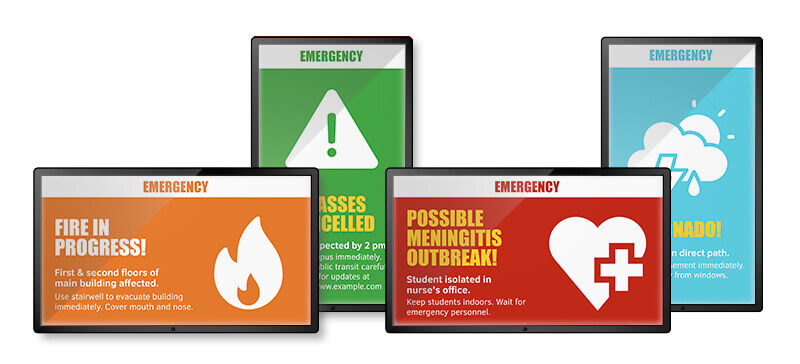
Traditional signs don’t change when situations escalate, leaving patients and staff without critical updates. Digital signs assist in emergencies by:
- Displaying evacuation routes instantly in case of fire or security threats.
- Alerting staff and visitors to hospital lockdowns or severe weather warnings.
- Providing multilingual emergency instructions, ensuring all patients understand the necessary steps.
Hospitals that use digital signs and symbols create safer environments by keeping everyone always informed.
Steps to Start Using Digital Hospital Signs
Step #1: Decide How Many Digital Signs Are Needed

The first step is identifying which areas benefit most from digital signs. Some health care practices may focus on wayfinding signs and directories, while others might prioritize waiting room signs or emergency messaging signs.
Common locations include:
- Entrance signs and lobby signs: Digital directories help patients and visitors find their way.
- Hallway signs and nurse station symbols: Displays provide quick updates on hospital services.
- Waiting room signs: Queue updates reduce patient frustration.
- Emergency exit signs and security zone signs: Clear, visible alerts improve hospital safety.
Step #2: Choose the Right Digital Sign Setup
Health care facilities can take different approaches when setting up digital signs. Some may already have compatible TVs, while others may need to purchase dedicated displays.
With most providers, hospitals have three choices:
- Use an existing display. If you have a smart TV, the process can be as simple as looking up the software in the TV app store.
- Buy a new display. Alternatively, you can also invest in a high-performance display like the Sony BZ30L or BZ35L, if you don’t already have screens for your signs.
- Use a media player. If your hospital already has TV systems in place, a cheaper alternative would be to buy a media player like the Amazon Fire Stick or the Raspberry Pi.
Step #3: Install and Pair the Screens for Your Signs

Once the right displays are selected, setting up your digital sign is a simple process. Download the digital signage software from the display’s app store.

Pair the screen by entering a unique code into the hospital’s signage management system. Assign a name and orientation (vertical for directories, horizontal for wayfinding signs).

Upload sign content, including department directories, appointment schedules, or emergency alert signs.
Step #4: Improve Hospital Navigation with Digital Directories

Hospitals constantly change—departments move, staff relocate, and new facilities open. Printed signs struggle to keep up, leaving patients lost and staff answering the same questions.
A digital directory system eliminates these issues by offering instant updates, clear navigation, and a user-friendly display. Setting up a building directory on a hospital’s digital signage is straightforward:
Download the directory application from the signage platform’s app store.

Open the app and customize the display, adding hospital department names, office numbers, and directions.
Assign categories, such as Outpatient Clinics, Emergency Services, and Administrative Offices, ensuring visitors can quickly find what they need.

Update room assignments instantly without requiring new printed signs.
Apply branding adjustments—colors, fonts, and layouts—to match hospital aesthetics.
Step #5: Manage Content Remotely and Schedule Updates
Once the signs are active, hospitals need an easy way to manage sign content. A centralized signage system allows administrators to:
- Upload images, videos, and announcements in one place.
- Schedule messages to appear on signs at specific times (e.g., visiting hours, doctor schedules).
- Adjust emergency alerts instantly, ensuring critical updates reach patients and staff.
Case Study: How a Major Urban Hospital Improved Efficiency with Digital Sign Directories

St. Francis Medical Center is a 900-bed hospital in a busy metropolitan area, serving thousands of patients and visitors daily. Despite having traditional wayfinding signs, hospital staff frequently received complaints about confusing navigation, which caused:
- Increased stress for patients and visitors struggling to locate departments.
- Delays in patient appointments due to visitors arriving late.
- Disruptions for staff, who were constantly asked for directions instead of focusing on patient care.
- Frequent costs associated with reprinting signs after hospital renovations.
The Solution
Hospital administrators decided to replace static signs with 120 digital signs, including interactive building directories at major entry points. The implementation process involved:
- Installing touchscreen kiosks in the main lobby, ER waiting area, and outpatient wings.
- Integrating a dynamic building directory, allowing patients to search for departments, doctors, and room numbers.
- Adding multilingual support, ensuring non-English-speaking visitors could access directions in their native language.
- Connecting the digital system to the hospital’s internal scheduling platform, so appointment locations are updated automatically.
Enhance Your Pictures Of Hospital Signs With AIScreen


Static signs can’t keep up with the fast-paced demands of a hospital. Digital signage offers a smarter way to keep information accurate, accessible, and easy to manage.
See the difference for yourself—start your 14-day free trial today and experience the future of hospital signage.
FAQs
How can hospital sign pictures improve healthcare facilities?
Visual references of effective hospital signage can serve as inspiration for designing clear and informative signs, which are crucial for guiding patients and visitors efficiently within healthcare environments.
What are the most common types of hospital signs?
Most hospital sign images feature wayfinding signs, emergency exit signs, ADA-compliant signs, and digital displays used for patient communication and hospital navigation.
What should I look for in hospital signs to ensure effective design?
Focus on clear fonts, high-contrast colors, universally recognized symbols, and strategic placement to enhance visibility and accessibility for all patients and visitors.
