Office Digital Signage
for Shared Workplaces and Hybrid Teams

Put timely updates in front of every employee with office digital signage, keeping teams aligned without manual edits or a crowded inbox.

14-day FREE trial. No credit card required
Office Digital Signage
Two colleagues tapping a wall-mounted touch screen outside a glass meeting room

Office Digital Signage
for Streamlined Workplace Communication

Put Internal Updates in Front of Every Employee

Plan announcements ahead and let corporate digital signage deliver your internal communications.

  • Back up email with reminders on screens near desks
  • Bring frontline and non-desk staff the same key news
  • Show leadership messages, HR notices and key calendar dates
Office wall screen listing today’s meetings by time and meeting room next to a company message

Celebrate People, Wins and Milestones on Screen

Give employees public credit for the work they do.

  • Feature birthdays and work anniversaries with team celebration templates
  • Spread customer wins and peer shout-outs to every floor
  • Introduce new hires, promotions and team events
Four colleagues gathered at a freestanding touch screen in a bright office lobby as one taps a tile

Keep Safety Steps and Policies Easy to Find

Share policy changes and get safety messages out fast.

  • Replace paper notices with a digital notice board
  • Interrupt regular playlists with a full-screen safety alert
  • Target alerts to one floor, one building or every site
Corridor screen showing an emergency alert while employees walk to the exit

Show KPIs So Every Team Knows Where It Stands

Link Microsoft Power BI or Tableau and put live KPIs on office screens.

  • Chart performance for each department
  • Stream secure live dashboards to wall screens
  • Help teams decide faster with KPIs that refresh automatically
Presenter beside a large office screen showing a world map, bar charts and a pie chart as colleagues with laptops follow along

Feed Screens From the Apps Your Teams Already Use

Pull in Microsoft tools, calendars and dashboards so content never goes stale.

  • Sync Google Calendar or Microsoft Calendar for room schedules and events
  • Post Microsoft Teams channel updates on shared screens
  • Mix dashboards, news and celebrations
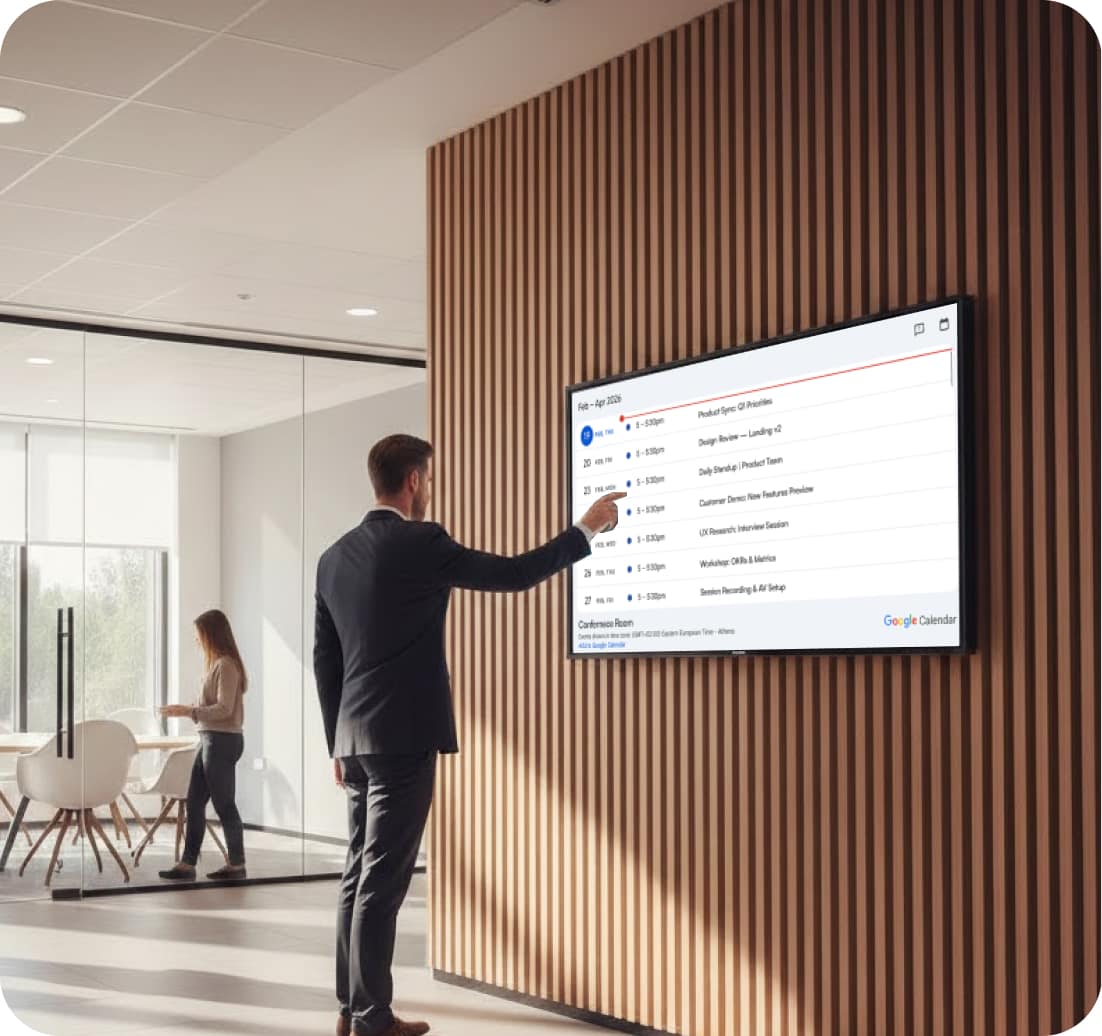
Office wall screen showing a synced meeting calendar beside a glass partition, with Google Calendar and Microsoft Outlook icons below

Office Digital Signage Placement Tips for Every Part of the Building

  • Icon of two office buildings

    Entrances and Reception

    Greet guests and point them to the right floor.

  • Megaphone icon

    Hallways and Corridors

    Post fresh news along the routes staff walk daily.

  • Event balloons icon

    Break Rooms

    Run HR notices, team wins and news where staff relax.

  • Room booking calendar with check marks icon

    Meeting Rooms

    Show live room bookings beside every door.

  • Icon of a group of people with a check mark

    Shared Spaces

    Catch hybrid and deskless staff between tasks.

  • Cafeteria menu fork and spoon icon

    Cafeterias

    Display the daily menu, opening hours and allergen notes.

Office Digital Signage in Sync on Every Screen, Every Day

Without AIScreen

  • Key news gets buried in email and chat.
  • Frontline and hybrid staff miss the latest updates.
  • Nobody knows who may publish what.
  • Vague emergency steps leave people unsure.

With AIScreen

  • Every update stays on screen, not lost in inboxes.
  • Onsite, hybrid and deskless staff see the same message.
  • Role-based access and approval workflows control who publishes.
  • A manual trigger puts emergency alerts full screen everywhere.

Office Digital Signage Across a Multi-Floor Company Office

How It Works at a Company Office on Several Floors

Picture a company office spread over several floors where HR pins notices to a cork board, the reception TV still loops last month’s slides, and an email about the fire drill goes unread by half the building.
 
With AIScreen, the office manager pairs the TVs already on the walls, builds one playlist with company news, birthdays and the cafeteria menu, and schedules it floor by floor. On drill day, one trigger puts the alert on every screen, and the manager switches back to the regular playlist from the same dashboard.
 
Office wall screen showing a monthly calendar above a small meeting table and chairs

Office Digital Signage Up and Running in Three Steps

Step 1.

Connect Your Office Screens

TV showing the AIScreen screen-pairing code next to the AIScreen Stick Player

Install the AIScreen app on a smart TV or media player from the supported hardware list, then pair it once with a code.

Step 2.

Create Workplace Content

Welcome to the office template with a white banner on a teal desk illustration

Build slides in AIScreen Aura or adapt a ready-made digital signage template for the office.

Step 3.

Push to Screen

Freestanding office directory screen listing room numbers by floor in a bright corporate lobby

Schedule playlists in the AIScreen digital signage CMS and send them to one floor or the whole office.

Office Digital Signage Apps for Always-Current Workplace Screens

Link Microsoft Teams, Jira, Excel and your calendars so office digital signage stays current on its own.

Microsoft Teams

Channel posts on hallway screens

Microsoft Excel

Team spreadsheets on wall screens

YouTube

Webinars and live events on screen

Canva

Canva designs for office screens

Google Calendar

Bookings shown beside each room

Microsoft Calendar

Outlook events on office displays

Welcome to the office template with a white banner on a teal desk illustration Workplace well-being template inviting staff to book a mental health session Keep our workplace safe template with hygiene and meeting guidelines Employee feedback survey template with a QR code and a woman in a yellow sweater Team meeting reminder template showing today at 12:00 in Board Room 1 Team meeting countdown template with a flip-clock timer Our team template introducing three team members with portrait photos Safety training announcement template with date and room number Office hours board template with a hanging sorry we are closed sign Innovation and technology seminar template about artificial intelligence with a QR code We are open announcement template on an orange sunburst background Corporate guidelines template listing five team rules beside a tent illustration

Office Digital Signage Templates Ready for Company News and Team Moments

Office Digital Signage Software
Teams Can Rely On Every Day

Four Reasons Offices Pick AIScreen

  • Made for internal messaging. AIScreen digital signage software carries daily workplace news to every screen from one web dashboard.
  • Easy for any department. An intuitive CMS, digital signage templates and scheduling let HR, facilities or marketing publish on their own, without waiting for IT.
  • Control that grows with you. Configurable permissions and separate department workspaces keep company-wide and local content apart, so every message stays consistent.
  • Connected to your daily tools. Microsoft Teams, Power BI and Microsoft Calendar feed office screens automatically, and calendar changes appear with no manual edits.
AIScreen schedule view with a weekly calendar, screen tags and a Corporate playlist

Office Digital Signage Questions?
Our Team Is Ready to Help

Get advice on screen placement, content and rollout for your office.

Planning screens for a new floor or a whole building? Book a call and we will walk you through it.

Talk to our team

Call us: +1 (302) 291-3330

Office Digital Signage FAQs

What exactly is office digital signage?

Office digital signage is a network of screens that shows announcements, calendars, KPIs, dashboards and company news in places such as the lobby, break rooms, corridors and the doors of meeting rooms. With AIScreen, every screen is managed from one cloud dashboard, so updates reach onsite, hybrid and deskless employees as soon as they are published.

What benefits does office digital signage bring?

Office digital signage helps a workplace:

  • Align employees around updates that appear in real time
  • Put dashboards and KPIs where teams can act on them
  • Cut down on email and make key messages clearer
  • Build company culture by celebrating people and wins
  • Greet visitors and point them to the right floor
  • Show room schedules beside each meeting room door

Together, these turn idle screens into a channel that people actually notice.

What kinds of offices use digital signage?

Offices of many kinds use digital signage, including:

  • Corporate offices that share news across the whole company
  • Small businesses and startups running a single floor
  • Medical and dental offices with a busy waiting area
  • Agencies and other teams that share one office space

Whatever the office, digital signage keeps messages consistent and easy to update.

How can a workplace improve its internal communication?

A workplace improves internal communication by putting messages where people already look. Mount screens in busy areas such as entrances, corridors and break rooms, then rotate leadership news, HR notices, safety reminders, IT updates, onboarding advice and team celebrations. Scheduling each message for the right time of day means it reaches people when it matters, instead of sitting unread in an inbox.

What kind of content do employees notice most?

Employees tend to notice content that is short, current and about their own work. On office screens, that can mean leadership messages, brief videos, live KPI boards, IT notices, safety reminders, birthday and anniversary shout-outs, onboarding advice, upcoming events and profiles of colleagues. Mixing formats in one playlist and refreshing it on a regular schedule keeps the screens from feeling like wallpaper and gives people a reason to look again.

Can one dashboard manage screens in several offices?

One AIScreen dashboard can manage screens across several floors, buildings or offices in different cities. From the same place you can:

  • Organize screens by location, tags or spaces
  • Send targeted updates to chosen screens
  • Schedule playlists by time, date or interval
  • Keep branding the same on every display

It suits small teams and large, distributed companies alike.

Does AIScreen support multi-zone screen layouts?

AIScreen supports multi-zone layouts through split-screen zones in its playlists, so one display can show a dashboard, a news feed, a calendar, the weather and alerts at the same time. A break room screen might pair company announcements with the lunch menu, while a screen outside a meeting room shows the day’s bookings next to a short welcome message. Each zone can be designed separately, which helps when several teams share one screen.

Is office digital signage safe for corporate networks?

Office digital signage on AIScreen includes security controls in the CMS and role-based SSO access control to manage user permissions, while approval workflows decide what goes live. Network settings, authentication and certificates on each device can be changed remotely, and firmware and security updates are rolled out centrally, so every screen runs the same approved version.

How much does it cost to run office digital signage?

Office digital signage cost comes down to the number of screens and where they go. AIScreen plans start at 10 USD per screen per month, and the app runs on many smart TVs and media players you may already own, so you can start with one screen and add more as the rollout grows. A free trial lets you test it in your own office first.

What other digital signage solutions are available from AIScreen?

AIScreen offers digital signage solutions far beyond the office, including:

  • Corporate digital signage for headquarters and campuses
  • Lobby and reception screens
  • Conference room signage
  • Retail and restaurant screens
  • Education and manufacturing signage

All of them run on one cloud platform, which means screens are managed the same way across every site and team as the organization grows.

Office Digital Signage Ready for Your Next Announcement

Try AIScreen on the screens your office already has, with a 14-day free trial and no credit card required.