Digital Signage
for Events

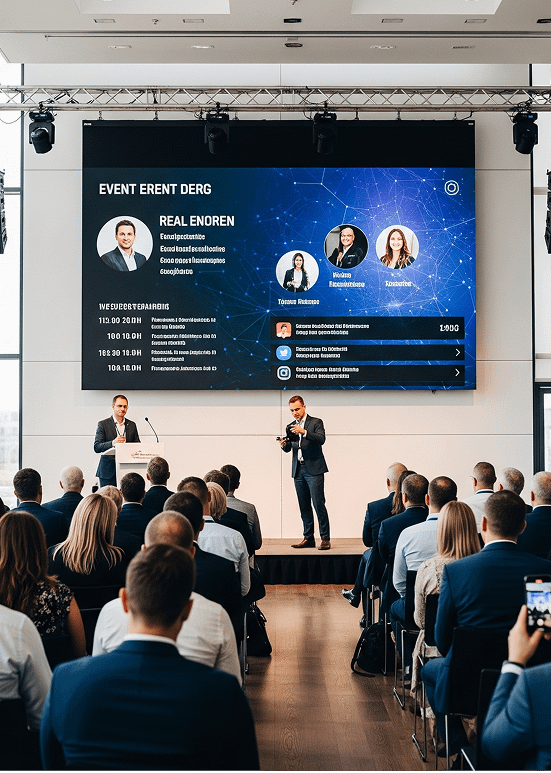
Digital signage for events turns every screen at your conference, trade show, or festival into a live channel you control from one dashboard. Build eye-catching video walls, draw crowds to exhibitor booths, and keep attendees on schedule with agendas, speaker cards, and wayfinding that update the moment plans change. Share live streams, sponsor promotions, and session reminders on any screen, break through the noise of a busy venue, and give guests a polished, professional experience from the entrance to the final session.

Start free trial
Digital signage for events

It’s Easy to Use, and We’re Here to
Support You

AIScreen is built to be run by event staff, not IT. Upload agendas, speaker cards, and sponsor loops, drop them into a playlist, and schedule everything to switch automatically between event days and sessions. During the event you can change a room, swap a talk, or post an alert from your phone in seconds, and group screens by hall or zone so each area shows exactly what its audience needs, all without leaving the show floor. Start from a ready-made event template, add your branding, and reuse the same setup across every conference, trade show, and festival you run.

Have Questions? – Our sales team is happy to help! Give us a call, and we’ll walk you through everything.

Contact Us: +1 (628) 285-2929

Digital signage for events Digital signage for events Digital signage for events Digital signage for events Digital signage for events Digital signage for events Digital signage for events Digital signage for events Digital signage for events Digital signage for events Digital signage for events Digital signage for events

Digital Signage for Events Templates

AIScreen’s digital signage for event templates are designed to meet the diverse needs of businesses across industries. Explore our collection of free templates, making it simple to create, manage, and schedule dynamic content. These templates are crafted to improve customer experiences by delivering visually engaging and relevant information. Visit the AIScreen templates section to discover more options and find the ideal solution for your business!

Features of Event Digital Signage

Digital signage for events management helps businesses deliver dynamic, engaging content across multiple screens. With a comprehensive solution, playlist management challenges are addressed, ensuring seamless content delivery and improved audience engagement. Explore more hospitality digital signage solutions.

  • Digital signage for events

    Centralized Content Scheduling

    Centralized content scheduling gives event organizers one dashboard to control every screen across the venue. Build playlists for each day, session, and zone in advance, then schedule them to switch automatically as the agenda moves from keynote to breakout to networking. When a session runs late or a room changes, update the schedule once and every display follows instantly, with no staff running between screens. Set content to rotate by time of day, group screens by hall, and queue sponsor loops between talks. This keeps messaging consistent and timely across the whole event while cutting the manual effort of managing dozens of displays by hand.

  • Digital signage for events

    Multi-Zone Layouts
    for Dynamic Displays

    Multi-zone layouts let a single screen show several types of content at once, so each display works harder during a busy event. Split a screen into zones for the live agenda, a sponsor banner, a social feed, and a rolling ticker of announcements, all updating independently. Registration walls can pair wayfinding with welcome messages, while stage screens combine speaker names, session titles, and countdown timers. Because every zone is managed from the same dashboard, organizers tailor the mix for each area, from the main hall to the exhibitor floor, and maximize the value of every screen without cluttering the attendee experience.

  • Digital signage for events

    Create Playlist

    Creating playlists in AIScreen makes it simple to assemble everything an event needs to show and play it in the right order. Combine promo videos, speaker cards, sponsor logos, maps, and live feeds into a single playlist, then drag to reorder and set how long each item stays on screen. Save playlists per day or per zone and reuse them across recurring events, so setup for the next conference takes minutes instead of hours. Schedule playlists to start and stop with each session, and swap items on the fly from your phone, keeping content fresh and engagement high from doors open to close.

  • Digital signage for events

    Live URL

    Live URL integration turns any screen into a real-time window on the data your event depends on. Point a display at a live web page or feed to stream session status, ticketing numbers, travel and weather updates, live social walls, or a sponsor’s own site, and the content refreshes on its own without manual edits. For hybrid and multi-day events, live URLs keep remote agendas, leaderboards, and results in sync across every venue at once. Because the source updates in real time, attendees always see the latest information, and organizers avoid the scramble of re-uploading content every time a detail changes.

How to Set Up Digital Signage for Events

Get started with AIScreen’s digital signage software quickly and easily. Follow these 4 simple steps to deploy your solution:

Step 1.
Don’t have a TV?
Digital signage for events
prev
next

Simply purchase a TV and start without any additional digital signage or hardware.

or
Have TV or hardware?
Digital signage for events

Then download digital signage software directly on your TV from your app store to manage it remotely.

Step 2.
Connect Your Screen(s).
Digital signage for events
After receiving your pairing code simply enter this code in your manager account to pair your screen seamlessly
Optional.
AIScreen OS.
AiScreen
Benefits:
  • Remote Troubleshooting
  • Auto Power On/Off TV
  • Track Available Memory in your cache
  • Clean Cache Remotely
  • Security

Why Use Digital Signage for Events?

Events move fast, and attendees make decisions in seconds: where to go next, which session to catch, which booth to visit. Digital signage for events meets people at exactly those moments, at entrances, registration desks, hallways, and high-traffic areas, with schedules, speaker details, wayfinding, sponsor messages, and live updates that never rely on a reprinted poster or an extra staff member at the door. When a session moves rooms or a keynote runs late, you change it once and every screen across the venue updates together, so no guest is left following an out-of-date sign. Clear, easy-to-read screens also lift the whole event experience: attendees navigate large venues without crowding around a printed map, sponsors get premium visibility that justifies their spend, and your team spends the day running the event instead of taping up notices. From a single conference room to a multi-hall exhibition, one platform keeps every message accurate, on-brand, and on time, which is what makes an event feel organized and professional from start to finish.

Solutions for Events Digital Signage Management Challenges

From the moment doors open to the closing session, event teams use AIScreen to put the right message on the right screen at the right time, across every zone of the venue:

  • Promote The Event: Build anticipation by spotlighting the agenda, headline speakers, sponsors, and signature experiences on entrance walls and lobby screens.
  • Announce Updates And Reminders: Push schedule changes, room switches, safety notices, and check-in reminders to every screen instantly, so no attendee follows an out-of-date sign.
  • Highlight Sessions And Sponsors: Rotate upcoming sessions, booth highlights, and sponsor promotions to drive attendance, add exhibitor value, and keep premium ad space earning its place.
  • Educate And Guide Attendees: Share bite-sized tips, FAQs, and venue rules so first-time guests always know what to do and where to go.
  • Show Live Data And Wayfinding: Display real-time session status, directional maps, queue lengths, and event alerts so people always know what is happening and where to head next.

With every zone managed from one dashboard, organizers elevate the attendee experience, strengthen communication, grow sponsor value, and run smoother, more professional events without printing a single poster or reprinting a single agenda.

Digital signage for events
Digital signage for events Digital signage for events Digital signage for events

Digital Signage for Events That Grows With Your Business

AIScreen offers a scalable digital signage playlist solution that grows with your business. Start with a free trial and enjoy easy setup for just $10/month, with pricing based on the number of screens. Benefit from powerful features like playlist creation, flexible scheduling, and access to over 100 apps and integrations. Whether you’re managing a few screens or expanding to thousands, AIScreen adapts to your needs. Visit our pricing page to get started and grow your digital signage today!

    This field is required
    This field is required
    You must type in an email
    This field is required
    This field is required
    This field is required

    How many screens do you intend to connect?

    • 1-10
    • 11-50
    • 51-199
    • 200-499
    • 500+

    See How Customers Use Digital Signage
    for Events to Drive Growth

    EventTech Conference Boosts Attendee Engagement with Interactive Signage

    The Challenge

    EventTech Conference, a major tech event held annually in the USA, struggled with low attendee engagement and difficulties providing real-time updates during its sessions. Traditional signage and static boards were not providing the level of interactivity or up-to-date information needed to keep attendees informed and engaged throughout the event.


    The Solution

    AIScreen’s interactive digital signage system was deployed across the event venue to provide real-time updates, session schedules, speaker bios, and interactive maps. The digital signage allowed attendees to engage with the event content directly, exploring the schedule, networking opportunities, and venue layout through intuitive touchscreens.


    The Results

    AIScreen’s digital signage system transformed the event experience by keeping attendees informed, engaged, and connected. Real-time updates ensured that participants were always in the loop about session timings, venue changes, and exclusive offers. Interactive displays increased engagement by allowing attendees to access session details, maps, and speaker information instantly.

    “AIScreen’s digital signage has truly enhanced our attendee experience. It’s streamlined communication, increased engagement, and helped make our event more interactive and memorable for everyone.”
    Rachel Johnson
    Event Coordinator, EventTech Conference
    Digital signage for events
    Digital signage for events

    What Every Event Team Gets With AIScreen

    • Digital signage for events
      14
      day free trial, no card needed
    • Digital signage for events
      100+
      apps and integrations
    • Digital signage for events
      24/7
      support by chat, call, or email

    Boost Engagement and Strengthen Your
    Brand with Digital Signage for Events

    Frequently Asked Questions

    What is digital signage for events?

    Digital signage for events refers to the use of electronic displays to showcase dynamic content such as event schedules, attendee information, sponsor ads, and more. It enhances engagement by providing real-time updates during events.

    How does digital signage improve event experiences?

    Digital signage enhances event experiences by providing engaging, real-time content that can be customized to match event themes. It helps streamline communication and boosts attendee engagement through visuals, videos, and interactive content.

    What are the benefits of using digital signage at events?

    Using digital signage at events offers benefits like real-time updates, improved attendee navigation, easy-to-update schedules, and dynamic content display. It also reduces reliance on printed materials, cutting down costs and waste.

    Can digital signage be used for event branding?

    Yes, digital signage is ideal for event branding. It allows you to display logos, color schemes, promotional videos, and messages in high-visibility areas, creating a cohesive and immersive brand experience.

    What type of content can be displayed on digital signage during events?

    Content types include event schedules, session details, speaker introductions, sponsor advertisements, social media feeds, interactive maps, and live streaming. The content can be updated in real-time to keep attendees informed.

    Can digital signage be interactive at events?

    Yes, interactive digital signage enhances attendee engagement. Features such as touch screens, wayfinding maps, and interactive polls or surveys allow event-goers to interact with the content, creating a more engaging experience.

    How do I manage content on digital signage for events?

    Content management for event digital signage is typically handled through a cloud-based platform. You can upload, schedule, and update content remotely from any device, ensuring timely and accurate information is displayed.

    Is digital signage suitable for large events?

    Yes, digital signage is highly effective for large events. It can scale to display content across multiple screens, ensuring attendees are informed regardless of their location within the venue.

    Can digital signage be used to display live event data?

    Yes, digital signage can display live event data, such as live scores, real-time social media feeds, or even changes to event schedules. This keeps the content fresh and relevant throughout the event.

    How does digital signage improve attendee navigation at events?

    Digital signage helps attendees navigate events by displaying interactive maps, session information, and directional signage. It reduces confusion, making it easier for attendees to find sessions, booths, and facilities.