Conference Room
Digital Signage

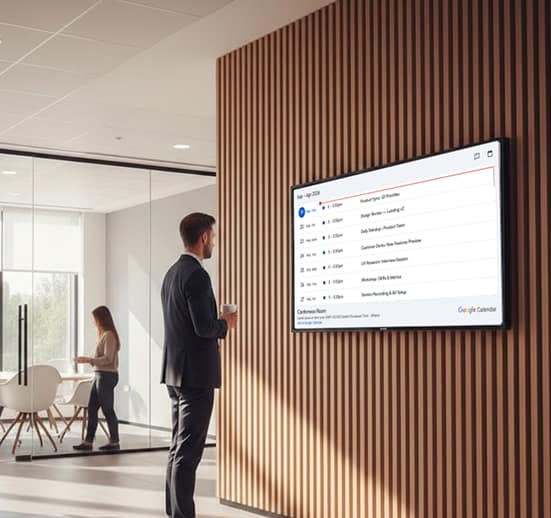
Conference room signage is used to display meeting schedules, room availability, and booking details on screens placed outside meeting spaces. These displays help teams quickly see whether a room is occupied, upcoming meetings, and schedule changes. With digital signage software, offices can update room information in real time, reduce scheduling conflicts, and manage meeting spaces more efficiently.

14-day FREE trial. No credit card required
Conference Room
Conference Room

Why Use Conference Room Signage?

Conference room signage helps organizations manage meeting schedules, room availability, and booking information across office spaces. Digital displays placed outside meeting rooms allow teams to quickly see whether a room is occupied, upcoming meetings, and schedule changes. With digital signage software, businesses can keep conference room displays updated in real time, reducing scheduling conflicts and improving workplace efficiency.

Solutions for Conference Room Signage Challenges

Conference room signage systems solve this by providing real-time visibility into room status and meeting schedules. Digital signage software ensures that meeting room displays remain accurate, synchronized, and easy to manage across multiple locations.

  • Live Availability: Shows real-time conference room status so teams can quickly find available spaces.
  • Instant Updates: Digital signage software updates meeting schedules immediately when bookings change.
  • Clear Displays: Conference room screens show upcoming meetings, room usage, and booking details.
  • Central Control: Manage all meeting room signage across locations from one system.
  • Better Utilization: Improves room usage and reduces scheduling conflicts across office spaces.
Conference Room

Why Conference Room
Digital Signage Improves
Workplace Productivity

Conference room digital signage shows real-time room availability and meeting details at a glance. Meetings start on time, space conflicts are reduced, and room usage stays efficient. Mounted outside each meeting room, digital room signs display live status, the current schedule, and the next available slot, so employees can find open space without walking floor to floor. Room scheduling syncs with your calendar system, and management gets clear analytics on how each workspace and conference room is actually used. Whether you run a handful of huddle rooms or an enterprise workplace, digital conference signage turns booking guesswork into visible, bookable information. Get started using this simple framework.

  • 1

    Eliminate scheduling conflicts with real-time room status
  • 2

    Keep meeting schedules accurate through live calendar sync
  • 3

    Guide employees and visitors with on-screen wayfinding

Connect Office Screens Eliminate Scheduling Conflicts With Real-Time Room Status

Meetings shouldn’t be delayed by double bookings or unclear availability. Conference room digital signage software shows real-time room status directly outside each meeting space using an API app, helping teams make faster decisions and avoid last-minute interruptions. Each digital sign reflects live occupancy, so collaborative tasks aren’t derailed by someone walking into a booked room. Signage content updates automatically from the room scheduling system, giving office and workplace managers one view of every meeting room, its status, and its booking history.

Conference Room
Conference Room
Conference Room
Conference Room

Keep Schedules Accurate With Seamless Calendar Integration

Manual updates and outdated schedules create confusion across busy workplaces. Conference room digital signage software integrates with existing calendar systems to ensure meeting information stays accurate across all displays.

Guide Employees With Interactive Wayfinding Displays

Large offices and corporate campuses can be difficult to navigate. Conference room digital signage software adds an interactive wayfinding to help employees and visitors quickly locate meeting rooms and key destinations.

Conference Room
Conference Room

Setting Up Digital Signage for Conference
Room

Setting up digital signage for conference room is crucial for business success and improving employee engagement. AIScreen offers flexible solutions tailored to your specific needs, ensuring that your digital displays effectively connect and engage your workforce.

Step 1.
Don’t have a TV?
Conference Room
Conference Room
Conference Room
Conference Room
Conference Room
prev
next

Simply purchase a TV and start without any additional digital signage or hardware.

or
Have TV or hardware?
Conference Room

Then download digital signage software directly on your TV from your app store to manage it remotely.

Step 2.
Connect Your Screen(s).
Conference Room
After receiving your pairing code simply enter this code in your manager account to pair your screen seamlessly
Optional.
AIScreen OS.
AiScreen
Benefits:
  • Remote Troubleshooting
  • Auto Power On/Off TV
  • Track Available Memory in your cache
  • Clean Cache Remotely
  • Security

How Conference Room Displays Improve Scheduling and Availability

  • Conference Room

    Up to 27%

    fewer meeting delays

    Clear room availability and schedules help meetings
    start on time

  • Conference Room

    Up to 46%

    better room utilization

    Conference spaces are used more efficiently across teams

  • Conference Room

    Up to 52%

    fewer scheduling conflicts

    Double bookings and
    unused rooms are reduced

Conference room digital signage
to boost meeting efficiency

Save valuable time with AI-powered software that automates conference room displays and scheduling at scale. From a single meeting room sign to a whole workplace of connected room signs, keep availability, status, and booking information accurate on every digital display.

Conference Room Conference Room Conference Room Conference Room Conference Room Conference Room Conference Room Conference Room Conference Room Conference Room Conference Room Conference Room

Digital Signage Templates for Conference Room

AIScreen offers customizable, high-impact templates for employee communications, and more. Available in landscape and portrait, these designs adapt to any menu setup. Easily update text, images, and branding to create stunning digital menu boards in minutes. Simplify your signage with AIScreen’s user-friendly, professionally designed templates!

Discover how companies are boosting meeting efficiency and internal alignment with conference room digital signage solutions.

Conference Room

TechNova Optimizes
Meeting Rooms with Digital Signage

Learn how TechNova simplified conference room coordination using conference room digital signage, reducing scheduling conflicts, displaying real-time meeting updates, and improving collaboration across teams, all from a centralized dashboard.

Conference Room
Conference Room

Conference Room Digital Signage That Works Smarter

Eliminate scheduling conflicts, reduce no-shows, and keep everyone informed with conference room digital signage. Display real-time room availability, meeting details, and important updates on any screen, automatically synced across locations. Get clearer schedules, smarter meetings, better productivity.

Explore other use cases

  • Digital Signage for
    Churches

    Share service schedules, announcements, and
    ministry updates across every church space while
    reducing printed materials and manual coordination.

  • Smarter Meeting Room
    Scheduling

    Keep meeting rooms organized with real-time
    schedules, live availability, and interactive booking.
    Prevent conflicts, reduce no-shows, and make better
    use of shared spaces with automated meeting room
    digital signage.

Frequently Asked Questions

What is conference room signage and why is it needed?

Conference room signage displays meeting schedules and room availability outside meeting rooms. It helps teams avoid confusion and quickly identify available spaces.

Meeting-room signage shows real-time availability, current bookings, and the day’s schedule outside each room. AIScreen syncs with Microsoft 365, Google Calendar, and room-booking systems, displays book-now or busy status, and reduces double-bookings, helping teams find and reserve space at a glance.
What is the best software for digital signage in conference room?

For effective conference room signage, leading digital signage software options include AIScreen, ScreenCloud, Yodeck, and TelemetryTV. These platforms provide cloud-based, scalable solutions with advanced content management features.

Can digital signage increase workplace productivity?

Yes, digital signage enhances workplace productivity by streamlining communication and providing real-time updates, enabling employees to stay informed and make quicker decisions, thereby improving workflow efficiency.

How much does digital signage for conference room cost?

Digital signage for conference room costs vary based on software, hardware, and installation. AIScreen offers affordable plans starting at $10 per screen/month, with over 100 apps, 1,500 templates, and unlimited storage. Hardware costs range from $200 to $5,000, and installation starts at $200. Get a cost-effective solution tailored to your needs.

Is digital signage effective for remote or hybrid employees?

Yes, digital signage solutions are highly effective for remote and hybrid employees. By providing cloud-based access, these systems synchronize updates across multiple locations and devices, ensuring all team members stay informed and engaged.

What features should I look for in digital signage for conference room?

When selecting digital signage for conference room, prioritize features such as:

  • Real-time updates
  • Employee engagement tools
  • Automated scheduling
  • Cloud-based access
  • Robust security controls
  • Integrations with platforms like Slack, Microsoft Teams, and HR software

These functionalities enhance internal communication and streamline operations.

What is the ROI of using digital signage in workplaces?

Digital signage enhances employee communication, leading to a 25% increase in productivity. It reduces communication gaps and administrative costs, improving engagement and information retention.

What are the benefits of using digital signage for internal communications?

Key employee communications digital signage benefits include enhanced engagement, real-time updates, reduced email clutter, better brand consistency, and increased transparency. It also enables organizations to share important company announcements, news, and events effectively.