Meeting Room Digital Signage That Shows Every Team Where to Meet

Bring meeting room digital signage to huddle rooms, conference rooms and other collaboration spaces with AIScreen. Before presentations and video calls start, screens by every door show the day’s schedule and company news, all set up in AIScreen digital signage software.

14-day FREE trial. No credit card required
Meeting Room Digital Signage
Two coworkers using a wall-mounted touch screen in an office corridor next to a meeting room

Meeting Room Digital Signage That Puts Idle Room Screens to Work

One Screen for Messages, Room Bookings and Alerts

  • Targeted messages. Choose the playlist for every meeting room digital signage screen and conference room display. For employees, rooms on the marketing floor can show an HR reminder; for customers, a room off the lobby can show a welcome message. Playlists then run themselves.
  • Space booking. Put live room availability on each meeting room display and room scheduler screen, so employees can spot a free collaborative workspace before they walk over. A QR code on the screen links to your booking tool, so people can request the room from their phone.
  • Emergency alerts. Reach every connected screen in the building at once through meeting room digital signage. One manual trigger turns chosen meeting room screens into a full-screen alert; employees and visiting guests see weather warnings or evacuation steps.
Empty meeting room with a wall screen announcing a town hall on Friday at 3 PM above a round table

Meeting Room Digital Signage on the Screens and Players You Choose

Start with the screen you have today, or with none at all, and add rooms one at a time.

AIScreen wall-mounted and freestanding digital signage displays

AIScreen Displays for New Rooms

No screen outside the room yet? AIScreen wall-mounted and freestanding displays arrive with the media player installed, so each one joins your account once it is plugged in and online. Touch models also work as whiteboards in meeting rooms.

AIScreen Stick Player HDMI stick and a media player box that run the AIScreen app

A Stick Player or a Supported Device

Already have a TV by the door? Connect the 4K AIScreen Stick Player to the TV’s HDMI port, or run AIScreen on a supported smart TV or media player you already own.

AIScreen app pairing screen with a pairing code on a TV

The AIScreen App on Any Room Screen

Put the AIScreen app on Android, Fire TV, ChromeOS, LG webOS, Raspberry Pi, Linux, Windows or Samsung Tizen, type the pairing code into your account, and the room screen is ready for a schedule.

Meeting Room Digital Signage in the Cloud, With No Servers to Maintain

AIScreen is cloud-based digital signage software that grows with your rooms and updates every screen remotely. You never run an on-premise server or patch local infrastructure. From a single huddle room to offices on many sites, every screen sits on the same enterprise-grade platform with role-based access and permissions.

Meeting Room Digital Signage That Makes Every Meeting Start Better

Greet Your Guests

Give each guest a branded welcome the moment they reach the meeting room. Meeting room digital signage tailored to that visit can show the agenda, Wi-Fi details or a welcome note.

Keep Employees Informed

Use the few minutes before a meeting begins for company updates, leadership messages and invitations to the next corporate event. Every glance at the room screen then tells people something new.

Connect Your Calendars

Link Google Calendar or Microsoft Calendar, and meeting room digital signage shows real-time bookings and reminders the moment they change.

Meeting Room Digital Signage With Microsoft Teams on Hallway Screens

Teams Posts Where People Wait for a Room

A Microsoft Teams Rooms device is optional, because AIScreen shows Teams channels as digital signage on any idle office screen. Sign in to Teams once on the player, add the Teams view to a layout and schedule it, and the screens you own share internal communications. New posts then reach every workplace screen without anyone touching them.

Employee with a coffee walking past a corridor screen with Team Update, New Hires and Town Hall cards between glass meeting rooms

Meeting Room Digital Signage for Live Room Status at Every Door

Room Status and Occupancy at a Glance

Double bookings and people hovering at a door usually start with a room whose status nobody can see from the hallway. A meeting room occupancy screen beside each door shows whether the room is busy or free, how long the current meeting runs and what comes next.

Because the screen reads the room calendar, its status changes on its own when a booking moves, ends early or is cancelled. Digital signage for meeting room status means nobody has to tape a paper sign to the glass again.

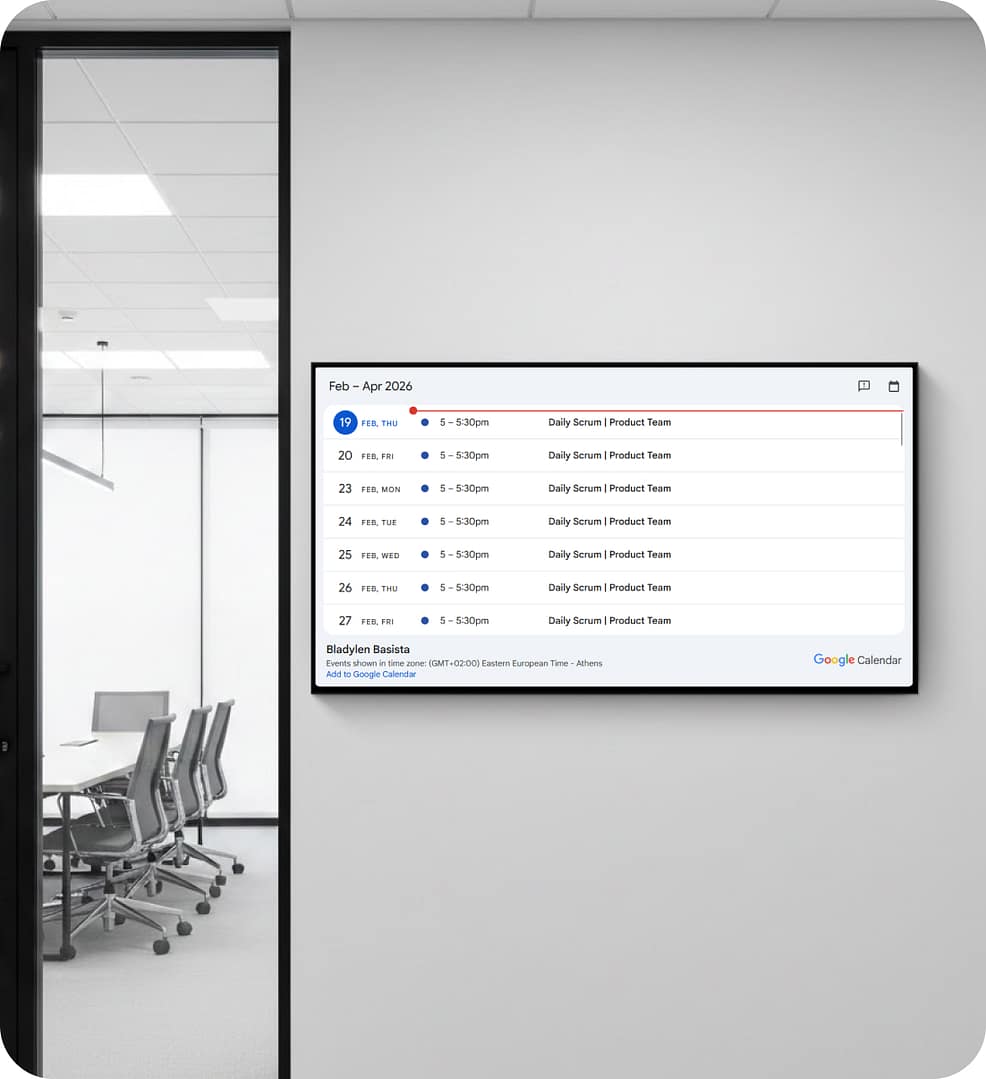
Wall screen in a glass office corridor listing a meeting room's upcoming bookings by day and time

Meeting Room Digital Signage With Daily, Weekly and Monthly Views

A Meeting Room Schedule Display for Each Wall

Pick the calendar view that suits each wall. A digital room scheduler beside a small huddle room can list just the next few events, while a larger screen in the corridor shows the full day, week or month.

Give event types their own colors, so a client meeting stands out from a team standup, and set the language and the first day of the week to match each office.

Office wall screen showing a monthly calendar above a small meeting table and chairs

Meeting Room Digital Signage for Hybrid Teams and Shared Floors

Workspace Hoteling Without the Guesswork

Hybrid offices rearrange who sits where every week, so meeting room displays need to keep up. Group screens by floor, location or space in one dashboard and update every huddle room in a building at once, or target one floor at a time.

For workspace hoteling on shared floors, a tap on a touch screen can open your desk or room booking page.

Employee in a suit tapping a wall-mounted touch screen in a bright office corridor

Meeting Room Digital Signage Across a Coworking Building

How It Works at a Coworking Building

Picture a coworking building where members book meeting rooms in a shared calendar, yet still walk the corridors to find one that is free, and guests wait at the front desk while someone checks which room they are booked in.
 
With AIScreen, the community team mounts a portrait room sign beside each huddle room door and a larger screen at the front desk, both reading the same calendars. Members see at a glance which room is taken, and the front desk screen welcomes each guest and lists the week’s member events.
Coworking front desk with a wall screen showing available meeting rooms

Explore Other Workplace Signage Use Cases

  • Corporate Digital Signage

    Carry company news, KPIs and town hall reminders from headquarters to every office and campus, all scheduled from one AIScreen account.

  • Office Digital Signage

    Turn the screens across one office into a shared noticeboard for dashboards, schedules and announcements that update without manual work.

Meeting Room Digital Signage FAQs

What can meeting room digital signage do for workplace communication?

Meeting room digital signage turns the screens inside and beside meeting rooms into a communication channel. Alongside the room schedule, they can show agendas, welcome notes or company updates, so more employees see internal news.

How do meeting room digital signage screens get bookings from your calendar?

Meeting room digital signage screens read bookings from Google Calendar or Microsoft Calendar, so new meetings and changes appear on the room screen automatically. People keep booking in their calendar system as usual, or scan a QR code that opens your booking page.

What hardware do meeting room screens need with AIScreen?

Meeting room screens can be the TV already in the room with a supported media player, a TV with the AIScreen Stick Player in its HDMI port, or an AIScreen display with the player built in.

Can meeting room signage switch to an emergency alert?

Meeting room signage can switch to a full-screen emergency alert on the screens you pick, and you return them to normal from the dashboard.

Can each meeting room digital signage screen show different content?

Each meeting room digital signage screen can play its own playlist, so content can differ by floor, department or audience and still follow your brand.

What support comes with AIScreen?

AIScreen offers 24/7 customer support by phone, chat or email for questions about any room screen. Before you buy, you can book a demo or a free consultation and walk through your rooms, calendars and screens with the team. Day-to-day work happens in one web dashboard, where you pair screens, connect calendars and schedule playlists. For larger networks, the Enterprise plan adds single sign-on, remote hardware management, a Customer Success Manager, onboarding and training, and premium support. Installation services with certified technicians are available when you need help on site.

How do I start using AIScreen in my meeting rooms?

Starting with AIScreen takes a few steps. Sign up for the 14-day free trial (no credit card required), install the AIScreen app on the screen beside a meeting room and pair it with the code it shows. Connect your calendar, build the first playlist, then add rooms as you go. If you would like a walkthrough first, book a demo with the team.

Bring People and Rooms Together With AIScreen

AIScreen pairs digital signage with optional AI audience analytics, so organizations can plan room screens, measure attention and send timely messages to employees, guests and visitors from one dashboard.