
What Are the Best Practices for Digital Signage in 2026?
What are the best practices for digital signage in 2026, and why are AI-powered screens setting the standard? AI-powered digital signage has become essential for modern businesses, enabling real-time communication through interactive displays and dynamic visuals. Grand View Research values the global market at $28.83 billion in 2024, citing 83% recall rates and up to a 400% increase in views versus static signs, clear proof that engaging portrait screens deliver results. Leading platforms like AIScreen now automate scheduling, enable analytics, and power personalized messaging across retail, hospitality, education, and healthcare.
In this article, you will get to know about the “10 digital signage best practices you need to follow” so your impactful digital signage content stands out and your screens get noticed. Want your digital menu boards, internal announcements, or interactive wayfinding to deliver real impact? Use clear calls to action, legible fonts, contrasting colors, and concise video or static layouts so every message lands. With smart templates and robust analytics, AIScreen helps you master these easy and practical tips and get the best return.
1. How Do You Set Clear Goals for Your Digital Signage?
Setting clear goals for your digital signage success in 2026. Start by asking, “What’s the one thing you need your digital displays to accomplish?” Maybe it’s driving more sales, improving internal communication, or enhancing the guest experience by presenting the best digital signage content. Measurable objectives like boosting upsell conversions by 15% or cutting wait times by 20% make it easy to track progress and adjust your approach.
- Set objectives and goals: Decide what business outcomes mean “success” for your project, using the SMART framework (Specific, Measurable, Achievable, Relevant, Time-bound) for clarity.
- Establish your metrics: Pinpoint exactly how you’ll track progress. Will you measure foot traffic, sales spikes, employee engagement, or reduced call center queries?
- Know your audience: Tailor and manage digital signage content for communications by understanding who will be viewing each screen. Are they visitors, staff, or shoppers?
- Determine your location: Choose high-traffic areas for maximum exposure, and map how signage fits into existing customer journeys or workflows using an effective content management system.
- Evaluate resources: Assess your budget, staffing, and technology for creating quality content so that your goals are realistic and timelines are clear.
With well-defined goals, you will ensure every screen is delivering the results you want, turning digital signage from an “eye-catcher” into a true business driver. If mapping those goals feels overwhelming, digital signage consulting can help you build a strategy tailored to your locations and audience.
2. What Content Strategy Works Best for Digital Signage?
Now that you’ve defined clear, actionable goals, the next step is planning how your content will actually show up on screen. This is where asking which content strategy works best for digital signage, becomes critical, especially as we head into 2026.
A strong content strategy ensures your digital posters stay relevant, engaging, and effective, helping your screens communicate with purpose rather than just display information.
To do this, you’ll want to decide which type of content to use: static, dynamic, or a smart mix of both.
- Static content is your foundation. This includes digital posters, logos, digital menu boards, brand messages, or simple informational slides that don’t need frequent updates. Static visuals keep your digital signage clean, legible, and professional, perfect for core branding and evergreen messaging.
- Dynamic content is what keeps people looking. Videos, animations, interactive elements, and real-time data feeds help personalize messaging, highlight timely offers, and boost engagement. Dynamic formats work especially well for promotions, announcements, and audience-specific messaging where freshness matters.
The most effective digital signage strategy doesn’t choose one over the other, it balances both. Static content provides consistency, while dynamic content adds movement and relevance that keeps viewers coming back.
You’ll also need to decide who manages the content:
- Who is creating it?
- How often will it be updated?
- What level of expertise is required to maintain it?
While basic static content can be created with tools like PowerPoint, interactive and automated content requires a dedicated digital signage platform. AIScreen simplifies this by offering 1,500+ design templates and 100+ app integrations, making it easy to personalize, automate, schedule, and rotate content across locations, mwithout adding complexity.
With the right mix of static and dynamic formats, your digital posters stop being just displays and start becoming powerful communication tools.


3. How Do You Make Digital Signage ADA-Compliant?
When accessibility is overlooked, even the best-designed screens can exclude part of your audience. That’s why making digital signage ADA-compliant should be a core part of your content planning, not an afterthought.
The Americans with Disabilities Act (ADA) requires businesses to provide equal access to information, services, and experiences for everyone, including people with visual, hearing, or physical impairments. Digital signage is no exception. Accessible design ensures your screens communicate clearly to all viewers while reducing legal and usability risks.
Here are key guidelines to follow when building ADA-compliant interactive digital signage:
- Interactive elements: Touch points such as buttons, keyboards, or controls must be reachable, generally no higher than 44 inches from the floor. Requirements may vary depending on whether the display is obstructed or unobstructed.
- Speech output: All critical information and functionality should offer a speech-enabled option, allowing users with visual impairments to access content audibly.
- Text size: Readability matters. The height of the letter “I” determines viewing distance, for example, a minimum character height of 5/8 inch is required for a viewing distance of 72 inches.
- Typography style: Sans-serif fonts are preferred for ADA signage because they’re easier to read at a distance and improve clarity for users with visual challenges.
By designing with accessibility in mind, digital signage becomes more inclusive, more effective, and more aligned with real-world audience needs.
4. What Are Some Key Digital Signage Design Tips?
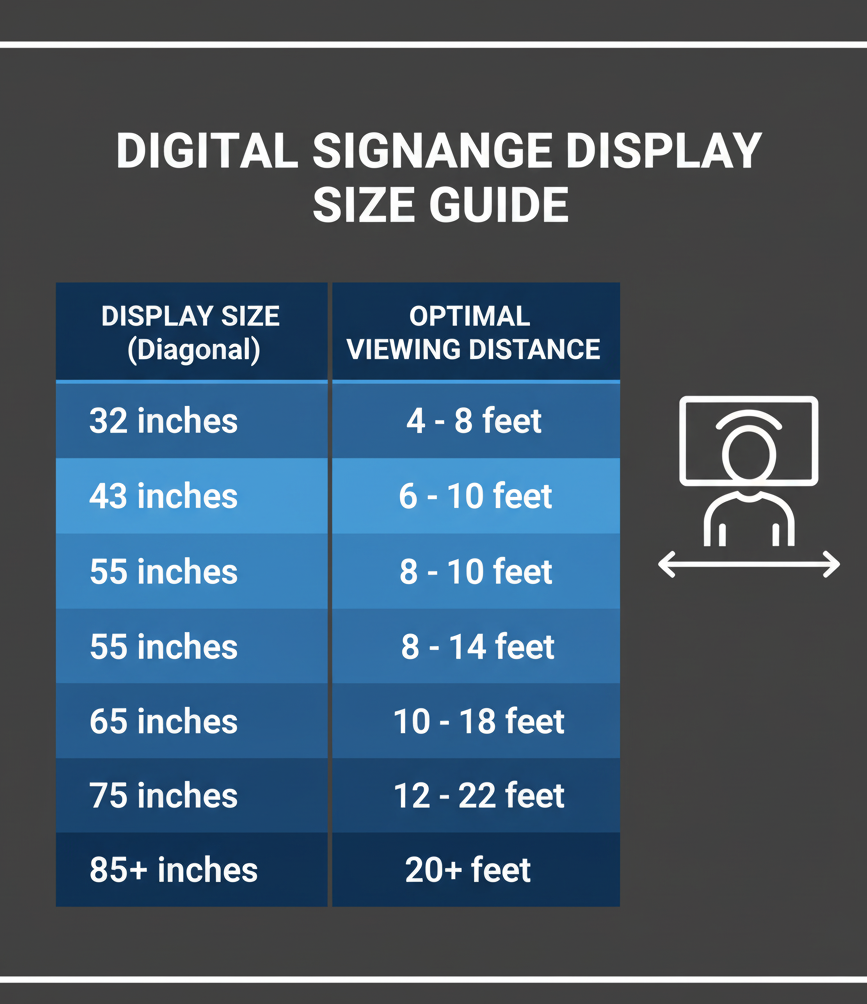
When it comes to visual impact, clarity always beats complexity. Some key digital signage design tips include using high-contrast colors, large readable fonts, minimal text, and strong visuals so messages are easy to absorb at a glance. Keep layouts clean, maintain consistent branding, and design with viewing distance in mind to ensure your signage stays engaging and effortless to read.
Text
When creating digital signage content, text clarity should always come first. For digital signage displays viewed from 7–10 feet away, a font size between 20–30 points improves readability, always test content on real digital signage screens at expected viewing distances.
To avoid cluttered screens, limit designs to one or two fonts, using additional styles sparingly. Prioritize sans serif typefaces, keep your main message largest on screen, and use bold text for key details. A helpful rule is the 3×5 guideline, three lines with five words each, or five lines with three words each, so messages remain easy to scan, even quickly.
Contrast
Strong contrast is essential for readable digital signs. Use dark text on light backgrounds or light text on dark backgrounds to ensure visibility across different lighting conditions.
Avoid placing similar colors next to each other, especially on high-brightness digital displays, as poor contrast strains the eyes and reduces message impact, particularly for internal communications and wayfinding content.
Colors
Color plays a major role in attracting your target audience, but too much color can overwhelm. Bright tones work well for attention, yet restraint is key when designing for digital signage software layouts.
A proven approach is the 60–30–10 rule:
- 60% dominant color
- 30% secondary color
- 10% accent color
This balance keeps screens visually engaging without distraction, even when displaying rotating promotions or social media feeds.
Visuals
Visuals bring energy to digital signage screens and help break up text, but relevance matters. Choose appealing visuals that support your message and brand, not generic fillers.
Since most viewers scan content left to right, place images on the left and text on the right for faster comprehension. Always match visuals to the correct screen resolution and aspect ratio:
- Horizontal: 16:9 (1920 × 1080)
- Vertical: 9:16 (1080 × 1920)
When paired with subtle interactive features, strong visuals elevate engagement without overwhelming the viewer, just a few tips that make a big difference.
5. How Do You Adapt Digital Signage to Different Locations?
The most effective digital signage doesn’t use a one-size-fits-all approach. This is why adapting digital signage to different locations is essential for delivering the right message at the right moment.
Environment and audience behavior directly influence how content should be designed, displayed, and timed. A screen in a busy hallway serves a very different purpose than one near a checkout counter or inside a lobby.
To adapt content effectively, digital signage is typically planned around three core viewing contexts, each defined by audience type, intent, and attention span.
1. Point of Transit
Typical location: Corridors, hallways, entrances, outdoor walkways
Audience type: Moving viewers
Purpose: Deliver fast, clear messages in under 5 seconds
Common examples:
Maps, directions, CTAs, brief promotions, reminders
Optimization tips:
- Keep messages short (five words or fewer)
- Use large fonts and high-contrast visuals
- Focus on actionable information (e.g., “Turn Left for Conference Room”)
Transit areas demand instant clarity. If a message can’t be understood at a glance, it’s likely to be missed.
2. Point of Wait
Typical location: Lobbies, service areas, elevators, waiting rooms
Audience type: Captive viewers
Purpose: Inform, entertain, and reduce perceived wait times
Common examples:
Directories, trivia, spotlight stories, scrollable content, news updates
Optimization tips:
- Use looping or interactive content to sustain attention
- Mix helpful information with light entertainment
- Repeat key messages so viewers absorb them over time
In waiting zones, people are more receptive. Well-paced content can turn idle time into a positive brand experience.
3. Point of Sale
Typical location: Checkouts, food counters, retail shelves
Audience type: Captive buyers
Purpose: Influence immediate purchase decisions
Common examples:
Flash sales, combo deals, menu boards, product reviews
Optimization tips:
- Use strong CTAs like “Buy Now” or “Limited-Time Offer”
- Highlight pricing, benefits, and social proof clearly
- Pair bold visuals with concise copy to prompt action
At the point of sale, relevance and timing matter most. The right message at the right moment can directly impact conversions.
By aligning content with location-specific behavior, digital signage becomes more intentional, more effective, and far more memorable.
6. How Can You Write Better Headlines and CTAs?
6. How Can You Write Better Headlines and CTAs?
If your message doesn’t stop people mid-glance, it won’t convert. Writing better headlines and CTAs is about triggering instant viewer response, especially in fast-moving digital signage environments where attention spans are short.
Strong headlines should be quick to read, emotionally engaging, and action-oriented. The goal isn’t to explain everything, it’s to spark interest and pull viewers into the message.
Tips for writing effective digital signage headlines:
- Keep it short and active: Fewer words, stronger impact.
- Use numbers for clarity: Headlines like “Save 30% Today” are easier to process and feel more concrete.
- Ask engaging questions: “Ready to refresh your menu?” invites viewers to mentally respond.
- Use action verbs: Words like Tap, Scan, Join, or Discover encourage immediate movement.
A headline gets attention, but a clear, compelling CTA drives action. CTAs should be simple, relevant, and free of jargon. This is often your final chance to guide behavior, whether that’s making a purchase, scanning a QR code, or visiting a website.
AIScreen’s professionally designed templates help guide CTA placement and hierarchy, ensuring calls to action are positioned where eyes naturally land, making it easier for viewers to know exactly what to do next.
7. How Do You Keep Your Messaging Clear and Concise?
In digital signage, clarity is everything because your audience only has a few seconds to absorb your message. A cluttered or wordy design can easily make them lose interest. To keep your messaging clear and concise, keep it structured, and visually balanced.
Here’s how you can do it effectively:
- Use 5–8 words max for key points: Your headline should be snappy and instantly understandable. It should be short enough to grasp at a glance.
- Replace long sentences with icons or visuals: People process visuals faster than text, so use symbols or imagery to communicate key ideas efficiently.
- Use hierarchical typography for structure: Highlight important words using font weight, size, or color to guide the viewer’s eyes naturally.
- Test readability from various distances: Stand at different distances from your screen to check if your message is still legible and clear.
AIScreen’s pre-built templates are designed with optimal text balance and visual hierarchy, helping you maintain message clarity and visual appeal across all screen sizes.
8. How Often Should You Rotate Digital Signage Content?
Ever walked past the same screen playing the same ad for weeks? Chances are, you stopped noticing it after a while. That’s exactly why rotating your digital signage content regularly is essential to keeping viewers engaged and preventing screen fatigue.
Here’s a simple guide to help you plan your content refresh schedule effectively:
- Rotate daily for high-traffic zones, like retail stores, quick-service restaurants, and airports where people see your screens multiple times a day.
- Update weekly or biweekly for corporate or internal displays, where employees or visitors are your primary audience.
- Schedule automated updates using AIScreen’s cloud CMS through automated content scheduling and updates across multiple locations without manual effort.
- A/B test variations to determine the optimal refresh frequency to see which version performs best, and adjust your content refresh frequency based on real data.
Keeping your digital signage content fresh and relevant not only boosts engagement but also reinforces your brand’s dynamic and modern image. This is where content automation for digital signage plays a key role, turning your screens into a living part of your marketing strategy, one that evolves continuously with your audience.
9. How Can You Test and Improve Digital Signage Performance?
If you are not tracking how your screens perform, you are missing half the story. To make your digital signage truly effective, it is important to measure, analyze, and refine your content regularly using data-driven insights.
Here’s how you can test and improve your signage performance step-by-step:
- Track key engagement metrics, including dwell time, impressions, and interactions. These tell you how long viewers are paying attention and what’s catching their eye.
- Use QR codes or touchpoints to collect real-world engagement data. This helps you see which campaigns actually drive actions or conversions.
- Run A/B (split) tests by changing one element at a time, like headline, visuals, or CTAs, to understand what resonates best with your audience.
- Leverage AIScreen’s analytics dashboard to monitor results in real time and make quick adjustments for better performance.
By consistently measuring and optimizing your digital signage performance, you can fine-tune every campaign to boost engagement, retention, and ROI, turning your screens into powerful, data-backed marketing tools.
10. How Do You Ensure Data Security in Digital Signage Systems?
In today’s connected world, data security in digital signage systems is not optional; it is essential. With screens linked to networks and cloud-based CMS platforms, protecting sensitive information from breaches should always be a top priority.
Here’s how you can keep your digital signage network secure and reliable:
- Use encrypted media players and secure Wi-Fi networks to prevent unauthorized access or data leaks.
- Regularly update firmware and access controls so that all devices stay protected against the latest security vulnerabilities.
- Restricting admin privileges to trusted users only, limiting who can upload, edit, or schedule content, minimizes potential risks.
- Rely on AIScreen’s SOC 2-ready architecture, which provides enterprise-grade protection and ensures that your signage network meets top industry compliance standards.
By implementing these best practices, you safeguard not just your digital signage content but also your brand’s reputation and customer trust.
What Hardware Do You Need for Effective Digital Signage?
To run an impactful and reliable digital signage system, you need the mix of right hardware and components that ensure smooth content delivery, vibrant display quality, and long-term durability. Each element plays a vital role in maintaining performance and uptime.
Here’s a breakdown of the essentials:
- Displays: Use commercial-grade LED or LCD panels built for 24/7 operation. These screens offer better brightness, durability, and energy efficiency than standard TVs, making them perfect for retail stores, restaurants, or corporate spaces.
- Media Players: Choose between dedicated hardware players or browser-based digital signage players depending on your setup. Media players handle content playback, syncing, and updates, ensuring your visuals stay crisp and uninterrupted.
- Mounts: Invest in sturdy, adjustable mounts to secure displays and optimize viewing angles. Proper mounting not only enhances visibility but also supports a clean, professional setup.
- Networking Tools: Reliable connectivity is key. Use high-quality routers, switches, and hubs to keep your screens connected for real-time updates and smooth remote management.
AIScreen integrates effortlessly with major display brands like LG, Sony, and Raspberry Pi, ensuring that your signage setup remains flexible, scalable, and performance-driven.
Take Your Digital Signage to the Next Level with AIScreen!
Ready to transform the way your business communicates? This is where Take Your Digital Signage to the Next Level with AIScreen becomes a reality. AIScreen empowers brands to manage, automate, and scale digital signage effortlessly from one unified platform. From crafting dynamic visuals to scheduling content across multiple locations, AIScreen ensures your screens deliver the right message at the right time, every time.
By applying the best practices outlined above, clear messaging, strategic placement, consistent updates, and secure performance, you can turn every screen into a high-impact engagement tool. And with AIScreen’s smart automation, real-time analytics, and seamless device integration, your digital signage becomes not just efficient but truly future-ready.
Start your free trial or book a demo today to experience how AIScreen makes digital signage smarter, simpler, and more effective for any business.
Frequently Asked Questions
What is the 3×5 rule in digital signage?
The 3×5 rule means keeping your on-screen text simple, no more than three lines of five words each. It helps your audience quickly absorb the message, even if they are just passing by. Think short, punchy, and visually clear!
What makes digital signage ADA-compliant?
To make your digital signage ADA-compliant, ensure text is readable, contrast is high, and touchscreens are accessible to all users, including those with disabilities. Voice assistance and easy navigation also help meet accessibility standards.
How often should I update my digital signage content?
Updating your digital signage content basically depends on your environment. For retail or high-traffic areas, update daily or weekly. For corporate or internal screens, every couple of weeks works. Regular refreshes keep your content engaging and prevent “screen fatigue.”
What is the best font for digital signage?
The best font size and style for digital signage content creation is to stick to clear, sans-serif fonts like Helvetica, Arial, or Roboto. These fonts are clean, legible from a distance, and display well across all screen sizes, and are perfect for maintaining clarity in your message.
How can I measure the ROI of my digital signage campaign?
You can measure the ROI of your digital signage campaign by tracking key metrics like viewer engagement, dwell time, and conversions. Use tools like QR codes, touch interactions, or sales data to link engagement to results. Over time, you will see how well your screens are driving real-world impact.
