Campus Digital Signage

Campus digital signage replaces static boards with real-time, interactive notice boards that guide students, inform staff, and keep communication aligned across every building and department. From lecture halls to student unions, announcements reach everyone through networked digital signage screens across campus. Because a campus is a physical estate of many buildings, entrances, athletic venues, and outdoor spaces, one connected network keeps every location on the same message from a single dashboard. See also schools digital signage, education digital signage, and university digital signage. This is built on the digital signage management platform.
14-day FREE trial. No credit card required
Campus digital signage

Why Campus Digital
Signage Works at Scale

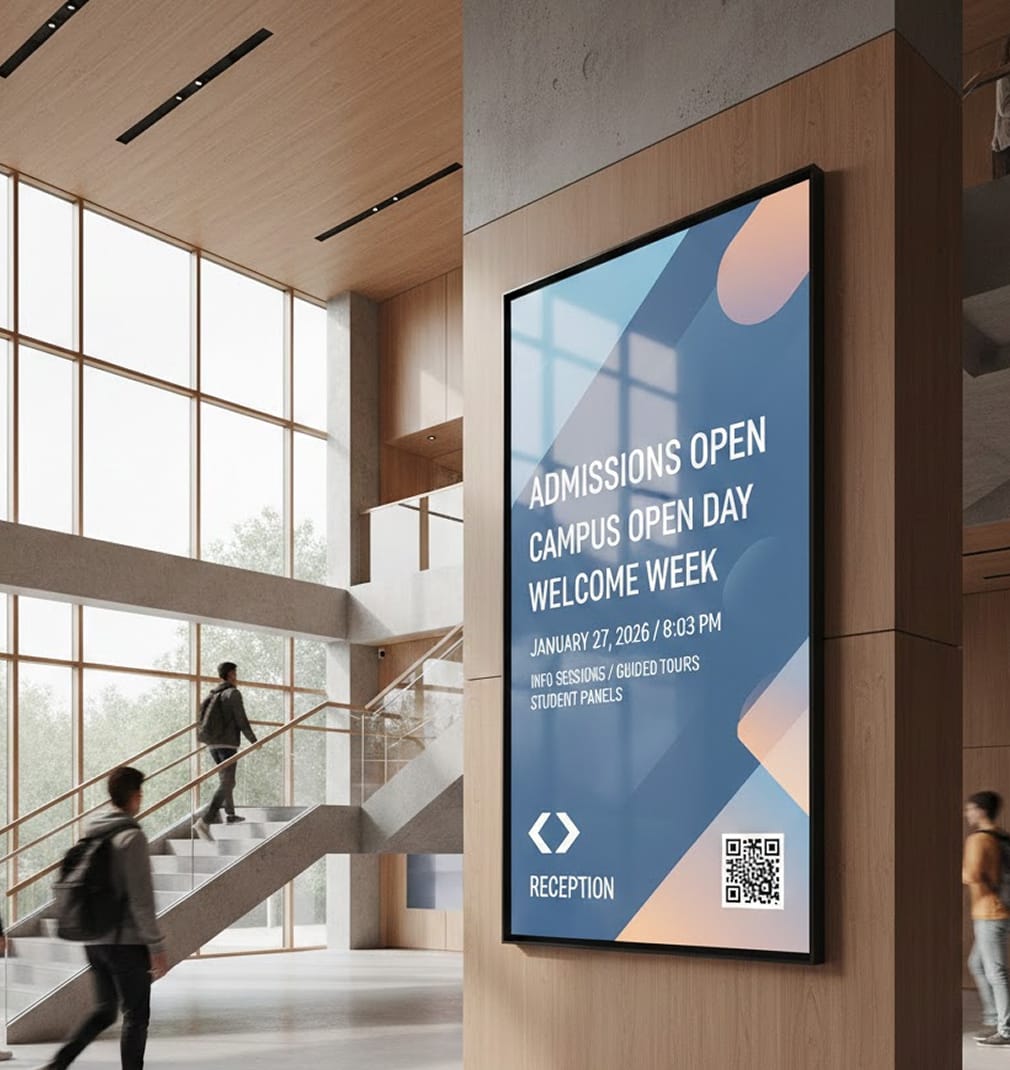
Universities and large campuses move fast. Information changes by the hour, spaces are shared, and audiences are diverse. A campus-wide signage network replaces static boards and scattered updates with connected, real-time screens that guide, inform, and engage across every building and department. Transforming digital screens into a single campus communication layer changes how a university feels day to day. A digital sign at the library entrance rotates study-space availability, screens in common areas carry club news and dining menus, and campus maps at every quad help first-years find their way. Commercial displays in the student center double as event media, while visitor management screens at reception check guests in without a queue. Because everything runs on one platform, the same update reaches every lecture hall in seconds: no printing, no taped flyers, no paper signs. Here’s a simple framework that works at scale. Corporate and institutional campuses use signage for wayfinding, shuttle schedules, event listings, and safety alerts across multiple buildings. AIScreen targets content by building or zone, pushes campus-wide emergency messages, and coordinates shared displays, keeping a large, multi-site campus informed from one dashboard. For facilities and communications staff on a multi-building campus, consistency is the hard part: AIScreen manages wayfinding, event schedules, and emergency alerts across every building from one console with role-based access, so local teams update their own screens without anyone losing the ability to push a campus-wide message instantly. For a campus operations team, the hard requirement is a message that reaches every building at once: AIScreen targets routine content by zone yet pushes an emergency alert to all displays instantly, so a distributed, multi-building campus stays coordinated from a single dashboard. This fits within AIScreen’s school communication screens for campuses and schools. A campus is a physical estate, not a single building, so the operations picture spans parking structures, athletic fields, residence halls, dining commons, and the quad between them. AIScreen coordinates all of it from one place: shuttle and parking availability at transit points, facilities and maintenance notices at affected entrances, weather and closure alerts across the whole estate, and orientation content for new students during their first weeks on campus. Each department keeps ownership of its own zone while a central communications team retains one override for anything that must reach every corner of campus at once. That single layer is what turns dozens of independent screens into one coordinated estate. For a deeper look at moving people safely between buildings, see our guide to campus wayfinding signage for safety. For proof at scale, see Eastern Mennonite University’s campus-wide rollout across multiple buildings.

  • 1

    Help everyone find their way with interactive navigation
  • 2

    Keep schedules accurate with real-time data
  • 3

    Engage students with dynamic, community-driven content
  • 4

    Maintain control with centralized, secure management

1. Help Everyone Find Their Way With Interactive Wayfinding & Mapping

A big campus shouldn’t feel confusing. Digital kiosks and touch screens make navigation intuitive for students, staff,
and visitors alike: searchable directories, accessible routes, and live shuttle times, all a tap away. Across a multi-building campus, wayfinding is the difference between a confident visitor and a late one. Interactive directories list every academic department, administrative office, lab, and lecture theatre by name, so a parent on open day or a contractor reporting to facilities finds the right door without asking. Touch maps route a first-year student from the main gate to the correct floor of the correct building, and outdoor kiosks at transit stops show live shuttle arrivals alongside the walking path to each hall. Inside each building, lobby screens confirm which rooms sit on which level and flag any space closed for maintenance that day. For more campus layouts and examples, see our guide to digital signage for universities and colleges.

  • Enable touch-based campus navigation using interactivity, allowing users to search buildings, offices, and event locations in seconds. Directories stay accurate as departments move between buildings, and accessible routes highlight step-free paths, lifts, and the nearest accessible entrance for every visitor.

  • Display interactive maps and real-time directions that reduce foot traffic confusion and missed appointments with live data integration. Pull live shuttle times, parking availability, and event locations onto the same map, so a full campus reroutes visitors around a closed walkway or a booked venue automatically.

Campus digital signage

2. Keep Schedules Accurate With Real-Time Data Integration

When classrooms change or exams are rescheduled,
delays in communication create frustration. Campus
screens should always reflect what’s happening now. On a working campus the schedule is more than class times: it is shuttle departures between satellite lots and the main quad, library and computer-lab hours, dining commons service windows, gym and pool sessions, and the shifting availability of shared study rooms. AIScreen keeps every one of these current by pulling from the systems that already own them, so a student reading a screen outside the dining hall sees the menu and closing time for that day, not last week. Facilities and maintenance notices post to the exact entrances they affect, and a rescheduled exam updates the moment the registrar changes it. The result is one estate where the printed timetable never goes stale because there is no printed timetable to update.

  • Sync academic schedules and room availability directly from Google calendar to display live exam times and space usage. The same feeds drive shuttle timetables, dining service windows, and athletics fixtures, so every building shows the version of today that matches its own calendar.

  • Ensure students and faculty see accurate, current information wherever they are on campus through multi-location management. A single change reaches residence halls, the student union, and the far side of the athletics complex at the same moment, so no corner of the estate runs on old information.

3. Engage Students With Dynamic Content & Social Integration

Static announcements don’t hold attention. Campuses need content that feels alive, relevant, and community-driven. Athletics and events are where a whole campus comes together, so screens in the student union, arena concourses, and residence lobbies promote upcoming fixtures, ticket links, and live scores on game day, then rotate to concert, career fair, and club night listings through the rest of the week. Orientation is another moment the estate can own: during welcome weeks the same displays greet new students, point them toward sign up sessions, and loop the clubs and support services they can join, so student life feels open from day one. Sustainability belongs on screen too. A live energy dashboard in a common area shows real time building consumption against the campus reduction target, turning an abstract goal into something students can see and act on. Dining commons displays carry the day’s menu, allergen notes, and busy time indicators, so the food hall reads as a service rather than a queue. Because every zone draws from one platform, a department can spotlight its own community while campus communications keeps the whole estate telling a consistent story.

  • Showcase student life, announcements, and department updates using Instagram social wall content in shared spaces. Feature athletics fixtures, live game day scores, and event promotion for concerts, career fairs, and club nights, so every shared space doubles as a channel for what is happening on campus this week.

  • Rotate targeted messages for specific faculties, events, or student groups without cluttering screens with scheduling & playlists. Publish a live sustainability and energy dashboard for common areas, showing each building’s consumption against campus reduction goals, and tailor orientation content by residence hall or first year cohort.

Campus digital signage

4. Stay In Control With Centralized & Secure Management

Managing dozens or hundreds of screens requires consistency, security, and clear oversight. AIScreen’s signage solutions give IT one dashboard for every display on campus: role-based access for departments, scheduled takeovers for urgent notices, and health monitoring that flags a dark screen before anyone reports it. Coordinating many buildings and departments is the real test on a large estate: facilities, athletics, dining, the library, and each faculty publish to their own zones, while campus communications keeps a single overview of every screen across every building. On open days and campus tours, entrances and lobby screens switch to visitor wayfinding and welcome content on a schedule, then return to daily operations automatically once the event ends.

  • Control all displays from one secure content manager, accessible remotely by authorized staff. Group screens by building, entrance, or zone so one campus wide message and each local update reach exactly the right displays without overwriting each other.

  • Set role-based permissions and approval workflows to protect content accuracy and brand standards using user roles & permissions. Give facilities and maintenance teams their own approval path, so a closure or safety notice posts to the affected entrances in minutes while the rest of the estate carries on uninterrupted.

With Campus Digital Signage,
Institutions See These Results:

  • Campus digital signage

    Up to 47%

    faster campus-wide communication

    Real-time updates replace emails and printed notices

  • Campus digital signage

    Up to 48%

    reduction in admin effort

    Centralized control eliminates manual screen updates

  • Campus digital signage

    Up to 36%

    increase in student engagement

    Dynamic and social content captures attention

Campus Digital Signage Built
for Modern Universities

Guide visitors, inform students, and connect departments with campus digital signage designed to scale across complex educational environments. A campus is a physical estate of many buildings, transit points, and outdoor spaces, and one connected network keeps parking, shuttles, dining, athletics, facilities notices, and safety alerts aligned from a single dashboard. Local teams own their own zones, campus communications keeps one override for anything urgent, and every screen tells the same story so the whole estate feels coordinated rather than scattered.

Campus screens on brand

Start from templates in the Design Studio to build wayfinding, event and announcement screens that match your institution’s brand in minutes.

Discover how universities unify
communication with campus
digital signage

Campus digital signage

Greenfield University Connects Its Campus With Digital Signage

Learn how Greenfield University deployed campus digital signage across academic buildings, student centers, and shared spaces to guide visitors, synchronize schedules in real time, and engage students with dynamic content, while maintaining centralized, secure control from one platform.

Campus digital signage

Campus Digital Signage That Brings Campuses Together

From wayfinding and schedules to student life and alerts, campus digital signage creates one connected communication layer across your entire institution. Real-time data, interactive displays, and centralized control ensure everyone stays informed, oriented, and engaged, no matter where they are on campus.

Explore other use cases

  • Elevator Digital Signage for High-Visibility Moments

    Turn every elevator ride into a high-impact communication channel. Deliver real-time updates, interactive directories, and targeted messages inside one of the most captive spaces in a building.

  • Wayfinding Digital Signage for Clear Visitor Navigation

    Help visitors move confidently through large buildings with real-time directions, interactive directories, and dynamic updates that reduce confusion and improve flow.

Frequently Asked Questions

What is campus digital signage?
A network of screens across every building on a campus for wayfinding, event schedules, and emergency alerts, managed from one console.
How does it keep a multi-building campus consistent?
Central control with role-based access lets local teams update their screens while a campus-wide message can still go out instantly.
Can it handle emergency notifications?
Yes. Push lockdown, weather, or evacuation alerts to targeted buildings or the entire campus in seconds.
What content suits a campus?
Wayfinding, event calendars, dining and facility hours, shuttle updates, and safety messaging.
Does it support per-building targeting?
Yes. Schedule different content per building, entrance, or zone from a single dashboard.
Where are campus screens placed?
Building lobbies, common areas, dining halls, athletic facilities, and outdoor kiosks.
What hardware is needed across a campus?
Commercial indoor displays plus weather-rated outdoor units, each with a media player and network link.
How does AIScreen coordinate campus screens?
AIScreen manages wayfinding, schedules, and alerts across every building from one place with role-based access.