Conference Room Digital Signage for Meetings, Events and Busy Offices

Put schedules, live status and on-screen guidance on conference room screens with one digital signage platform so teams stay informed and guests find their room.

14-day FREE trial. No credit card required
Conference Room
Two colleagues tapping a wall-mounted touch screen outside a conference room

Conference Room Digital Signage
for On-Time Meetings and Teams in Sync

Teams connect the apps they already use, and conference room digital signage turns their data into schedules, live room status and updates.

Make Each Room Screen a Live Meeting Guide

Bring Microsoft Teams posts and live updates onto screens in larger conference spaces.

  • Post room status and event schedules in hallways outside meeting rooms
  • Fill gaps between meetings with news and town hall reminders
  • Cut interruptions from mixed-up room bookings
Office wall screen listing today’s meetings by time and meeting room next to a company message

Upgrade the Meeting Room Experience for Every Attendee

Connect Microsoft Calendar to put Outlook bookings and notices on every meeting screen.

  • Let people check meeting times without knocking
  • Show room availability before and after bookings
  • Push Outlook changes to screens with no manual edits
Employee checking a portrait room schedule display beside a glass conference room door

Bring Internal Reports Into Large Meeting Spaces

Show internal Power BI reports and live data on meeting room screens.

  • Align teams on shared numbers without another email
  • Keep KPIs and financial reports on display
  • Ground in-person discussions in live data
Presenter beside a large conference room screen showing a world map, bar charts and a pie chart as colleagues with laptops follow along

Put Every Room Schedule in Plain Sight

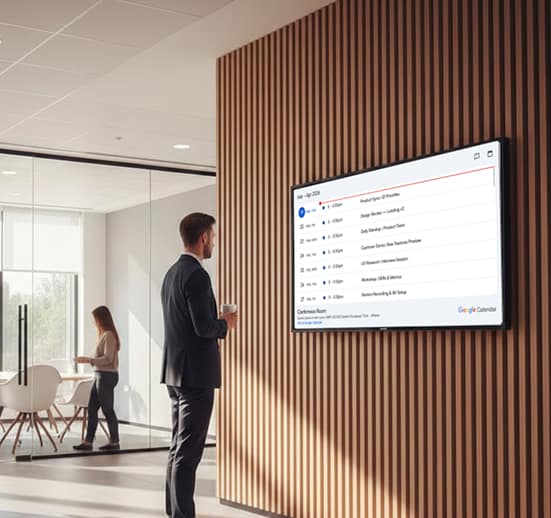
Sync Google Calendar so each room display lists live meetings and open slots.

  • Send calendar changes to room screens automatically
  • Head off late arrivals and double-booked rooms
  • Guide guests straight to the correct room
Wall screen with a synced calendar of upcoming meetings beside a glass conference room

Show Prep Work and Follow-Ups Before the Meeting Starts

Link Google Sheets to put task lists and team schedules on shared screens.

  • Put team schedules beside the task tracker
  • Align the team before discussion begins
  • Pair the task list with the agenda
Team planning a project on a large interactive touch screen in a bright meeting room

Conference Room Digital Signage Benefits Across the Modern Workplace

Room screens bring order to modern workplaces, turning scheduling chaos into a clear daily plan teams and visitors can see.

  • Icon of a calendar with a clock

    Fewer Double Bookings

    Screens mirror the calendar, which cuts down double bookings

  • Icon of a screen split into zones

    On-Time Starts and Finishes

    Clear room status helps sessions begin and end as planned

  • Icon of two office buildings

    Smarter Room Usage

    Teams spot free rooms quickly, so rooms get used more fully

  • Icon of a group of people with a check mark

    A Professional First Impression

    Clear signs and welcome messages lead guests to their room

  • Megaphone icon

    An Internal Comms Channel

    Between meetings, screens show company updates and reminders

  • Icon of a picture with a pencil and ruler

    Less Admin Work

    Less time on manual edits and day-to-day booking fixes

Conference Room Digital Signage on a Busy Training Floor

How It Works at a Corporate Training Center

Picture a corporate training center where a printed sheet on each conference room door lists the day’s workshops, and visitors keep walking into sessions that moved an hour ago.
 
With AIScreen, the facilities team connects the room calendars to a screen beside every door and a directory in the lobby. When a session moves in the calendar, each screen updates on its own, and between sessions the screens remind everyone about the next town hall.
 
Freestanding office directory screen listing room numbers by floor in a bright corporate lobby

Conference Room Digital Signage Apps That Power Every Display

Connect calendars, internal platforms and the tools behind each meeting, so conference screens stay current with no manual updates.

Google Calendar

Live bookings on every room sign

Microsoft Calendar

Outlook meetings beside each door

Microsoft Teams

Channel posts in meeting-room hallways

Google Sheets

Task trackers beside the agenda

Microsoft Excel

Spreadsheets on the big screen

YouTube Live

Town halls streamed to overflow rooms

Conference Room Conference Room Conference Room Conference Room Conference Room Conference Room Conference Room

Conference Room Digital Signage Templates for Dynamic, Modern Signs

Conference Room Digital Signage Software
Built for Real Workplaces

Why Office Teams Choose AIScreen

  • Made for everyday offices. AIScreen digital signage software also runs dashboards, wayfinding, announcements and messages well past the conference room door.
  • Central control with clear permissions. Run a single room or a few hundred from one dashboard, and use role-based access and user permissions to keep company-wide and local content apart.
  • Dependable playback. Remote device management tracks every screen, raises failure alerts and restarts media players from a distance.
  • Fits the tools you already use. Calendar and workplace apps connect in a few steps and keep running on their own, so conference screens stay accurate without new routines for staff.
Empty boardroom with a long white table and a wall of screens showing charts and a world map

Conference Room Digital Signage FAQs

Why should a business use digital signage for conference rooms?

Digital signage for conference rooms does away with paper schedules, door-to-door room checks and sudden interruptions. With real-time room status on screen, people see at a glance which spaces are free, meetings stay on track and rooms get used more fully. Teams lose less time hunting for a space and keep their attention on the meeting itself.

What are the most common uses of digital signage in conference rooms?

Digital signage in conference rooms is most often used to:

  • Show whether each room is free or in use, along with the next meetings
  • Display the day’s agenda straight from Google Calendar or Microsoft Calendar
  • Keep people from walking into rooms that are already occupied
  • Run presentations, KPI dashboards and town hall streams on in-room screens
  • Point visitors and employees to the right room with wayfinding screens
Where should you mount conference room digital signage displays?

Conference room digital signage displays belong beside the door of each conference room, mounted at eye level so people can read the status and schedule while walking past. On busy floors, a summary screen by the elevators or along the main corridor lists the nearby rooms. If clients and guests visit often, a welcome screen at reception greets them and points the way.

How does digital signage stack up against static conference room signs?

Digital signage beats static conference room signs because it stays correct without anyone editing it by hand. Paper timetables and handwritten whiteboards go stale within hours and send people to the wrong room. Digital signs refresh on their own when bookings change, and one dashboard covers every room, which cuts admin work, and the signs look more professional.

Is it easy to manage digital signage for meeting room status?

Digital signage for meeting room status is easy to manage, even for teams with no technical background. Office managers run every conference room display from one cloud dashboard with playlists, schedules and digital signage templates. Calendar apps connect in a few steps without any coding, and remote device management lets IT check each screen from the same place.

Can a single account handle meeting rooms in multiple locations?

A single AIScreen account handles meeting rooms across multiple locations, from one floor to many offices. The CMS gives centralized control over content on many screens and sites, so head office can share company-wide messages while each location keeps its own room schedules. Role-based access and user permissions decide who can change what.

Can live meeting schedules appear on meeting room digital signage?

Live meeting schedules can appear on meeting room digital signage and on larger conference room screens. AIScreen syncs with Google Calendar and Microsoft Calendar, so each screen shows the current meeting and the bookings that follow. When a meeting moves, ends early or is canceled in the calendar, the screen updates automatically, with no manual edits.

What does digital signage for conference rooms cost to run?

Digital signage for conference rooms is priced by screen, so the cost depends on how many rooms you cover and whether screens go outside the door, inside the room or both. AIScreen plans start at 10 USD per screen per month, so you can begin with one conference room and add screens as the rollout grows. Start with a free trial to pilot the workflow first.

Which industries get the most from digital signage for meeting rooms?

Digital signage for meeting rooms pays off most wherever space is tight and rooms are booked all day. It is common in:

  • Corporate offices and headquarters
  • Schools and universities
  • Conference and event venues
  • Hotels and other hospitality venues
  • Hospitals and clinics

If several teams or sites share your rooms, everyone can see what is free and when without asking around.

What related solutions fit modern spaces?

Related solutions that fit modern spaces run from the same AIScreen dashboard:

  • Internal communications that put company-wide messages on every office screen
  • Wayfinding on touch screen kiosks to guide guests and new hires
  • Digital notice boards in place of paper posters
  • Digital calendar displays for agendas in lobbies, corridors and break areas
  • Video walls for reception and town hall spaces

Conference Room Digital Signage Ready for Your Next Meeting

Start a 14-day free trial, no credit card required.