
How to Set Up Digital Signage Signs of Safety?

Safety signage is vital in preventing workplace accidents and ensuring a safe environment. According to the National Safety Council, in 2020, approximately 4.6 million work-related injuries and illnesses were reported in the United States, researched by AIScreen’s team.
In this guide, you’ll learn how to effectively set up signs of safety, from choosing the right equipment and software to designing and positioning your signs for maximum visibility. Whether you’re looking to enhance safety protocols or meet regulatory requirements, this guide will provide essential steps to improve safety communication in your workplace.
Short Summary:
- Visual indicators warn, inform, and guide individuals on hazards, emergency protocols, and safe practices.
- Types of Safety Signs include warning signs, prohibition signs, mandatory signs, emergency exit signs, and fire safety signs, each serving a unique purpose in preventing accidents.
- Provides real-time updates, ensures clear communication, supports emergency readiness, and helps maintain regulatory compliance.
- Best Strategies for Digital Safety Signs include assessing key risk areas, using high-contrast designs, integrating real-time updates, and strategic placement for maximum visibility.
- We help design and manage digital safety signs with easy integration, real-time updates, and customizable features to improve workplace safety.
What are Signs of Safety?
Signs of safety are critical visual tools used to communicate information about potential hazards, necessary precautions, and emergency protocols within various environments such as workplaces, public spaces, or industrial areas.
Safety signs help protect individuals by providing clear, immediate guidance on avoiding danger or responding to emergencies. They can range from simple warnings to more complex emergency evacuation directions. They are designed to be easily visible, legible, and universally understood, ensuring quick recognition in urgent situations.
Well-designed and strategically placed signs are crucial for reducing accidents and ensuring people know how to respond to threats like fires, chemical spills, and machinery malfunctions. Proper design and placement are key to their effectiveness. They help prevent injuries, promote safe practices, and ensure compliance with safety regulations.
How to Design Safety Signs?
Here are the steps to design safety signs:
Step 1: Choose the Best TV for Signs
Sony BRAVIA EZ20L Series V Digital Display

- Screen sizes: 43” to 98”
- Features: 440 nits brightness, 4K resolution, and TRILUMINOS Pro for vivid colors
- Motionflow XR technology for smooth visuals
- Mount options: portrait or landscape
- Price range: $710 – $3,940
Step 2: Choose the Best Hardware for Signage
Fire TV Stick
- Use Fire TV Stick starting at $40
- Easy setup and smart integration with AIScreen
- Switch content across displays seamlessly

Step 3: Choose the Right Software for the Sign
- Download the app from the App Store
- Log in or create an account
- 14-day free trial to test all features

Step 4: Link Your Screen with Sign
- Go to “Screens” section in the app
- Click “Add Screen” and enter the 4-digit display code
- Name your screen and set orientation (portrait/landscape)
- Save settings to activate the screen
Step 5: Personalize Engaging Content for the Digital Board
- Use the Canvas Feature to design safety signs
- Choose from 1,500+ templates or create custom designs
- Add images, bold fonts, and dynamic text for clear messaging
- Customize content for promotions, seasons, or new items
Step 6: Plan Safety Content for Different Times
- Morning: Display safety reminders for the start of the workday, such as wearing protective equipment or checking equipment safety before use.
- Afternoon: Highlight safety tips for operating machinery, handling chemicals, or workplace ergonomics.
- Evening: Remind workers about end-of-day procedures, such as securing hazardous materials, checking for fire hazards, or following emergency evacuation routes.
What Are The Types Of Workplace Safety Signs And Symbols:
Before diving into types, it’s important to understand what is digital signage safety sign and symbol? to see how modern formats enhance clarity and compliance. Here are the types of Workplace Safety signs and symbols:
Warning Signs
Features: These signs indicate hazards that may cause harm or injury. They often feature bold yellow or orange colors for visibility.
Examples: Signs for slippery floors, high-voltage areas, or areas with toxic materials.

Prohibition Signs
Features: Used to communicate actions or behaviors not allowed for safety. These safety awareness signage are typically red with a prohibition symbol.
Examples: “No smoking” in flammable areas, “No entry” in restricted zones.

Mandatory Signs
Features: These signs instruct people to perform a specific action for safety. Typically blue, they are paired with symbols for clarity.
Examples: “Wear safety goggles,” “Use ear protection.”

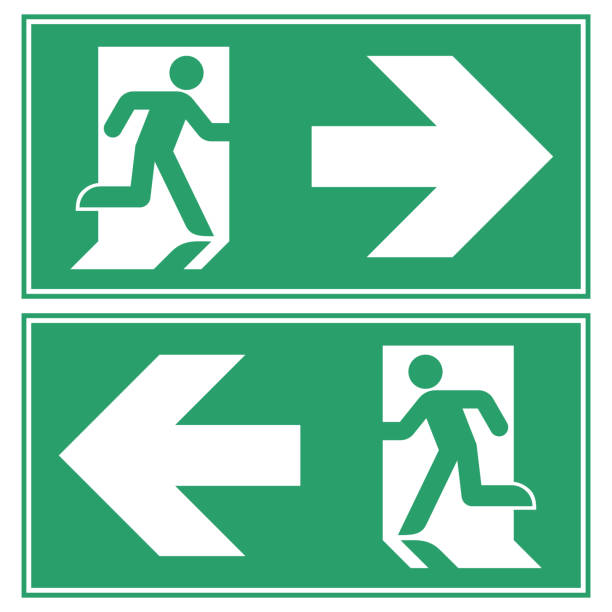
Emergency Exit Signs
Features: These are essential for guiding individuals to safe emergency exit routes. They are often green or illuminated for easy identification.
Examples: “Emergency Exit,” “Exit Route Ahead.”
First Aid Signs
Features: These signs direct individuals to the location of medical supplies or assistance. They are usually marked; these signs have a red and, which makes them easy to spot.
Examples: “First Aid Kit,” “Medical Assistance.”

Fire Safety Signs
Features: Indicate locations of fire safety equipment such as extinguishers, alarms, or exits. Often red or white for high contrast.
Examples: “Fire Exit,” “Fire Extinguisher,” “Fire Alarm.”

What Are The Benefits of Using Signs of Safety
Increased Awareness:
Safety signs help digital signage employee communication to quickly recognize potential hazards, leading to better awareness of their surroundings. This heightened awareness significantly reduces the likelihood of accidents, as people can take precautionary actions more promptly when they know what to look for.
Emergency Readiness:
Clear signage provides essential guidance on evacuation routes and procedures in emergencies. This clarity helps ensure everyone knows what to do and where to go, minimizing panic and confusion during critical moments and enhancing safety.
Compliance with Regulations:
Proper signage ensures businesses comply with workplace safety regulations, avoiding fines and penalties. Digital signage makes it easier to stay compliant by allowing quick updates and ensuring all required signs are prominently displayed and up to date.
Clear Communication:
Digital safety signs are designed for maximum visibility and legibility, ensuring that essential messages are clear and accessible to everyone. Unlike traditional printed signs, digital signs can be easily updated to reflect current safety information, keeping communication adequate and relevant.
How to Identify Hazard Zones for Safety Signage?
- Evaluate High-Risk Areas: Identify places with machinery, electrical equipment, or chemicals that pose risks.
- Check Walkways and Staircases: Look for areas where slips, trips, or falls could happen.
- Assess Emergency Exits and Routes: Ensure clear, visible signage in case of evacuation.
- Inspect Workspaces and Kitchens: Mark areas where hot surfaces, sharp objects, or food safety hazards are present.
- Consider Visibility Needs: Place signs where they are easily seen to maximize safety awareness.
Understanding Safety Signage Standards and Compliance:
- Follow International Guidelines: Adhere to OSHA, ANSI, and ISO standards for consistent safety signage.
- Use Standardized Symbols: Ensure signs use universally recognized icons and colors for clear communication.
- Placement Regulations: Position signs in visible, accessible locations for maximum effectiveness.
- Regular Updates: Keep signage up-to-date to reflect any safety regulations or procedures changes.
- Ensure Legibility: Use legible fonts, appropriate sizes, and contrasting colors for easy reading from a distance.
How Digital Signage Can Help Ensure Emergency Readiness?
- Real-Time Updates: Digital signage lets you update emergency protocols and evacuation routes instantly, keeping information current.
- Clear Visibility: Emergency procedures are displayed clearly, ensuring everyone can easily see and follow them during a crisis.
- Guidance in Multiple Languages: Digital signage can display emergency messages in various languages, ensuring all facility personnel comprehend them.
- Automated Alerts: In emergencies, digital signage can automatically switch to display critical alerts, guiding people safely.
What Are The Best Strategies for Implementing Digital Safety Signs?

- Assess Key Risk Areas: Conduct a thorough risk assessment to identify high-hazard zones, such as machinery rooms or high-traffic areas, where safety signs will be most effective. Ensure that signs are placed where they will grab attention and be noticed immediately.
- Use High-Contrast and Simple Designs: Safety signs should be bold, high-contrast colors (red, yellow, or green) to ensure they stand out. Opt for clear, easy-to-read fonts and simple graphics to make the messages understandable at a glance, even from a distance.
- Integrate Real-Time Updates: Digital signage allows you to make instant changes. If safety regulations or procedures change, you can quickly update the signage across multiple displays. This ensures that your signage is always current, helping prevent confusion and ensuring compliance.
- Position Strategically: Install safety signs in high-traffic areas and key locations such as near exits, entrances, machinery, or along emergency routes. Make sure signs are placed at eye level and in positions where they are unobstructed, ensuring maximum visibility.
- Regular Maintenance and Testing: Digital signage should be tested regularly to ensure it works as intended. Any technical issues, such as screen malfunctions or outdated content, should be checked for and fixed promptly. This also includes updating content as needed to reflect changes in safety procedures, regulations, or seasonal hazards.
FAQs
Why do I need digital signs for safety?
Digital signs allow dynamic, easily updated safety information to be adjusted remotely, ensuring your safety protocols stay relevant and precise.
How often should safety signs be updated remotely?
Yes, you can. Safety signs should be updated regularly, especially when safety procedures, building layouts, or regulations change.
Can I create my own safety signs?
Yes, with tools like AIScreen, you can design custom safety signs that fit your specific needs and ensure they are visible and effective.
Implement Signs Of Safety With AIScreen


Implementing effective safety signage is crucial for creating a safe and compliant environment. By following best practices for design, placement, and regular updates, you ensure that safety information is clear and accessible to everyone.
With AIScreen’s advanced digital signage solutions, you can easily manage and update safety signs in real-time, enhancing emergency readiness and maintaining compliance. AIScreen is a leading provider of digital signage, offering tools that simplify creating and managing safety signs, ensuring a safer workplace.
